The Defender Tier List: What to Turn On First When You Own All of It
All right class.
You have E5. Every Defender product in the suite is licensed and sitting there. Somebody enabled Defender for Endpoint on about two thirds of the estate and then left the company. The Purview portal has never been opened by anyone on your team.
So the question is not which product is best. Microsoft would very much like the answer to be all of them, simultaneously, this quarter. The question is which one you turn on this morning, which one waits until next month, and which one you can leave alone until an auditor asks about it.
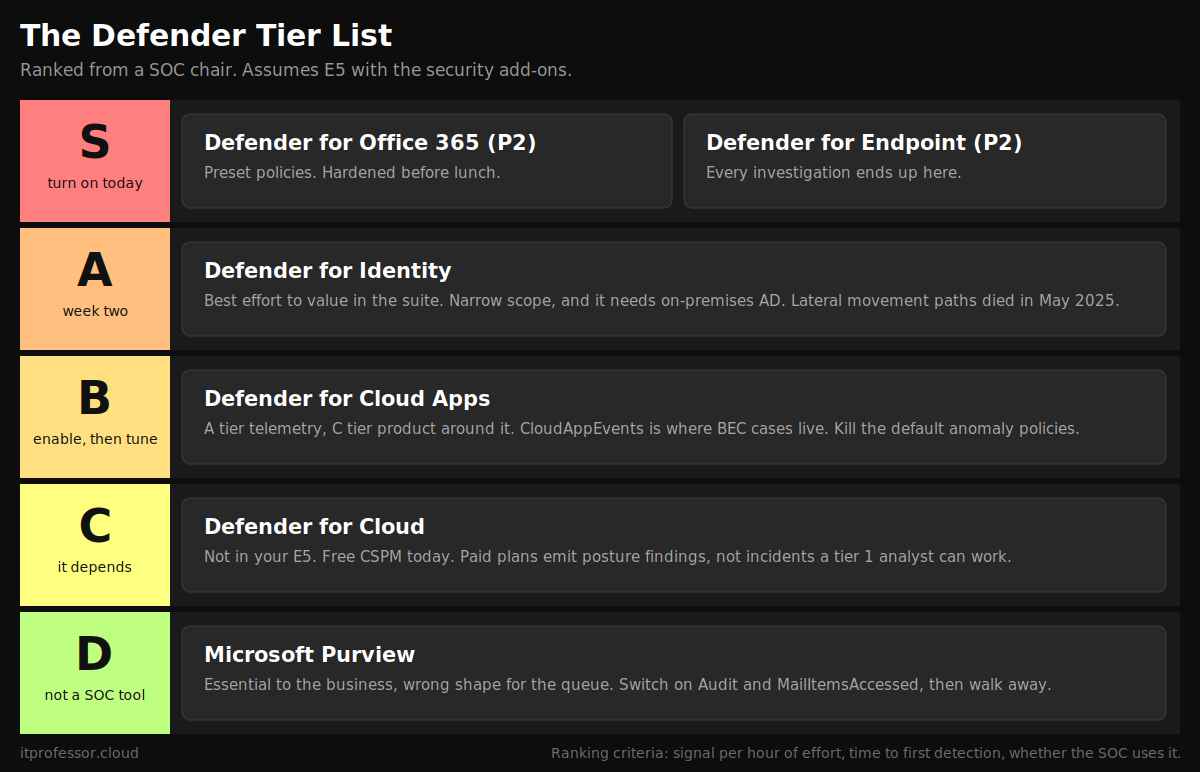
Here is my tier list.
How I ranked them
Four criteria, weighted in this order.
Signal per hour of effort. How much useful detection do you get back for each hour of engineering time you put in?
Time to first real detection. Hours, weeks, or never.
Whether the SOC actually uses it. An alert nobody triages is worth nothing. Worse than nothing, because it trains analysts to close things without reading them.
What the analysts say. Gartner and the rest. Weighted last, and I will explain why at the end.
Everything below assumes E5 with the security add-ons, no licensing constraint, and a team that has to operate whatever you switch on.
S tier
Microsoft Defender for Office 365 (Plan 2)
Email is still where the intrusion starts. Not always, but often enough that any ranking which puts email protection below third place is a ranking made by somebody who has never worked a business email compromise case at 2 am (🙁)
What puts Defender for Office 365 in S tier is not the detection quality. It is the time to value. Preset security policies give you Standard and Strict, both maintained by Microsoft, both applied by assigning users to them. You can meaningfully harden a tenant before lunch. There is nothing else in the suite with that ratio.
 Bartosz Wysocki
For the SOC the substance is in Advanced Hunting. EmailEvents, EmailPostDeliveryEvents, UrlClickEvents, and EmailAttachmentInfo are the four tables that turn "a user says they clicked something" into a timeline. UrlClickEvents in particular tells you whether the click happened, when, and whether Safe Links blocked it. Zero-hour Auto Purge pulls delivered mail back out of mailboxes after the verdict changes, which is the single most useful automated response in the product.
Gartner named Microsoft a Leader in the 2025 (we are yet to see 2026 report) Magic Quadrant for Email Security. That placement matches what the tooling feels like to operate.
Where it disappoints. Impersonation protection does nothing until you populate the protected users and protected domains lists by hand, and almost nobody does. Attack Simulation Training is a compliance artefact more than a security control. Priority account protection is quietly good and quietly undocumented.
Turn it on first. Standard preset for the whole tenant, Strict for administrators, finance, and the executive team.
Microsoft Defender for Endpoint (Plan 2)
Everything else in this list is more useful because Defender for Endpoint is running. That is the argument for S tier in one sentence.
DeviceProcessEvents, DeviceNetworkEvents, DeviceLogonEvents, DeviceFileEvents, and DeviceRegistryEvents are where every serious investigation ends up. An identity alert tells you an account did something. Endpoint telemetry tells you which process, launched by which parent, with which command line, on which machine. Without it you are guessing and calling the guess an investigation.
Microsoft was named a Leader in the 2026 Gartner Magic Quadrant for Endpoint Protection, the seventh consecutive time. Plan 2 is included in E5 at no incremental cost, which means the only real question for an E5 tenant is whether a third party EDR is worth paying for twice (good luck explaining this to your boss)
Where it costs you. This is the highest deployment tax in the suite. Onboarding every device, including the servers nobody documented and the three Macs in the design team. Attack Surface Reduction rules need (well.. should) to run in audit mode for weeks before you enforce them, because the rule that blocks Office child processes will break somebody's finance macro and you want to find that out from a report rather than from a ticket. Device groups and role based access need designing properly before you have 4,000 machines in one flat group.
Budget six weeks. It is worth six weeks.
A tier
Microsoft Defender for Identity
The best effort to value ratio in the suite, with one large condition attached: you need on-premises Active Directory for it to mean anything.
Put sensors on the domain controllers, and optionally on AD FS, AD CS, and Entra Connect servers. What you get back is Kerberoasting, DCSync, golden ticket, pass-the-ticket, and domain reconnaissance detection. Sentinel cannot see most of that, because Sentinel reads logs. Defender for Identity reads network traffic. When an attacker replays a valid Kerberos ticket the event log looks completely normal, because the ticket is valid. The traffic pattern is not.
 Bartosz Wysocki
Alert volume is low and fidelity is high, which is exactly the shape you want from an identity product bolted onto a queue that is already full.
Where it disappoints. Lateral movement path mapping is dead. Microsoft disabled remote SAM-R collection across all deployments in May 2025 following CVE-2025-26685, a spoofing vulnerability found by NetSPI. The maps in your portal have not updated since. If somebody recommends this product to you for lateral movement visualisation, they are quoting a blog post written before that date.
Cloud-only tenants get almost nothing from it. Alert quality also depends entirely on the audit policy configured on your domain controllers, so the deployment is only as good as the Windows event configuration underneath it.
Why A and not S. The scope is narrow and conditional. Where it applies it is excellent.
B tier
Microsoft Defender for Cloud Apps
A split verdict. The telemetry is A tier. The product wrapped around the telemetry is C tier. B is the average, and the averaging is my honest part.
CloudAppEvents is where user compromise investigations live. Inbox rule creation, mail forwarding, mass SharePoint download, OAuth grants, admin activity across connected SaaS. If you have ever tried to answer "what did the attacker do inside the mailbox" without it, you already know why it earns its place. App governance and OAuth application detection sit here too, and there is no other product in the Microsoft stack that does that job.
 Bartosz Wysocki
Then there is the rest of it.
The default anomaly detection policies will bury your queue in the first fortnight. Impossible travel and activity from an infrequent country are the two worst offenders in any tenant with a VPN and a sales team. Conditional Access App Control is a reverse proxy, it breaks single sign-on in ways that are difficult to diagnose. Shadow IT discovery is often overlooked by, well, everyone
How to actually deploy it. Connect it and the API app connectors on day one. Then spend a day turning most of the default policies off. Keep app governance. Keep the file and activity policies you wrote yourself. Treat session control as a project with its own change window, not as a checkbox.
 Bartosz Wysocki
C tier
Microsoft Defender for Cloud
The odd one out, and I want to be precise about why.
It is not in your E5. It is consumption-billed Azure spend, priced per plan and per resource. Every other product in this list is already paid for. This one arrives on a different invoice, and the invoice grows with your estate.
 Bartosz Wysocki
Free CSPM costs nothing and belongs on every subscription today. Secure Score, security recommendations, and regulatory compliance mapping for no money is not a decision that needs a business case.
Beyond that, value depends entirely on whether you have an Azure estate worth defending. For a shop that is ninety percent Microsoft 365 with a handful of virtual machines, the paid plans are hard to justify. For a real Azure footprint, Defender CSPM adds attack path analysis and agentless scanning that a cloud security engineer will use every week.
One detail worth knowing for the budget conversation. Defender for Servers Plan 2 includes Defender for Endpoint and a data ingestion allowance of 500 MB per server per day into Log Analytics, covering a defined set of security tables. On a large server estate that allowance is a visible line in the Sentinel bill, and it changes the arithmetic on whether the plan pays for itself.
Why C for a SOC. Most of what this product emits is posture findings rather than incidents. Attack path analysis is excellent work for a cloud engineer on a Tuesday afternoon and close to useless for a tier 1 analyst at two in the morning. The alert quality also varies sharply by plan. Defender for Storage malware scanning is worth the money on any account that accepts uploads from outside. Defender for Containers, in a busy cluster, is a firehose.
The analyst signal is thinner here too. Microsoft's recognition for this product comes from the 2026 Frost Radar for Cloud Workload Protection Platforms and a KuppingerCole Leadership Compass placement, not a Gartner Magic Quadrant Leader position in CNAPP. That gap is a fair summary of where the product sits next to Wiz and Palo Alto.
D tier
Microsoft Purview
Purview is in D tier and the ranking needs explaining, because it is not one product, and it is not a Defender product at all.
As a compliance platform it is essential and the organisation cannot function without it. As a SOC tool it is the weakest thing in this list. Both statements are true at once, and this is a SOC ranking.
Data Loss Prevention alerts land in the Defender portal with a false positive rate that will teach your analysts to close them unread by about week two. Insider Risk Management is a strong product that your SOC probably cannot see, by design, because the access model is built for HR and legal rather than security operations. Sensitivity labels are an eighteen month programme with a change management workstream attached, not a switch.
One large exception. Audit, and specifically the premium retention and the MailItemsAccessed event. That log is the difference between saying "the attacker had access to this mailbox" and saying "the attacker read these 400 messages". Which is the difference between a security incident and a notifiable breach, and therefore the difference between a bad week and a regulatory one. Confirm auditing is on. Confirm the retention policy. Then leave the rest of Purview alone until compliance asks.
The DataSecurityEvents table in Advanced Hunting has improved things. Sensitivity label access, sensitive information type matches, and DLP events are now huntable next to device and email telemetry, which is the first time Purview signal has been usable in a normal hunting workflow. That is the reason this is D and not F.
On the analyst reports. There is no Gartner Magic Quadrant to point at here. Gartner retired the enterprise DLP quadrant in 2018 and replaced it with a Market Guide. Microsoft's data security recognition is a Forrester Wave Leader placement from 2023, which is both older and thinner than the endpoint and email positions.
The order I would actually enable them
- Hour one. Defender for Office 365 preset security policies. Strict for administrators, finance, and executives. Standard for everybody else.
- Hour two. Free CSPM across all subscriptions, and confirm Purview Audit is enabled with the retention you think you have.
- Week one to six. Defender for Endpoint onboarding. ASR rules in audit mode from day one, enforcement once you know what breaks.
- Week two. Defender for Identity sensors, gMSA configured first. Then two weeks of baselining before you tune a single alert.
- Week four. Defender for Cloud Apps. Connect the app connectors, disable the default anomaly policies, keep app governance.
- Month three onwards. Defender for Cloud paid plans, scoped to the subscriptions that hold something worth stealing.
Notice what is absent from the first month. Purview beyond Audit. Conditional Access App Control. Container protection. Those are projects, not switches. Treating a project as a switch is how you end up with fourteen half-configured products and no working detection.
About those analyst reports
Microsoft is a Leader in endpoint, in email, in SIEM, and in access management. Every one of those placements is real and none of them tells you what to switch on first.
A Magic Quadrant measures completeness of vision and ability to execute, at the vendor level, against a market. It does not measure whether your six analysts can operate the thing you just bought. It does not know that your default anomaly policies are generating 300 impossible travel alerts a week. It cannot tell you that a feature you are counting on was disabled fifteen months ago.
Use the quadrant to shortlist a purchase you have not made yet. You have already made this purchase. Use your own alert queue instead.
Class dismissed.