Conditional Access, Part Two: Authentication Strengths and the Road to Phishing-Resistant

All right class.
 Bartosz Wysocki
Last time we built the estate. Personas, naming, exclusions, rings, a baseline set of twenty policies and the KQL to check that what is running matches what you designed. If you have not read that one, start there, because everything below assumes you have somewhere to put these controls.
Today we deal with the control that most tenants think they already have.
Go and look at your global multifactor authentication policy. Open the grant blade. If the selected control is Require multifactor authentication, then the honest description of your posture is this: you require a password plus one of text message, voice call, push notification, software token or hardware token. A text message. In 2026. Against attackers who have industrialised adversary-in-the-middle phishing to the point where a kit costs less than a decent lunch and proxies your real sign-in page in real time, harvests the password, relays the one-time code within its validity window and walks away with a session cookie.
That tick box is not a control. It is a category. Authentication strengths are how you turn the category into a control, and this post is about doing that properly, including the parts that are genuinely awkward.
By the end you will know exactly what each built-in strength accepts, the five limitations that catch experienced engineers, how passkey profiles changed the picture earlier this year, how to solve the bootstrap deadlock, what to do about the people who cannot carry a security key, and five queries that tell you which methods are actually protecting your tenant right now.
What an authentication strength actually is
An authentication strength is an allow list of authentication method combinations. Nothing more clever than that. You attach it to a Conditional Access policy through the Require authentication strength grant control, and the user gets in by satisfying any one of the combinations on the list.
It sits on top of the Authentication methods policy rather than replacing it. The Authentication methods policy decides which methods exist for which users across the whole tenant. The strength decides which of those methods count for this particular access. So you might enable Microsoft Authenticator in either push or passwordless mode tenant-wide, and then use a passwordless strength on your finance application to say that push notifications do not count there.
Two things follow from that relationship and both matter.
A strength cannot conjure a method that the Authentication methods policy has not enabled. If you build a strength requiring FIDO2 and the method is switched off for that user's groups, you have built a policy that nobody can satisfy. That is a lockout, not a control.
And a strength does not restrict the first factor. Conditional Access evaluates after initial authentication, so a user hitting a phishing-resistant strength can still type a password, get past primary authentication, and only then be told they need a passkey. The password is still on the wire. Phishing-resistant means the second factor cannot be relayed, not that the password stops existing. Getting rid of the password entirely is a different project, and a worthwhile one, but it is not what an authentication strength does.
The three built-in strengths, and what they really accept
Microsoft ships three. They are progressive, they cannot be edited, and Microsoft updates them when new methods appear. Here is what each one actually accepts, which is worth memorising because the names are misleading in both directions.
| Method combination | MFA | Passwordless MFA | Phishing-resistant MFA |
|---|---|---|---|
| FIDO2 security key or passkey | Yes | Yes | Yes |
| Windows Hello for Business or platform credential | Yes | Yes | Yes |
| Certificate-based authentication, multifactor | Yes | Yes | Yes |
| Microsoft Authenticator, phone sign-in | Yes | Yes | No |
| Temporary Access Pass, one-time or multiple use | Yes | No | No |
| Password plus something the user has | Yes | No | No |
| Federated single factor plus something the user has | Yes | No | No |
| Federated multifactor | Yes | No | No |
| Certificate-based authentication, single factor | No | No | No |
| SMS sign-in | No | No | No |
| Password alone | No | No | No |
| Federated single factor alone | No | No | No |
| QR code | No | No | No |
"Something the user has" expands to text message, voice call, push notification, software OATH token or hardware OATH token. That single row is where the bulk of your users currently live.
Read the phishing-resistant column carefully, because the shape of it is the whole point. Three method families qualify. FIDO2, which now includes passkeys in Microsoft Authenticator and passkeys held in enterprise password managers. Windows Hello for Business including the platform credential variant. And certificate-based authentication configured as multifactor. Everything else fails, including Authenticator phone sign-in, which people routinely and wrongly assume is phishing-resistant because it feels modern.
What makes those three families different is not that they are newer. It is that the credential is cryptographically bound to the origin it was registered against. A lookalike domain, however convincing, cannot complete the handshake, because it is not the origin the private key was minted for. There is no code for the user to read out and no prompt for the user to approve. That is a structural property, not a user education one, which is exactly why it holds up when your users are tired and busy.
The MFA strength is worth one sentence of its own. It accepts precisely the same combinations as the old Require multifactor authentication grant control. They are equivalent. Which means you cannot select both in the same policy, and Entra will refuse to let you.
Five limitations that will bite you
These are documented, they are not obvious, and I have watched every one of them cause a production problem.
A strength and Require multifactor authentication cannot coexist in one policy. Covered above, but the practical consequence is that migrating an existing policy means editing the grant control, not adding to it. Plan that as a change, in a ring, not as a quick tidy-up.
Windows Hello for Business will not prompt. If a user has already completed primary authentication with a password, and your strength requires Windows Hello for Business, Entra does not prompt them to switch. It fails. The user has to abandon the sign-in, restart it, choose Sign-in options and pick a qualifying method. Your service desk will receive these tickets and will not immediately understand them, so write the fix down before you enforce.
Authentication strength and sign-in frequency are satisfied independently. This one is genuinely counter-intuitive and it is in Microsoft's own known issues. Suppose a resource requires a passkey and a one-hour sign-in frequency. A user signs in with their passkey. Twenty-four hours later, they unlock their Windows device with Windows Hello. Yesterday's passkey satisfies the strength. Today's unlock satisfies the frequency. They get in without touching the passkey again. If you assumed that combining a strong strength with a short frequency forces a hardware credential to be presented every hour, it does not, and your control is weaker than your design document claims.
Email one-time passcode is not a supported combination. Guests who authenticate to your tenant with email OTP cannot satisfy any authentication strength. Design your Externals policies knowing that.
Passkey registration is not supported for guests. External and B2B collaboration users cannot register a passkey in your resource tenant. So a phishing-resistant strength aimed at guests only works if they bring a qualifying credential from their home tenant, which means cross-tenant access settings and multifactor authentication trust (good thing that there is a planned change towards end of 2026 start of 2027 to support this function)
Custom strengths, and when you need one
Most tenants do not need a custom strength. The built-in phishing-resistant strength is well maintained and Microsoft adds methods to it as they ship, which means your policy improves without you touching it.
Three situations justify building your own.
You want to accept a narrower set than the built-in allows. A common example is an organisation that has decided Windows Hello for Business is not acceptable for administrators, because the credential lives on a general-purpose laptop rather than a separate token, and wants a strength that accepts only FIDO2 security keys and multifactor certificate-based authentication.
You want to restrict by AAGUID, so that only specific hardware models count. Custom strengths expose this under advanced options for the FIDO2 method.
Or you want an intermediate step during migration. A strength that accepts phishing-resistant methods plus Authenticator phone sign-in, but excludes anything involving a password or a code, gives you somewhere to stand between "anything goes" and "hardware only" while the keys are still arriving in the post.
Build them through the portal under Authentication methods, then Authentication strengths, or through Graph if you want them in source control alongside the rest of your policy definitions. I would recommend the latter, because a strength is a policy object and it deserves the same change control as everything else in the estate.
Name them the way you named the policies in part one. Something like AS-Admins-FIDO2KeysOnly beats Strong MFA v2 in every conversation you will ever have about it.
Passkey profiles, and why your AAGUID list might be a comfort blanket
This is the part most people have not caught up with, and it changed under everyone's feet earlier this year.
Passkey (FIDO2) used to be a single tenant-wide switch with one attestation setting and one AAGUID list. In March 2026 Microsoft migrated public cloud and GCC tenants to passkey profiles, automatically, whether or not anybody opted in. GCC High and DoD followed in May. USNat and USSec are scheduled for October. If your tenant had passkeys enabled and nobody made a decision, your previous configuration was moved into a profile called Default and the passkey type was inferred from your old attestation setting.
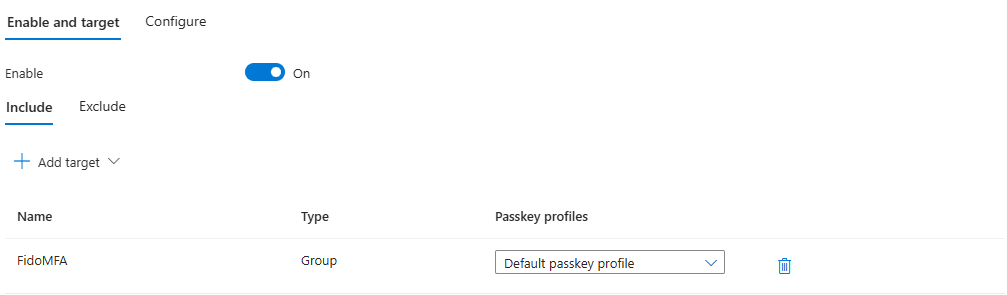
A passkey profile is a named set of rules targeted at groups. It governs passkey type, meaning device-bound or synced. It governs whether attestation is enforced. And it governs which AAGUIDs are allowed or blocked. You get up to ten profiles including the Default, raised from the original three, within a twenty kilobyte policy budget that a long AAGUID list will eat into faster than you expect.
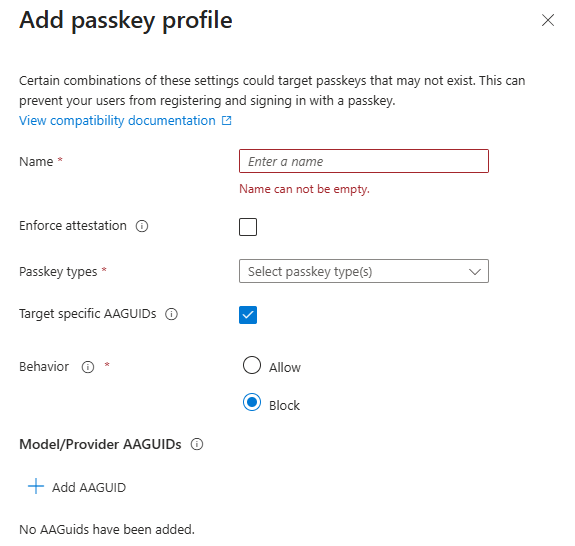
The design this unlocks is the right one. Administrators get a profile that permits device-bound passkeys only, with attestation enforced, restricted to the specific hardware you issued. Frontline and general staff get a profile that permits synced passkeys, because a passkey in iCloud Keychain or a corporate password manager is enormously better than a password plus a push notification and the registration success rate is far higher.
Now the part that matters most, and that I would put on a poster if I could.
Attestation is checked at registration time only. It is not checked at sign-in. If you enable attestation enforcement in September, every passkey registered before September continues to work, unattested, indefinitely. Enabling attestation does not retroactively clean anything up. If you want the estate attested, you enforce attestation and then you re-register, and the re-registration is the actual project.
And when attestation is not enforced, Microsoft states plainly in its own documentation that it cannot guarantee any attribute about a passkey, including whether it is synced or device-bound, and including the make, model and provider, even when you have configured a specific AAGUID list. The AAGUID is self-asserted by the authenticator. Without attestation, an allow list is a routing hint and a reporting aid. It is not a security control, and if your architecture document says otherwise, the document is wrong.
So the rule is straightforward. If the AAGUID restriction is load-bearing in your design, attestation must be enforced in the same profile. If attestation is not enforced, write down what the list is actually for and stop pretending.
One consequence people trip over: enforcing attestation excludes synced passkeys entirely, because a synced passkey cannot present a valid attestation statement. You cannot have both in one profile. That is precisely why profiles are group-scoped, and why the administrator profile and the workforce profile should be different objects.
The bootstrap problem
Here is the deadlock, and it catches people on day one.
A new starter has no authentication method registered. To register a method, they sign in. To sign in, your Conditional Access policy requires multifactor authentication. They have no method. They cannot register a method without signing in and they cannot sign in without a method.
Temporary Access Pass is the answer. It is a time-limited passcode, configurable as one-time or multiple use, issued by an administrator, that lets a user sign in and register a proper credential. It works on an account with no password set at all, which is exactly what you want for a clean passwordless build.
Look back at the strength table and note where TAP sits. It satisfies the MFA strength. It does not satisfy passwordless. It does not satisfy phishing-resistant.
That single fact creates the most common bootstrap failure I see. Somebody, quite reasonably, builds a Conditional Access policy on the Register security information user action and sets it to require the phishing-resistant strength, on the grounds that registering a credential is a sensitive operation. It is. But now a TAP cannot satisfy that policy, so a new starter with a TAP cannot register their first passkey, and the only route left is to exclude them from the policy, which defeats the purpose. Protect the registration action with the MFA strength, not the phishing-resistant one, and control the risk through who is allowed to issue a TAP and for how long.
Which brings us to the governance point. A TAP is a bearer credential that satisfies multifactor authentication. Anyone holding the string is the user. Treat issuance as a privileged operation, because that is exactly what it is.
Set the maximum lifetime short. I use one hour for staff and fifteen minutes for administrators. Enforce one-time use tenant-wide unless you have a specific onboarding flow that needs otherwise, remembering that the one-time setting is tenant-wide rather than per-pass. Scope which users can sign in with a TAP at all through the Authentication methods policy, and consider excluding your most privileged groups from TAP eligibility entirely once they are established. Know the role model: Privileged Authentication Administrators can issue a pass to administrators and members but not to themselves, Authentication Administrators can issue to members only, and Global Readers can see that a pass exists without reading the code.
Then alert on every issuance. A TAP issued to a Global Administrator account, outside a change window, by somebody who is not on the identity team, is one of the cleanest account takeover signals you will ever get. There is a query for it below.
For existing users who already have a traditional method registered, you do not need a TAP at all. They can use what they have to register their first phishing-resistant credential. Run that population through a registration campaign first and reserve TAP for new starters and genuine recovery, which keeps the volume of privileged issuance low enough that alerting on it is useful.
Mapping strengths onto the personas
Here is how the strengths land on the policy set from part one.
| Policy | Persona | Strength | Reasoning |
|---|---|---|---|
| CA006 | Global | MFA strength | The floor. Everybody, everywhere, no exceptions beyond emergency access |
| CA100 | Admins | Phishing-resistant, custom, FIDO2 keys and multifactor CBA only | Small population, high value, issue hardware and be done |
| CA103 | Admins | Phishing-resistant, on protected actions | Editing Conditional Access itself should cost a key tap |
| CA200 | Internals | Phishing-resistant, built-in | Accepts Windows Hello for Business, which most of the estate already has |
| CA300 | Externals | MFA strength, with cross-tenant MFA trust configured | Guests cannot register passkeys in your tenant |
| CA600 | Developers | Phishing-resistant, built-in, on Azure management | Command line tooling handles this better than people expect |
| Registration | Global | MFA strength, on the Register security information user action | Deliberately not phishing-resistant, so TAP works |
Note the deliberate asymmetry between CA100 and CA200. Administrators get a custom strength restricted to portable hardware, because an administrator credential that lives on a laptop is only as good as the laptop. Ordinary staff get the built-in strength, which accepts Windows Hello for Business, because insisting on security keys for eight thousand people is how a rollout dies in procurement.
That asymmetry is the whole argument for persona-based design. One control, three different bars, each set where the risk actually sits.
The people who cannot carry a key
Every honest rollout hits this and most published guidance skips it. Some of your users will not have a phishing-resistant option available, and the reasons are legitimate.
Shared workstations in manufacturing, retail and healthcare, where six people use one terminal across three shifts and Windows Hello for Business enrols to a person on a device. Field staff on locked-down mobile hardware. People with accessibility requirements that make a small physical token genuinely difficult. Sites where security policy forbids personal phones on the floor, which removes Authenticator from the table entirely. Contractors on their own equipment. And the perennial one, the executive who will lose the key.
The options, in the order I would reach for them.
Certificate-based authentication configured as multifactor is the strongest answer for shared and locked-down environments. It qualifies as phishing-resistant, it works from a smart card or a certificate on a managed device, and it fits organisations that already run a public key infrastructure. The setup cost is real and the operational cost is ongoing, but for a healthcare site with shared terminals it is frequently the only option that both qualifies and works.
Passkeys in Microsoft Authenticator cover the mobile-first population, provided the device meets the version floor. Device-bound passkeys in Authenticator can be attested, which distinguishes them from synced passkeys held in a consumer keychain.
Synced passkeys in an enterprise password manager cover contractors and personal devices reasonably well. Put the manager's AAGUID in the profile, accept that attestation is off for that profile, and be honest in your risk register about what that means.
External Multifactor Authentication, which is what external authentication methods are now called since they reached general availability, is the route if you already own a third-party provider. Note that the old custom controls mechanism does not satisfy the multifactor authentication claim anywhere in Entra, so if you are still on custom controls this is a migration rather than an option.
And for the residual population where none of the above works, the answer is a scoped exception with an owner, a reason and an expiry date, exactly as we discussed in part one. Not a permanent exclusion group that quietly becomes the real policy. A dated exception that somebody has to renew, and a plan to close it.
There is one group where I would refuse the exception outright, and that is anyone holding a privileged directory role. If a person cannot hold a phishing-resistant credential, that person should not hold Global Administrator. That is not a technology decision, it is an organisational one, and it is worth having the argument.
The rollout, in order
Sequence matters here more than anywhere else in Conditional Access, because the failure mode is a locked-out administrator rather than a grumpy user.
Start with your emergency access accounts, again. Enable Passkey (FIDO2) and Temporary Access Pass for them in the Authentication methods policy. Issue a TAP, sign in, register a security key, delete the TAP. Do this for both accounts, put the keys somewhere physically controlled, and prove they still work. An emergency account protected by a passkey is better than one protected by a password in a safe, and it means the account is not a weak point in your own design.
Next, get the Authentication methods policy right, because the strength cannot enable a method the policy has not. Confirm you are off the legacy multifactor authentication and self-service password reset policies and fully onto the Authentication methods policy. Enable Passkey (FIDO2) and configure your profiles: one for administrators with device-bound and attestation enforced and your hardware AAGUIDs, one for the workforce with synced permitted. Enable Temporary Access Pass and set the lifetimes short.
Then measure. Run the registration coverage query below and find out how many people already hold a qualifying credential. In most tenants running Windows the number is far higher than expected, because Windows Hello for Business has been quietly enrolling for years. That number decides whether your rollout is a procurement exercise or a communications exercise.
Run a registration campaign to nudge the population that has traditional methods but no phishing-resistant one. This costs nothing and it moves a surprising percentage before you have enforced anything.
Deploy the administrator policy, CA100, with the custom strength. Small population, hardware already issued, and the people affected can debug their own problems. Ring it anyway.
Deploy the registration protection policy on the Register security information user action, using the MFA strength, so that changing authentication methods requires authentication. This closes an attacker persistence path and it should have been there years ago.
Deploy CA200 for Internals through the rings, in report-only first, for a full month. Read the failures, chase the population that has nothing registered, then enforce ring by ring.
Leave the Externals policy until you have done part five, because guest authentication strength without cross-tenant trust configured produces a support queue rather than security.
The traps
The registration campaign only nudges some of your users. Microsoft's passkey registration nudge targets users who are enabled for both synced and device-bound passkeys with no profile restrictions configured. If your administrator profile enforces attestation and a specific AAGUID list, those users will not get the nudge. Which is fine, because you should be issuing their hardware directly, but do not assume the campaign is covering everybody.
Enabling attestation later does not fix what is already registered. Said above, repeated here, because this is the single most misunderstood behaviour in the whole feature.
Your AAGUID list may be a routing hint rather than a control. Also said above. Also repeated. Check whether attestation is enforced in the profile before you rely on it.
The twenty kilobyte policy budget is real. Tenants running several profiles with long AAGUID allow lists can hit the ceiling. If you are allow-listing every password manager and every key vendor across multiple profiles, use block lists instead of allow lists where the logic permits.
Legacy per-user multifactor authentication sits outside all of this. An account with per-user MFA enabled or enforced produces confusing sign-in results and interacts badly with strengths. Migrate every one and verify the count is zero. I said this in part one and I will keep saying it.
Certificate-based authentication has two modes and only one of them counts. Single-factor CBA satisfies nothing on the strength table. Multifactor CBA satisfies all three. If you are deploying CBA specifically to meet a phishing-resistant requirement, verify which mode your configuration produces before you build the policy on top of it.
Conditional Access now applies at credential registration for Windows Hello for Business and macOS Platform SSO. Since July 2026, registration for those credentials is subject to policy, which means requirements such as multifactor authentication and trusted locations apply during enrolment. If your provisioning process assumed registration sat outside policy scope, test it before your next device rollout.
Enforcing a strength does not remove the password. Worth ending on. A phishing-resistant strength stops the second factor being relayed. The password is still there, still sprayable, still the thing that gets stuffed against your tenant ten thousand times a night. Passwordless is the next project, not this one.
Watching it from Sentinel
Design intent is one thing. Here is how to find out what your users are actually doing.
First, the method census. What is genuinely satisfying authentication across the estate, right now.
SigninLogs
| where TimeGenerated > ago(30d)
| where ResultType == 0
| mv-expand Detail = todynamic(AuthenticationDetails)
| extend Method = tostring(Detail.authenticationMethod)
| extend StepResult = tostring(Detail.authenticationStepResultDetail)
| where isnotempty(Method) and Method != "Previously satisfied"
| summarize SignIns = count(), Users = dcount(UserPrincipalName), LastSeen = max(TimeGenerated) by Method
| extend Share = round(
    100.0 * SignIns /
    toscalar(
        SigninLogs
        | where TimeGenerated > ago(30d)
        | where ResultType == 0
        | count
    ),
    2
)
| order by SignIns desc
Run this before you design anything. The distribution tells you what your rollout is actually up against, and it is usually not what the identity team believes. If "Text message" and "Mobile app notification" together account for most of your volume, you have a communications project ahead of you, not a configuration change.
Second, find the users who have nothing better than a relayable method. These are the accounts an adversary-in-the-middle kit will take.
let PhishingResistant = dynamic([
    "FIDO2 security key",
    "Passkey",
    "Passkey (device-bound)",
    "Windows Hello for Business",
    "X.509 Certificate (MultiFactor)"
]);
SigninLogs
| where TimeGenerated > ago(30d)
| where ResultType == 0
| mv-expand Detail = todynamic(AuthenticationDetails)
| extend Method = tostring(Detail.authenticationMethod)
| where isnotempty(Method) and Method != "Previously satisfied"
| summarize Methods = make_set(Method, 20), SignIns = count() by UserPrincipalName, UserType
| extend StrongMethods = set_intersect(Methods, PhishingResistant)
| where array_length(StrongMethods) == 0
| project UserPrincipalName, UserType, SignIns, Methods
| order by SignIns desc
The method strings vary slightly by tenant and change as Microsoft ships new names, so run the first query, read the actual values in your workspace, and adjust the list before you trust the second one.
Third, cross that against privilege, because a marketing coordinator on push notifications is a different problem from a Global Administrator on push notifications.
let PhishingResistant = dynamic([
    "FIDO2 security key",
    "Passkey",
    "Passkey (device-bound)",
    "Windows Hello for Business",
    "X.509 Certificate (MultiFactor)"
]);
let WeakUsers = SigninLogs
    | where TimeGenerated > ago(30d)
    | where ResultType == 0
    | mv-expand Detail = todynamic(AuthenticationDetails)
    | extend Method = tostring(Detail.authenticationMethod)
    | where isnotempty(Method) and Method != "Previously satisfied"
    | summarize Methods = make_set(Method, 20) by UserPrincipalName
    | where array_length(set_intersect(Methods, PhishingResistant)) == 0
    | project UserPrincipalName, Methods;
let Identities = union isfuzzy=true
    (datatable(AccountUPN: string, AccountDisplayName: string, AssignedRoles: dynamic, IsAccountEnabled: bool, TimeGenerated: datetime)[]),
    (IdentityInfo
        | where TimeGenerated > ago(14d)
        | summarize arg_max(TimeGenerated, *) by AccountUPN);
Identities
| where IsAccountEnabled == true
| where array_length(todynamic(AssignedRoles)) > 0
| join kind=inner (WeakUsers) on $left.AccountUPN == $right.UserPrincipalName
| project AccountUPN, AccountDisplayName, AssignedRoles, Methods
| order by AccountUPN asc
Every row is a privileged account without a phishing-resistant credential. In a tenant that has not done this work, that list is normally short enough to fix in an afternoon and alarming enough to get the budget signed.
Fourth, watch authentication method registration, because adding a method is how an attacker keeps an account after the password is reset.
AuditLogs
| where TimeGenerated > ago(30d)
| where LoggedByService == "Authentication Methods"
| where OperationName has_any ("registered security info", "deleted security info", "updated security info", "changed default security info")
| extend TargetUser = tostring(TargetResources[0].userPrincipalName)
| extend ActorUser = tostring(InitiatedBy.user.userPrincipalName)
| extend ActorIP = tostring(InitiatedBy.user.ipAddress)
| extend MethodDetail = tostring(ResultReason)
| extend SelfService = iff(tolower(ActorUser) == tolower(TargetUser), "Self", "Administrative")
| project TimeGenerated, OperationName, TargetUser, ActorUser, ActorIP, SelfService, MethodDetail, Result
| order by TimeGenerated desc
The method name lands in ResultReason in most tenants. If yours puts it elsewhere, project AdditionalDetails and TargetResources and read what is actually there before you build a rule on it. The field to watch is SelfService. Administrative registration of a method onto somebody else's account is rare, legitimate in specific circumstances, and worth a human eyeball every single time.
Fifth, and this is the one I would turn into a scheduled analytic rule first, Temporary Access Pass issuance.
let Identities = union isfuzzy=true
    (datatable(AccountUPN: string, AssignedRoles: dynamic, TimeGenerated: datetime)[]),
    (IdentityInfo | where TimeGenerated > ago(14d) | summarize arg_max(TimeGenerated, *) by AccountUPN);
AuditLogs
| where TimeGenerated > ago(30d)
| where LoggedByService == "Authentication Methods"
| where OperationName has "registered security info" or OperationName has "Admin registered security info"
| where ResultReason has "Temporary Access Pass" or tostring(AdditionalDetails) has "TemporaryAccessPass"
| extend TargetUser = tostring(TargetResources[0].userPrincipalName)
| extend Issuer = tostring(InitiatedBy.user.userPrincipalName)
| extend IssuerIP = tostring(InitiatedBy.user.ipAddress)
| join kind=leftouter (Identities | project AccountUPN, AssignedRoles) on $left.TargetUser == $right.AccountUPN
| extend TargetIsPrivileged = array_length(todynamic(AssignedRoles)) > 0
| project TimeGenerated, TargetUser, TargetIsPrivileged, AssignedRoles, Issuer, IssuerIP, Result
| order by TargetIsPrivileged desc, TimeGenerated desc
Filter that on TargetIsPrivileged == true and you have a high-fidelity, low-volume detection for one of the cleanest privilege escalation paths in Entra. A pass issued to a privileged account is either a documented recovery or an incident. There is very little in between.
One caveat that applies to all five. A large share of authentication happens non-interactively and lands in AADNonInteractiveUserSignInLogs. For method census work the interactive table is the right one, because that is where the credential is actually presented, but if you are chasing a specific account you will want both.
Class dismissed.