The Sentinel Data Connector Tier List: What Earns a Slot in Your Loadout

All right class.
The Content Hub is a shop with hundreds of items and no gold limit. Every connector is right there, every one of them is free to install, and the install button never once asks whether you can afford what happens next.
What you do have is a carry weight. It is called your ingestion budget, and unlike the shop it is very real. Every connector you pick up costs you either money per gigabyte or analyst attention per alert, and usually both.
So this is a loadout problem, not a shopping problem. What follows is every connector worth an opinion, ranked on one thing only: how much detection you get back for what it costs you to carry.
I wrote the order to enable them in previously, along with the button clicking and the troubleshooting. This post is the argument underneath that one. If you want the how, read that. If you want to know which of these actually earn their slot, stay here.
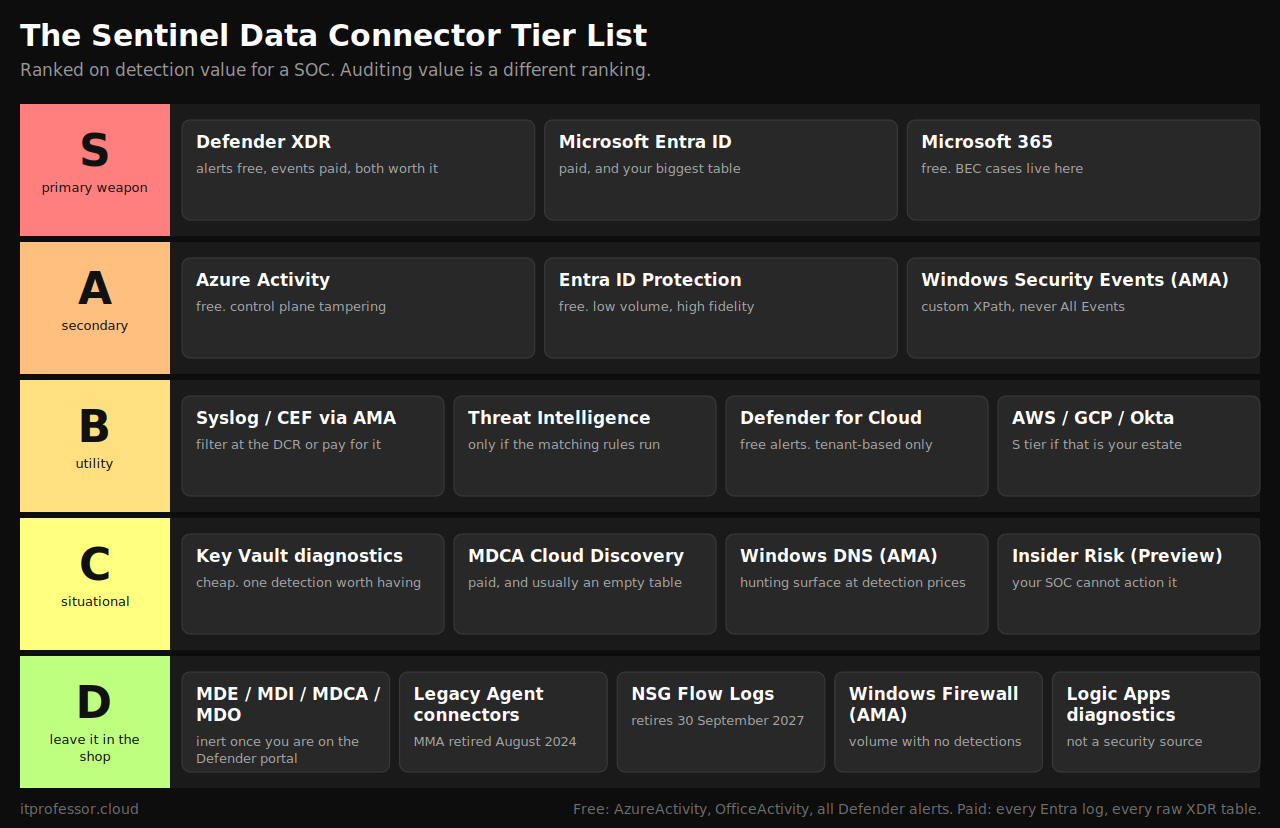
How I ranked them
Detection value only. A connector that answers an auditor beautifully and never fires a rule scores badly here. Audit value is a different ranking and it is getting its own post, because several of these swap tiers entirely when you change the question.
Cost per unit of signal. Free and useful beats expensive and useful. Expensive and noisy beats nothing at all, but only just.
Whether the detections exist. Microsoft ships analytic rules for some tables and almost nothing for others. Ingesting a table nobody has written a rule against means you paid for a hunting surface, not a detection.
Whether it is still alive. Several connectors in your Content Hub are corpses. They still install.
The free and paid split, because most people have this wrong
Before the tiers, the single most useful table in this post. This is straight from the Microsoft Sentinel billing documentation and it does not match what most people assume.
Free, forever, regardless of licence:
- AzureActivity
- OfficeActivity for SharePoint, Exchange and Teams
- SecurityIncident and SecurityAlert from Defender XDR
- SecurityAlert from Defender for Endpoint, Identity, Office 365, Cloud Apps, Cloud and IoT
- SecurityAlert from Entra ID Protection
- SentinelHealth
Paid at the standard per gigabyte rate, despite what you were told:
- Every Microsoft Entra ID log. Sign-ins, audit, non-interactive, all of it.
- Every raw Defender XDR advanced hunting table. DeviceProcessEvents, EmailEvents, IdentityLogonEvents, CloudAppEvents and the rest.
- Defender for Cloud Apps Cloud Discovery reporting.
The rule to remember: alerts are free, telemetry is not. Microsoft gives away the finished verdicts and charges you for the raw material. If you have Microsoft 365 E5, the 5 MB per user per day data grant offsets some of the Entra volume, which softens the blow without removing it.
S tier: primary weapon
Microsoft Defender XDR
One connector, two very different things inside it, and both belong in your loadout.
The incidents and alerts stream is free and switched on by default in any recent workspace. That gives you SecurityIncident and SecurityAlert containing the output of every Defender product you own, correlated into incidents before it reaches you.
The advanced hunting event stream is the paid half, and it is where the actual work happens. DeviceProcessEvents, DeviceNetworkEvents, DeviceLogonEvents, EmailEvents, UrlClickEvents, IdentityLogonEvents, CloudAppEvents. Every serious investigation you run ends in one of those tables. Every custom detection worth writing joins two of them.
Nothing else in the Content Hub gets close on signal density.
The trap attached to it. More on this in D tier, but read it before you enable anything else.
Microsoft Entra ID
Identity is the attack surface. This is the connector that watches it.
SigninLogs, AuditLogs and AADNonInteractiveUserSignInLogs are the base. Add the risk tables if you are on P2 and using them. Almost every identity detection you will ever run, built-in or custom, reads from these three tables, and a Sentinel workspace without them is a very expensive Azure resource inventory.
It is paid, and it is usually your largest table. Non-interactive sign-ins in particular will quietly become the biggest line in your bill, because every token refresh from every service principal and every mobile client lands there. Do not solve that by turning it off. Solve it with an ingestion-time transformation in the data collection rule, filtering the noise before it is billed rather than after.
Licensing catch. SigninLogs needs Entra ID P1 or P2. The connector will happily show Connected and deliver nothing if you do not have it.
Microsoft 365
Free. Exchange, SharePoint and Teams audit activity, all three workloads, at no ingestion cost whatsoever.
This is the best value in the entire product and it is not close. OfficeActivity is where business email compromise investigations live. Inbox rule creation, mail forwarding to external addresses, delegate additions, mass SharePoint download, external sharing links. The attack pattern that costs UK businesses the most money in practice is answered almost entirely from this one free table.
Enable Exchange, SharePoint and Teams. Then confirm each one separately, because a connector that reports Connected with one workload silently unticked is the most common configuration fault I see.
A tier: secondary
Azure Activity
Free, low volume, and it watches the control plane. Resource deletion, role assignments, diagnostic settings being removed, network security group rules changing, a Defender plan being switched off.
I put this first in the enable order in the previous post and I stand by that, but for a practical reason rather than a detection one. It is the easiest connector to deploy, it validates your policy assignment permissions, and getting it working teaches you the troubleshooting loop you will need for everything after it. On pure detection value it sits in A, not S, because the events it catches are real but rare.
If you have no Azure estate beyond the Sentinel workspace itself, it costs you nothing and catches somebody tampering with Sentinel. Enable it anyway.
Microsoft Entra ID Protection
Free. Low volume. High fidelity.
Risky users, risky sign-ins and risk detections arriving as SecurityAlert at no ingestion cost. This is the Microsoft machine learning verdict on identity risk, and it is one of the few free feeds where the alert quality justifies putting it straight into the queue rather than into a hunting table.
Needs Entra ID P2. If you have E5, you have it.
Windows Security Events via AMA
The highest-value on-premises telemetry available, and the single largest cost bomb in the Content Hub. Both of those are true, and which one you get depends entirely on one dropdown.
4624 and 4625 give you logon success and failure with logon types. 4688 gives you process creation with command lines if you have enabled command line auditing, which you should have. 4720, 4728 and 4732 give you account and group manipulation. 4768 and 4769 give you Kerberos ticket requests.
Choose All Security Events and you will regret it within a fortnight. Common is the sane default. A custom XPath filter is the professional answer, because it lets you take exactly the event IDs your detections read and nothing else.
Two things to know before you scope it. Defender for Servers Plan 2 includes a 500 MB per server per day ingestion allowance for a defined set of security tables, which changes the arithmetic considerably on a large server estate. And on domain controllers specifically, Defender for Identity already covers Kerberos attack detection better than event logs do, because it reads traffic rather than logs.
B tier: utility
Syslog and CEF via AMA
Your firewalls, proxies, VPN concentrators and anything else that speaks Syslog. CommonSecurityLog and Syslog.
The value is real. Egress traffic, VPN authentication, blocked outbound connections to known infrastructure. It is also the fastest way to double your Sentinel bill in an afternoon.
Filtering at the data collection rule is mandatory here, not optional. Drop the informational severities, drop the denies and internal to internal, keep the accepted and the authentication events. Do that before the data is billed, not with a workbook afterwards.
One warning from experience. Ingestion-time transforms across multiple data sources in a single DCR can behave in ways the documentation does not prepare you for, and a badly ordered transform can silently drop an entire appliance's logs. Validate with a Heartbeat query after every change.
Threat intelligence
Threat Intelligence Platforms, the TAXII connector and Microsoft Defender Threat Intelligence, all feeding indicators into Sentinel.
B tier for a specific reason: the connector is only worth its slot if you are actually running the matching analytic rules against your logs. Indicators sitting in a table nothing joins against are a subscription you forgot to cancel. If you have the matching rules enabled, promote this to A.
Microsoft Defender for Cloud
Free alerts, and worth having on if you have any Azure workload protection plans enabled.
Use the tenant-based connector. The subscription-based one still listed in your Content Hub is legacy, and it means enabling and maintaining the connection per subscription forever.
AWS, Google Cloud and third-party identity providers
Entirely conditional. CloudTrail, GuardDuty, GCP audit logs and Okta system logs are B tier as a default and S tier the moment that platform holds anything you care about. If Okta is your primary identity provider rather than Entra, move it to S and read the Entra ID section as if it said Okta.
C tier: situational pickup
Azure Key Vault diagnostics. Low volume, cheap, and there is at least one detection worth having: an identity pulling every secret in a vault in sequence. Enable it on the vaults that hold production credentials and ignore the rest.
Defender for Cloud Apps Cloud Discovery reporting. The alerts from Defender for Cloud Apps are free and already arriving via the XDR connector. This paid data type is the shadow IT reporting, and it depends on firewall log upload that most organisations configure once, badly, and never revisit. If you have not wired that up, you are paying for an empty table.
Windows DNS Events via AMA. Enormous volume, real value when you are hunting for beaconing or exfiltration over DNS, and almost no out-of-box detection content. A hunting surface rather than a detection source, and priced as though it were the latter.
Microsoft 365 Insider Risk Management (Preview). Good signal that your SOC almost certainly cannot action, because the Purview access model deliberately restricts insider risk data to HR and legal. Ingesting alerts nobody is permitted to investigate is not a control.
D tier: don't pick this up
The four Defender product connectors
Microsoft Defender for Endpoint. Microsoft Defender for Identity. Microsoft Defender for Cloud Apps. Microsoft Defender for Office 365 (Preview).
All four are alert-only connectors, and all four are superseded by the Defender XDR connector, which already carries every alert they would forward, plus the incidents that correlate them, plus the raw hunting tables.
One exception. The Cloud Discovery data type inside the Defender for Cloud Apps connector is a separate thing and it does still work. Covered in C tier, and still not worth paying for unless you've wired up firewall log upload.
Anything labelled legacy agent
Security Events via Legacy Agent and Syslog via Legacy Agent are both marked deprecated in the portal because the Log Analytics agent was retired in August 2024. They still appear. They still install. Use the AMA versions.
Same applies to the legacy subscription-based Defender for Cloud connector.
Network Security Groups
NSG flow logs are being retired on 30 September 2027, and Azure has already blocked the creation of new ones since 30 June 2025. The replacement is virtual network flow logs.
Even setting the retirement aside, this connector was never a good trade. High volume, no Sentinel detection content written against it, and the security questions it answers are usually better answered from the firewall.
Windows Firewall Events via AMA
Vast volume. Effectively no detection content. It answers questions nobody in a SOC asks, and it answers them once per connection.
Azure Logic Apps diagnostics
Operational telemetry for debugging your playbooks. Useful when a playbook is failing. Not a security data source, and it doesn't belong in a detection budget.
The loadout I would actually run
Day one, and all of it free: Microsoft 365 across all three workloads, Azure Activity, Entra ID Protection, and the Defender XDR alerts and incidents stream.
Day one, paid but non-negotiable: Microsoft Entra ID sign-ins, audit and non-interactive, with a DCR transform on the non-interactive table from the start rather than after the first invoice.
Week two: Defender XDR advanced hunting events, all of them. This is the biggest single paid decision in the workspace and it's the right one.
Week four: Windows Security Events via AMA, scoped with a custom XPath filter that matches the event IDs your rules actually read.
Month two, if you've the estate: Syslog and CEF from the perimeter, filtered hard at the DCR before it's billed.
Everything else waits until something specific makes you want it.
Notice that four of the six items in the first week are free, and that the free ones cover the attack that's most likely to actually happen to your customers. Business email compromise is answered almost entirely from OfficeActivity and Entra sign-ins. One of those two costs nothing.
Your job is detecting attacks, not achieving log completeness. The Content Hub will let you pick up all three hundred items. Your budget, your analysts and your alert queue will make you regret it.
Class dismissed.