Sentinel Table Transformations: Cut the Table, Keep the Detections

All right class
Two lessons ago we found the spike.
Here you learned how to walk the Usage table backwards until your data confesses.
 Bartosz Wysocki
In the here you learned where the money actually goes across a workspace.
 Bartosz Wysocki
Today we finish the job. You have identified the table. You now have to make it smaller without making your SOC blind.
The table on my bench is AADNonInteractiveUserSignInLogs. It is the usual suspect. It carries ten to twenty times the record count of SigninLogs in most tenants, it is almost entirely token refresh traffic, and nobody notices it until the invoice arrives. But of course it may be completely different one for you, there is no rule on it and all of the tables can be tweaked in one way or another. The same goes for my example today, you may find that there is a specific application worth removing from the logs, which will make the entire job even easier.
The three levers, and why only one of them is any good
When a table costs too much you have three options.
Turn the source off. Go to the Entra ID diagnostic setting and untick the category. This is free, instant, and total. You lose the table. Every rule, every hunt, every investigation that touched it is finished. Use this only when you can honestly say nobody needs the data.
Change the tier. AADNonInteractiveUserSignInLogs supports the Basic tier and lake-only ingestion. Ingestion is far cheaper. In exchange you accept query and detection limitations, and the Analytics tier is what scheduled analytic rules expect. If you actively detect on this table, check those limitations against your rule set before you move it.
Transform it at ingestion. Keep the table in the Analytics tier, keep every rule running, and throw away the specific rows and columns you have proven you do not need (or transfer them to the cheaper tier, which we are going to touch in another lesson). This is the surgical option, and it is the one this lesson is about.
What a transformation actually is
A transformation is a KQL query that runs against every incoming record after Azure Monitor receives it and before it lands in your workspace. It lives inside a data collection rule.
Three facts you need to hold onto:
- There is one workspace transformation DCR per workspace. One. It can contain a data flow for every table you want to transform, but there is only ever a single rule object.
- The transformation only ever touches new data. Everything already in the table is untouched.
- A dropped column is not deleted from the table schema. It stays in the schema and arrives empty. That distinction is the most dangerous thing in this lesson, and we come back to it.
The KQL you are allowed to use is a small subset
Transformations run per record, so anything that acts across records is out. There is no summarize, no join, no union, no mv-expand, no mv-apply, no sort. The supported tabular operators are extend, project, project-away, project-rename, where, parse, print, datatable and columnifexists.
The practical consequence for our table is worth saying out loud, because I have seen the opposite claimed more than once. You cannot surgically edit a JSON array inside a transformation. There is no mv-apply, so you cannot expand ConditionalAccessPolicies, keep only the entries where the result was success or failure, and repack it. Do not try to do it with a regular expression and replace either. You will produce malformed JSON on some records and you will not find out until an investigation goes sideways. A column is either in or out.
Full list is in the supported KQL features reference.
What it costs
For Analytics and Basic tables, transformations do not normally cost anything. Two exceptions apply. If the transformation grows the record you pay the standard ingestion rate on the extra. If it shrinks the record by more than fifty percent you are charged for the amount filtered above fifty percent, calculated as [GB dropped] - ([GB incoming] / 2).
Then the line that matters to everyone reading this:
If Microsoft Sentinel is enabled on the Log Analytics workspace, there is no transformation charge on Analytics tables regardless of how much the transformation filters.
So on a Sentinel workspace you can filter as hard as you like without a processing charge. On a plain Log Analytics workspace you cannot. Know which one you are working on.
One more check before you write anything
Entra ID sign-in and audit logs are covered by the Microsoft 365 E5, A5, F5 and G5 data grant of 5 MB per user per day. If your tenant sits comfortably inside that grant, this table is already free and you are about to spend an afternoon optimising a zero. Non-interactive sign-ins are usually the thing that blows through the grant, which is exactly why they are worth trimming, but confirm the position first.
Step 1: measure, do not guess
Here is the query everybody starts with.
AADNonInteractiveUserSignInLogs
| where TimeGenerated >= ago(365d)
| summarize count() by ResultType
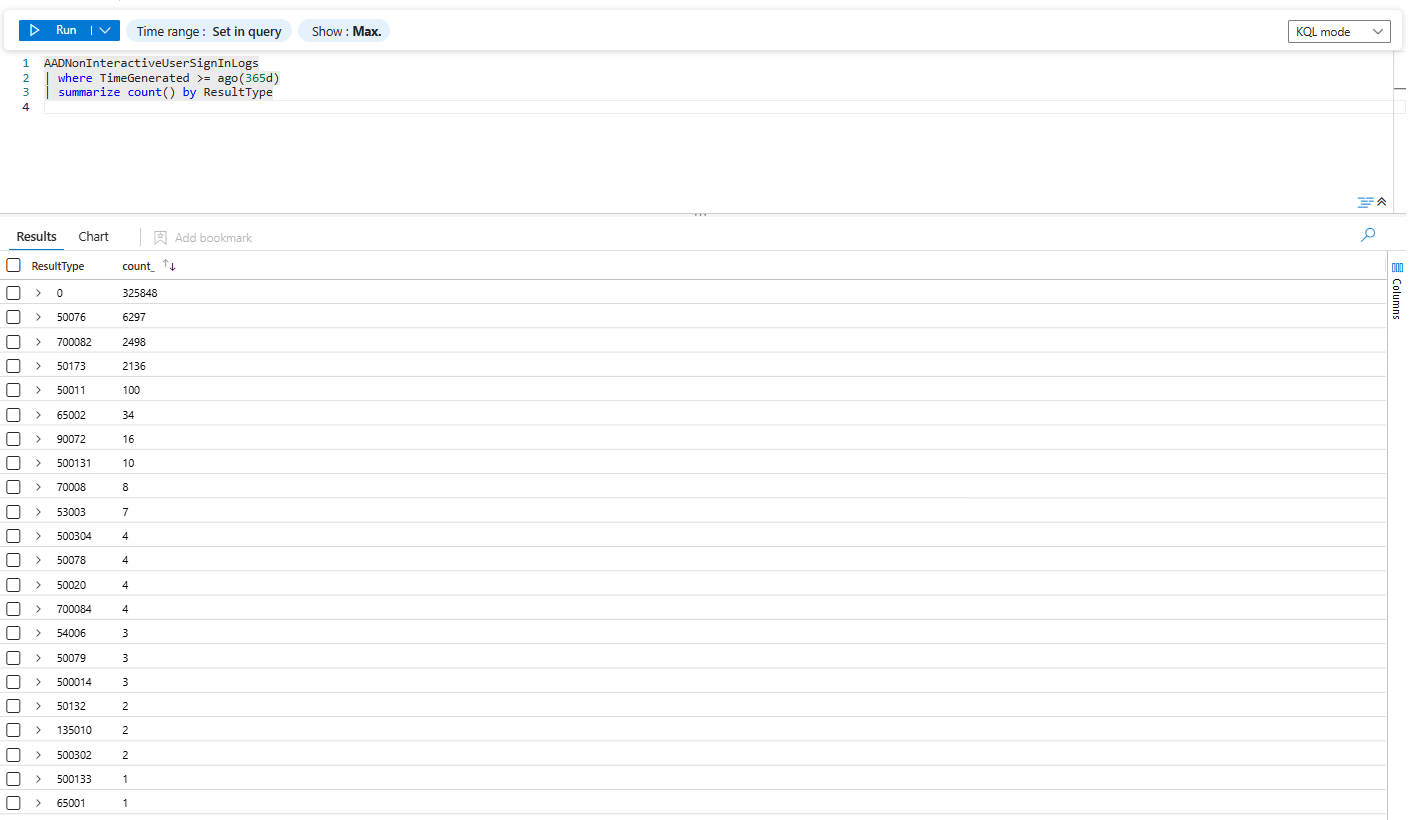
That output is genuinely useful, and it is also a trap, because it counts records rather than bytes. A code with a fat ResultDescription and a full Conditional Access array costs many times what a bare success costs. Count is not currency.
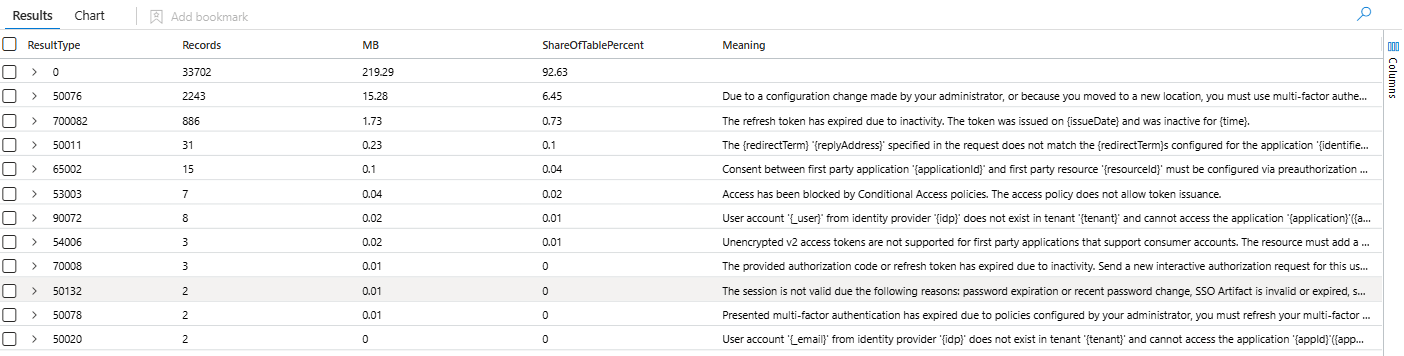
Weight it by _BilledSize instead.
let LookBack = 7d;
let SignIns = materialize (
    AADNonInteractiveUserSignInLogs
    | where TimeGenerated > ago(LookBack)
    | project ResultType, ResultDescription, Bytes = _BilledSize
);
let TotalBytes = toscalar (SignIns | summarize sum(Bytes));
SignIns
| summarize
    Records = count(),
    MB = round(sum(Bytes) / 1048576.0, 2),
    Meaning = take_any(ResultDescription)
    by ResultType
| extend ShareOfTablePercent = round(100.0 * MB * 1048576.0 / TotalBytes, 2)
| project ResultType, Records, MB, ShareOfTablePercent, Meaning
| sort by MB desc
Meaning is the important column. Do not take my word for what a result code means. Read your own tenant's ResultDescription values as there is a good chance they will be vastly different to mine.
Now weigh the columns
This is the query that changes the conversation.
let LookBack = 1d;
AADNonInteractiveUserSignInLogs
| where TimeGenerated > ago(LookBack)
| extend ColumnSizes = pack(
    "ConditionalAccessPolicies", estimate_data_size(ConditionalAccessPolicies),
    "AuthenticationDetails", estimate_data_size(AuthenticationDetails),
    "AuthenticationProcessingDetails", estimate_data_size(AuthenticationProcessingDetails),
    "DeviceDetail", estimate_data_size(DeviceDetail),
    "LocationDetails", estimate_data_size(LocationDetails),
    "NetworkLocationDetails", estimate_data_size(NetworkLocationDetails),
    "ConditionalAccessAudiences", estimate_data_size(ConditionalAccessAudiences),
    "AuthenticationRequirementPolicies", estimate_data_size(AuthenticationRequirementPolicies),
    "SessionLifetimePolicies", estimate_data_size(SessionLifetimePolicies),
    "AuthenticationMethodsUsed", estimate_data_size(AuthenticationMethodsUsed),
    "UserAgent", estimate_data_size(UserAgent),
    "Status", estimate_data_size(Status),
    "MfaDetail", estimate_data_size(MfaDetail),
    "AppliedEventListeners", estimate_data_size(AppliedEventListeners))
| mv-expand kind = array ColumnSizes
| extend ColumnName = tostring(ColumnSizes[0]), Bytes = tolong(ColumnSizes[1])
| summarize MB = round(sum(Bytes) / 1048576.0, 2) by ColumnName
| sort by MB desc
estimate_data_size() measures the in-memory representation rather than the billed bytes, so read the output as relative weight rather than as an invoice. It is accurate enough to tell you which column to argue about.
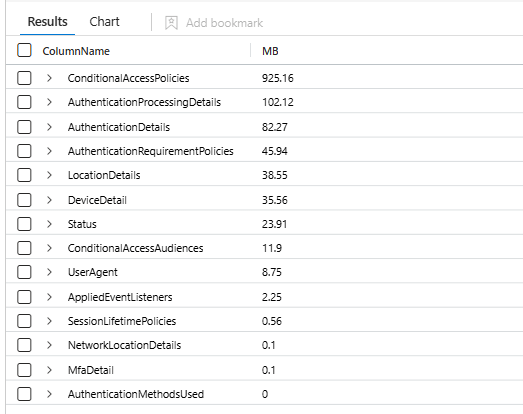
In a tenant with a healthy number of Conditional Access policies, ConditionalAccessPolicies will sit at the top of that list and it will not be close. Every policy evaluated against every token refresh, serialised into JSON, on every row. That single column is frequently the majority of the table.
Hold that thought.
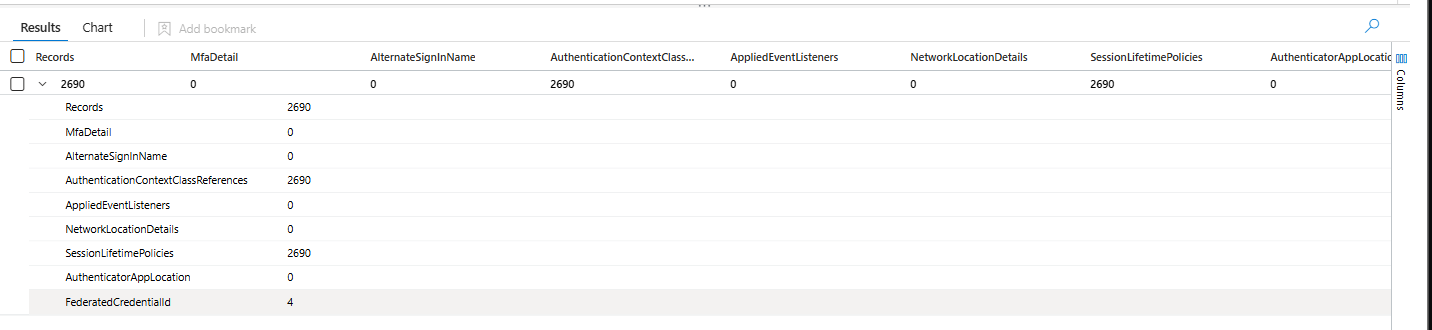
And check which columns are already empty
AADNonInteractiveUserSignInLogs
| where TimeGenerated > ago(1d)
| summarize
    Records = count(),
    MfaDetail = countif(isnotempty(MfaDetail)),
    AlternateSignInName = countif(isnotempty(AlternateSignInName)),
    AuthenticationContextClassReferences = countif(isnotempty(AuthenticationContextClassReferences)),
    AppliedEventListeners = countif(isnotempty(AppliedEventListeners)),
    NetworkLocationDetails = countif(isnotempty(NetworkLocationDetails)),
    SessionLifetimePolicies = countif(isnotempty(SessionLifetimePolicies)),
    AuthenticatorAppLocation = countif(isnotempty(AuthenticatorAppLocation)),
    FederatedCredentialId = countif(isnotempty(FederatedCredentialId))
An empty column costs you nothing. Putting it on the drop list buys you all of the risk and none of the saving. MfaDetail and AuthenticatorAppLocation are usually empty in the non-interactive table because the multi-factor step happened at the interactive sign-in, not here. Leave them alone.
Step 2: find out what breaks before you break it
This is the step that separates a cost optimisation from an incident.
Remember the rule from earlier. A column removed by a transformation stays in the table schema and arrives empty. That means an analytic rule referencing it does not fail. It does not throw a syntax error. It does not raise a health alert. It runs perfectly, matches nothing, and reports success forever.
A rule that errors gets noticed in a week. A rule that silently returns zero rows gets noticed after the breach.
So enumerate before you cut. Analytic rules first. You can run it in Azure CLI.
$sub = "<subscription-id>"
$rg  = "<resource-group>"
$ws  = "<workspace-name>"
$table = "AADNonInteractiveUserSignInLogs"
$columns = @(
    "ConditionalAccessPolicies", "ConditionalAccessAudiences", "AuthenticationDetails",
    "AuthenticationProcessingDetails", "NetworkLocationDetails", "SessionLifetimePolicies",
    "MfaDetail", "DurationMs", "ProcessingTimeInMs", "ResultSignature",
    "OperationVersion", "OperationName", "Level", "IsInteractive"
)

$base = "https://management.azure.com/subscriptions/$sub/resourceGroups/$rg/providers/Microsoft.OperationalInsights/workspaces/$ws"

# Scheduled and NRT analytic rules
$rules = (az rest --method get --url "$base/providers/Microsoft.SecurityInsights/alertRules?api-version=2023-02-01" | ConvertFrom-Json).value

# Hunting queries, saved searches and parser functions
$saved = (az rest --method get --url "$base/savedSearches?api-version=2020-08-01" | ConvertFrom-Json).value

$items = @()
$items += $rules | ForEach-Object { [pscustomobject]@{ Kind = "AlertRule"; Name = $_.properties.displayName; Query = $_.properties.query } }
$items += $saved | ForEach-Object { [pscustomobject]@{ Kind = "SavedSearch"; Name = $_.properties.displayName; Query = $_.properties.query } }

$items |
    Where-Object { $_.Query -and $_.Query -match $table } |
    ForEach-Object {
        $item = $_
        $hits = $columns | Where-Object { $item.Query -match "\b$_\b" }
        if ($hits) {
            [pscustomobject]@{
                Kind   = $item.Kind
                Name   = $item.Name
                AtRisk = ($hits -join ", ")
            }
        }
    } |
    Format-Table -AutoSize
Output will be similar to this

Then cover the humans. If you have log query auditing switched on, LAQueryLogs tells you what your analysts and workbooks have actually been reading for the last month.
LAQueryLogs
| where TimeGenerated > ago(30d)
| where QueryText has "AADNonInteractiveUserSignInLogs"
| extend Matches = extract_all(@"(ConditionalAccessPolicies|AuthenticationDetails|AuthenticationProcessingDetails|NetworkLocationDetails|SessionLifetimePolicies|MfaDetail|DurationMs|ProcessingTimeInMs|ResultSignature|OperationVersion|IsInteractive)", QueryText)
| mv-expand ColumnName = Matches to typeof(string)
| summarize Queries = count(), Analysts = dcount(AADEmail), LastSeen = max(TimeGenerated) by ColumnName
| sort by Queries desc
Query audit logs cover portal, API and workbook traffic. Do not rely on them alone for scheduled rule execution. Run both checks.
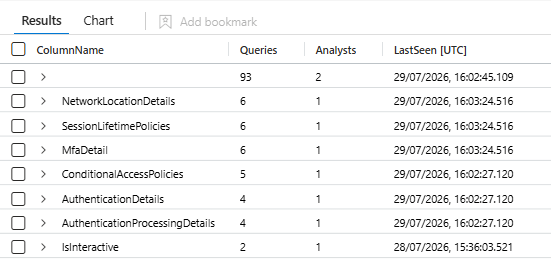
Two more places to look that neither check reaches: any ASIM parser or workspace function that unions this table, and your UEBA configuration. Non-interactive sign-in logs appear in the UEBA data source list in the Defender portal, so if you have connected them, stripping columns changes what the behavioural baselines see.
Step 3: cut the rows
Here is what my census returned. Twenty-two distinct result codes, 335,315 records (keep in mind that your records will be vastly different to mine)
| ResultType | Records | Share |
|---|---|---|
| 0 | 324,874 | 96.89% |
| 50076 | 5,559 | 1.66% |
| 700082 | 2,498 | 0.75% |
| 50173 | 2,176 | 0.65% |
| 50011 | 100 | 0.03% |
| Everything else | 108 | 0.03% |
Now look at that honestly. The successes are ninety-seven percent of the table. Every failure code combined is barely three percent. Row filtering on this table is a rounding error. If a blog post tells you to filter noisy result codes and stop there, it has not measured anything.
That said, three percent is free, so take it. Five codes earn a place on the list:
700082 - Refresh token expired due to inactivity
Why it goes: Token lifecycle hygiene. There is no attacker behind it.
70008 - Authorization code or refresh token expired due to inactivity
Why it goes: Same family, same reasoning.
50011 - Redirect URI does not match the application registration
Why it goes: An application configuration defect. Send it to the app owner, not the SOC.
50173 - Grant expired because it was revoked, fresh token needed
Why it goes: Fires on every client after a password change. The signal you would investigate is the password change itself, in AuditLogs.
50076 - Multi-factor authentication required by policy or location
Why it goes: Read the warning below before you accept this one.
Read this before you drop 50076. It is an interrupt, not a failure, and it is one of the codes that MFA fatigue and push bombing detections count in the run-up to 500121. If you have a rule that watches repeated MFA challenges against the non-interactive table, dropping 50076 disables it silently. Run the enumeration in step 2 against 50076 specifically. If nothing comes back, drop it and enjoy the 1.66 percent. If something comes back, leave it and lose nothing that matters.
Use a deny list, not an allow list.
| where ResultType !in ("50011", "50076", "50173", "70008", "700082")
Not this:
| where ResultType in ("0", "53003", "500121")
An allow list fails closed. The day Microsoft introduces a new result code for a new attack technique, an allow list throws it away and never tells you. A deny list fails open, which is the correct direction for a security pipeline.
Step 4: cut the columns
Same principle applies here. Use project-away, not project. project is an allow list over your schema, and Microsoft adds columns to this table regularly. Agent, AuthenticatorAppLocation and GlobalSecureAccessIpAddress were all added to AADNonInteractiveUserSignInLogs after it shipped. A project written today quietly discards whatever arrives tomorrow.
Sort your columns into three tiers.
Tier 1: telemetry with no detection semantics
Populated on every row, and no analyst has ever opened an investigation with them.
OperationVersion - Constant 1.0. It is the REST API version of the emitter.
Level - Constant 4. Severity of the diagnostic record, not of the sign-in.
DurationMs - How long the request took. Performance telemetry.
ProcessingTimeInMs - How long the STS took. Performance telemetry.
ResultSignature - Redundant. ResultType and ResultDescription carry the meaning.
IsInteractive - Always false. You are querying the non-interactive table. Why are you even here?
Tier 2: judgement calls, decide with your own numbers
ConditionalAccessPolicies
Keep it because: Conditional Access bypass detection and policy gap analysis.
Drop it because: Almost always the largest column in the table. If your Conditional Access detections read SigninLogs only, this is the biggest single saving available to you, and ConditionalAccessStatus still gives you the verdict for a few bytes.
AuthenticationDetails
Keep it because: Method-level analysis of the authentication steps.
Drop it because: On non-interactive records it is usually a single entry saying the requirement was previously satisfied. AuthenticationRequirement and AuthenticationMethodsUsed cover most of the ground.
AuthenticationProcessingDetails
Keep it because: Legacy TLS and OAuth scope hunting.
Drop it because: If you do not run those hunts, it is weight.
OperationName
Keep it because: Some workbooks filter on it.
Drop it because: Constant Sign-in activity, sixteen bytes on every row.
AADTenantId
Keep it because: Essential in a consolidated multi-tenant workspace.
Drop it because: Constant thirty-six byte GUID in a single-tenant workspace.
ResourceOwnerTenantId & ResourceServicePrincipalId
Keep it because: Cross-tenant resource attribution.
Drop it because: GUID heavy. ResourceDisplayName and ResourceTenantId usually answer the question.
Tier 3: never
This is the security spine of the table. Do not touch any of it.
TimeGenerated, CorrelationId, Id, UserPrincipalName, UserId, UserType, IPAddress, AutonomousSystemNumber, LocationDetails, DeviceDetail, AppDisplayName, AppId, ResourceDisplayName, ClientAppUsed, ResultType, ResultDescription, Status, ConditionalAccessStatus, RiskDetail, RiskState, RiskLevelDuringSignIn, RiskLevelAggregated, RiskEventTypes_V2, SessionId, UniqueTokenIdentifier, IncomingTokenType, TokenIssuerType, TokenProtectionStatusDetails, AuthenticationRequirement, AuthenticationProtocol, OriginalTransferMethod, CrossTenantAccessType, HomeTenantId, IsTenantRestricted, SignInEventTypes, UserAgent, ServicePrincipalId, ClientCredentialType.
A few of those deserve a sentence. SessionId and UniqueTokenIdentifier are how you trace token replay and stolen session material back to an interactive sign-in. OriginalTransferMethod and AuthenticationProtocol are how you catch device code phishing. TokenProtectionStatusDetails tells you whether the token was cryptographically bound to the device. Those four are worth more per byte than anything else in the table.
Also leave the system columns alone. TenantId, Type, _ResourceId and the underscore-prefixed billing columns are managed by the platform and are excluded from the billable calculation anyway.
Step 5: write the transformation
The source table is replaced by the keyword source. Everything else is normal KQL.
Variant A, the baseline. Row filter plus tier one. This is what I would deploy on a customer tenant on day one.
source
| where ResultType !in ("50011", "50076", "50173", "70008", "700082")
| project-away
    OperationVersion,
    Level,
    DurationMs,
    ProcessingTimeInMs,
    ResultSignature,
    IsInteractive
Variant B, once the checks pass. Adds the heavy columns from tier two. Do not deploy this until the enumeration in step 2 came back clean.
source
| where ResultType !in ("50011", "50076", "50173", "70008", "700082")
| project-away
    OperationVersion,
    OperationName,
    Level,
    DurationMs,
    ProcessingTimeInMs,
    ResultSignature,
    IsInteractive,
    ConditionalAccessPolicies,
    ConditionalAccessAudiences,
    AuthenticationProcessingDetails,
    SessionLifetimePolicies,
    ResourceOwnerTenantId,
    ResourceServicePrincipalId,
    AlternateSignInName
The portal, for one workspace
Go to the log analytics workspace, then Tables, find AADNonInteractiveUserSignInLogs, use the ellipsis and choose Create transformation.

If no workspace transformation DCR exists yet the wizard offers to create one. If one already exists the wizard picks it up, because there is only ever one.
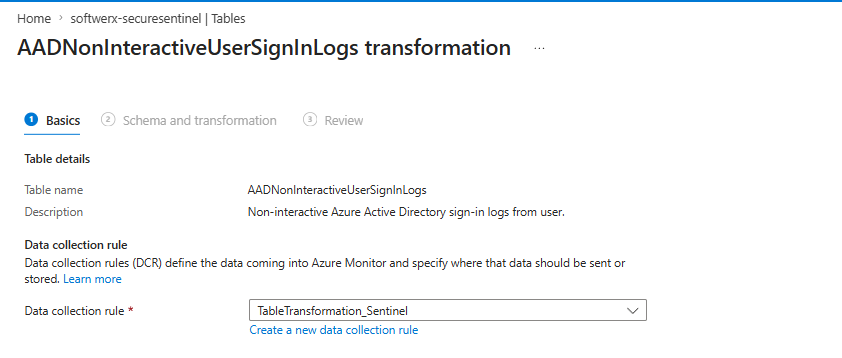
On the Schema and transformation tab, open the Transformation editor. The editor loads real sample data from your table and pre-populates the query with source. Paste your transformation, run it, and read the output before you accept it.
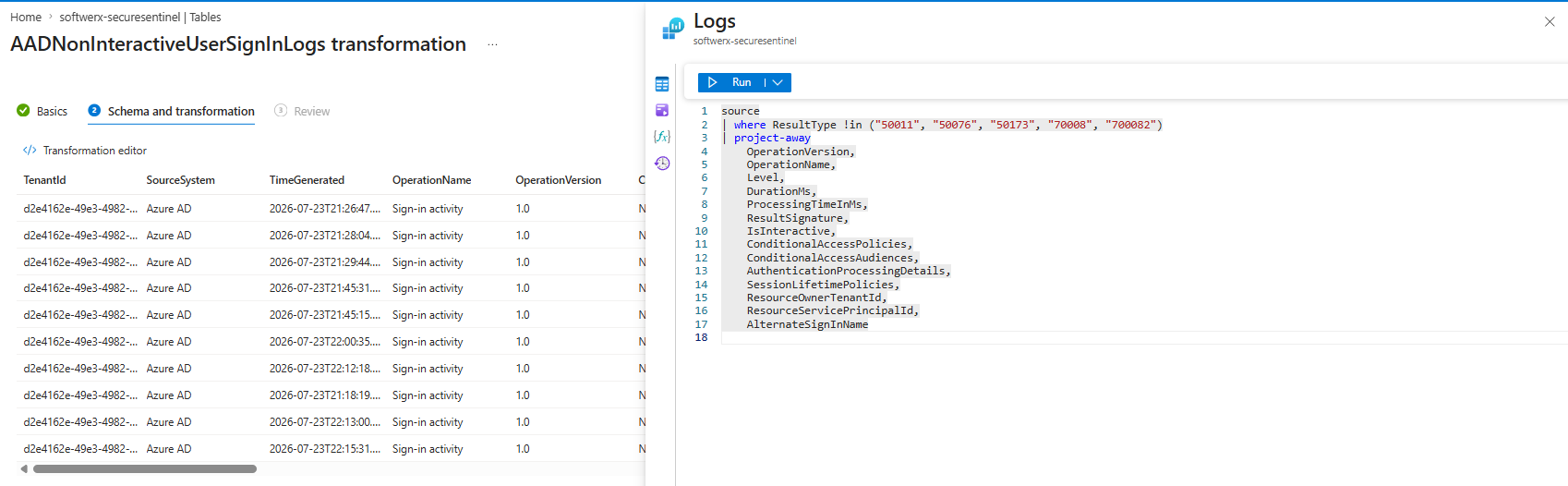
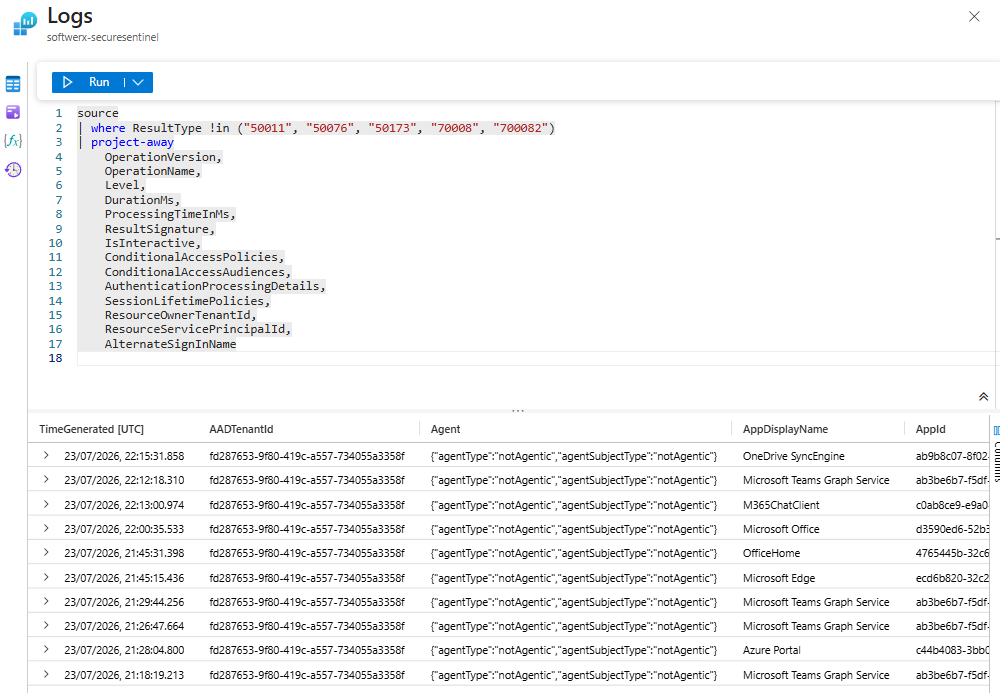
The editor is the best testing environment you will get, because it runs your transformation against genuine records from your own workspace. Use it even if you intend to deploy by template.
Once saved and pushed, you can then edit any other tables in the same way and they will auto update the DCR.
Step 6: verify, then keep watching
Allow up to an hour for a new transformation to activate. The Log Analytics IntelliSense cache can take twenty-four hours to catch up, so do not panic if the schema view looks stale.
The day after, run this.
let CutOver = datetime(2026-07-29 00:00:00); //change the date :)
AADNonInteractiveUserSignInLogs
| where TimeGenerated > ago(14d)
| extend Phase = iff(TimeGenerated < CutOver, "Before", "After")
| summarize
    Records = count(),
    AvgBytes = round(avg(_BilledSize), 0),
    DroppedCodesStillArriving = countif(ResultType in ("50011", "50076", "50173", "70008", "700082")),
    OperationVersionPopulated = countif(isnotempty(OperationVersion))
    by Phase
DroppedCodesStillArriving and OperationVersionPopulated should both be zero on the After row. AvgBytes should have fallen. If nothing has changed, you made a bubu, and you should retrace your steps.
Rolling back
You can just remove the source from the table transformation; afterwards, delete DCR if no longer needed.
The list of things that will catch you out
- A dropped column stays in the schema and arrives empty. Rules that read it succeed and match nothing. This is the one that matters.
- Only new data is affected. A rule with a fourteen day lookback straddles the cut-over for fourteen days and sees a mixture of old and new shapes. Plan the change window with that in mind.
- One workspace transformation DCR per workspace, shared by every table and every team.
- The transformation is a single line in JSON. Comments do not survive flattening.
- No
mv-applyand nomv-expand, so you cannot trim a JSON array. A column is in or out. project-awayfails on a column that does not exist. Check the schema per workspace.projectis an allow list and discards future columns. Useproject-away.- The DCR must sit in the same region as the workspace.
- Allow an hour for activation
- The workspace transformation DCR is ignored for any data that arrives through its own DCR, such as anything sent by the Azure Monitor Agent. Put those transformations in the agent's own rule
Where that leaves us
Run this against your own environment; don't let my own testing one give you a false sense that the table is not worth checking. It's not unusual to cut down tables by 20-60% without compromising security.
Measure it, name it, write the decision down, and make it with your eyes open.
The thing you must never do is cut first and find out later, because this technique does not fail loudly. It fails silently, and it fails in the direction of blindness.
Class dismissed.