Operation Silent Ledger: A SOC Tabletop Exercise for Adversary in the Middle Phishing
Alright class.
Every tabletop exercise I have sat in ended with everybody agreeing on the right answer. That is the problem with them. There is no clock in the room, no queue filling up behind you, and nobody from the customer waiting on the telephone while you decide what to tell them.
So this one has all three.
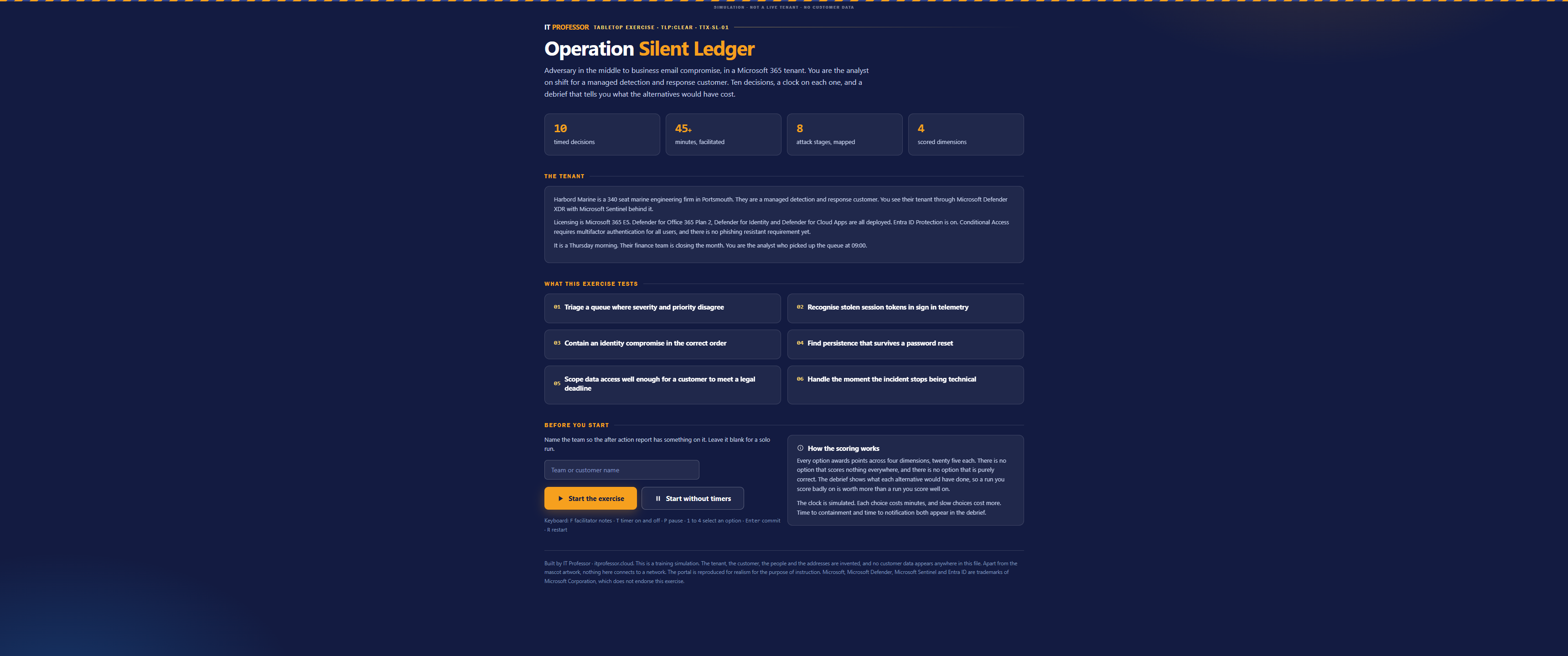
Operation Silent Ledger is a free interactive tabletop exercise that runs in your browser. It takes you through an adversary in the middle phishing attack that turns into business email compromise, inside a Microsoft 365 tenant you see through Defender XDR with Sentinel behind it. Ten decisions, a clock on every one, and a debrief that tells you what each option you did not pick would have cost.
Best on desktop. Nothing to install, no login, and no data leaves your machine.
The tenant
Harbord Marine is a 340 seat marine engineering firm in Portsmouth. They are a managed detection and response customer, so you see their tenant the way you see any other customer tenant, through Defender XDR with Sentinel behind it.
Their licensing is Microsoft 365 E5. Defender for Office 365 Plan 2, Defender for Identity and Defender for Cloud Apps are all deployed. Entra ID Protection is on. Conditional Access requires multifactor authentication for all users, and there is no phishing resistant requirement yet.
It is a Thursday morning and their finance team is closing the month. You are the analyst who picked up the queue at 09:00.
That last detail matters more than the licensing. Most exercises put you in a quiet room on a quiet day. Real incidents arrive while somebody is closing the month.
What the exercise tests
Six things, and none of them are product knowledge.
- Triage a queue where severity and priority disagree
- Recognise stolen session tokens in sign in telemetry
- Contain an identity compromise in the correct order
- Find persistence that survives a password reset
- Scope data access well enough for a customer to meet a legal deadline
- Handle the moment the incident stops being technical
Number three and number six are the ones teams fumble. Containment order is something everybody assumes they know until they have to sequence it under a clock, and number six is the part that most exercises never go near at all.
You read the telemetry, not a summary of it
The portal is reproduced rather than described. When the exercise puts you in advanced hunting, there is a real KQL query on the screen and a real result set underneath it, and you have to read it.
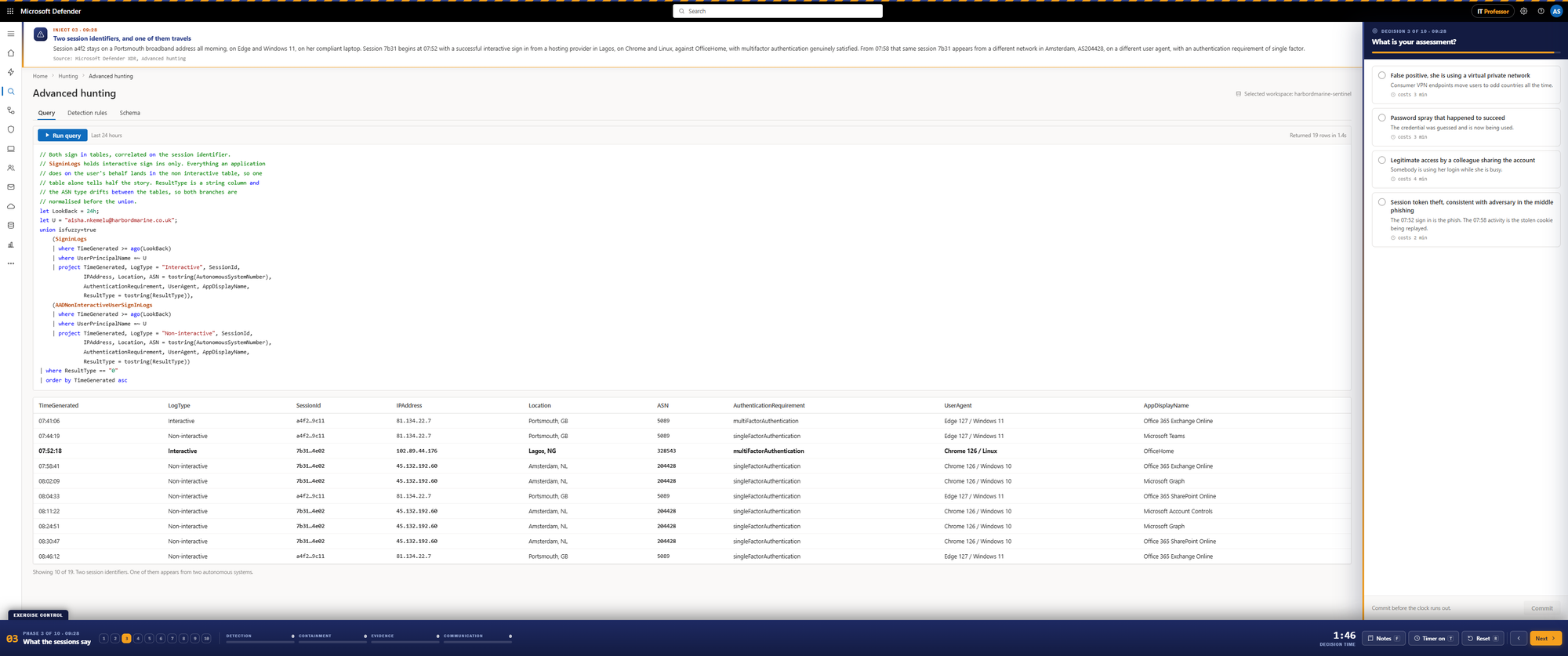
Two session identifiers belonging to the same user. One of them stays on a Portsmouth broadband address all morning, on Edge and Windows 11, on a compliant laptop. The other begins with a successful interactive sign in from a hosting provider in Lagos, on Chrome and Linux, with multifactor authentication genuinely satisfied. Six minutes later that same session identifier appears from a different network in Amsterdam, on a different user agent, with an authentication requirement of single factor.
Nothing in that picture is a failed sign in. Everything succeeded. That is the point.
The ten decisions
Without giving anything away, the shape of the run is this.
You start by choosing which incident to work first, in a queue where the severity labels and the actual priority disagree. Then you decide where to go for authentication evidence, and what the evidence means once you have it. You choose a first containment action, and the order you choose matters more than the actions themselves. You pick one persistence sweep, knowing an attacker who has been through a password reset is still inside. You build the answer to what was taken, because the customer is going to ask.
Then it stops being technical.
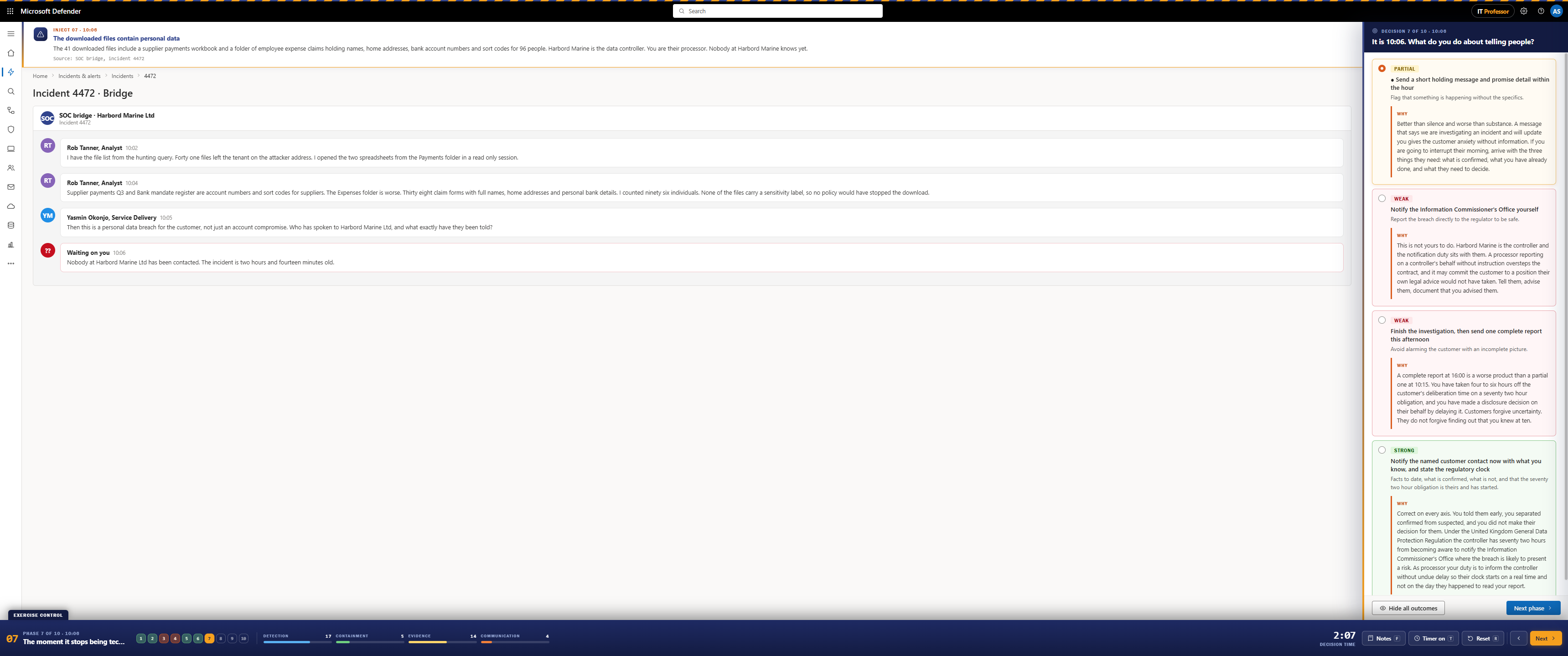
At 10:06 you know that forty one files left the tenant, that they include a supplier payments workbook and a folder of expense claims, and that ninety six people's names, home addresses and bank details are inside them. Nobody at the customer has been contacted. The incident is two hours and fourteen minutes old.
Harbord Marine is the data controller. You are their processor. Their seventy two hour clock has not started, and whether it starts depends on what you do in the next few minutes.
The last three decisions cover a mailbox rule that has been quietly working all morning, a finance director on the telephone who wants an answer now, and how you classify and close the incident.
How the scoring works
Every option awards points across four dimensions, twenty five points each: detection and triage, containment, evidence and scoping, and communication and escalation.
No option scores nothing everywhere, and no option is purely correct. Some answers are weak, and the exercise will say so, but a weak answer usually still earns something on one axis while costing you on another. That is deliberate. A scenario where one answer is obviously right teaches nothing, because in a real incident the bad option is the one that looked reasonable at the time.
The clock is simulated. Every choice costs minutes, and slow choices cost more, so both time to containment and time to notification appear in the debrief alongside the score.
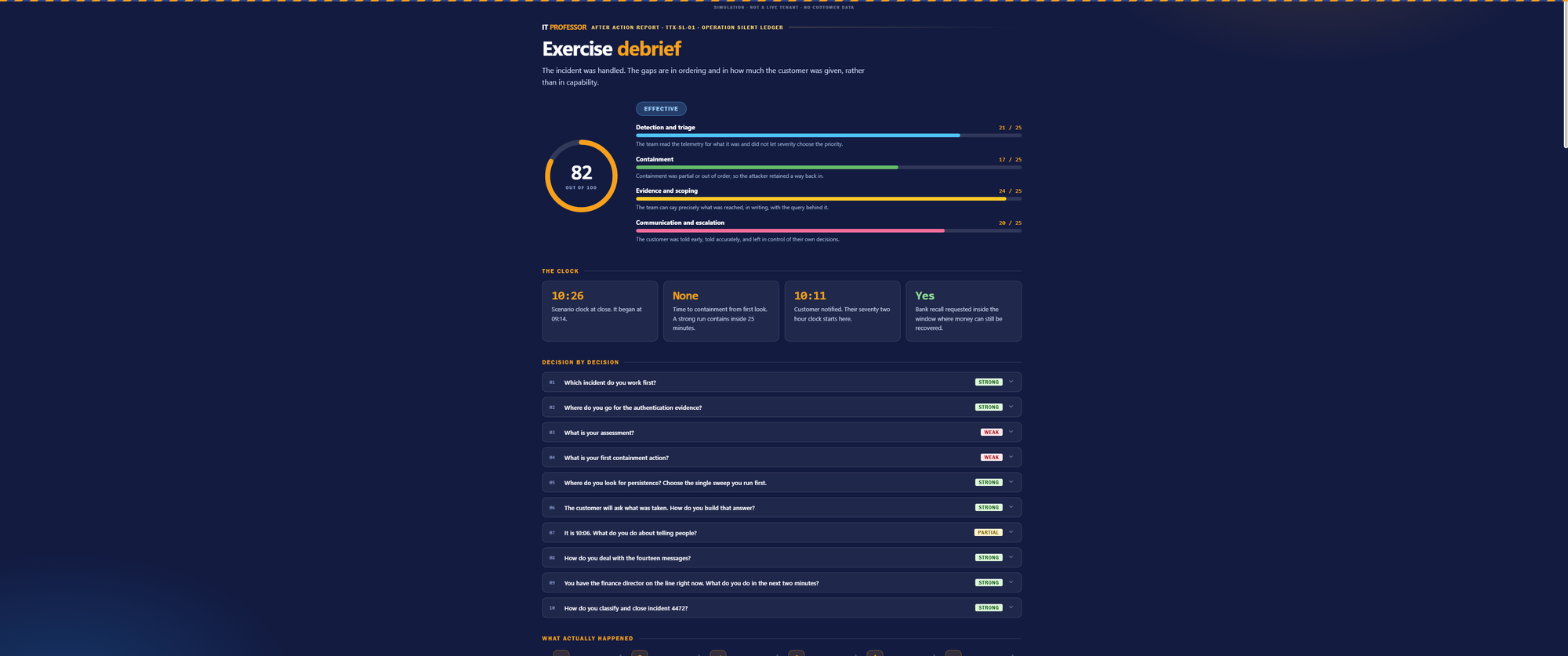
A run you score badly on is worth more than a run you score well on, because the debrief shows what each alternative would have done. The point is not the number in the ring.
How to facilitate it for a team
Running this on your own takes about forty five minutes. Running it for a team is a different exercise, and it is the one I would recommend.
Group size. Three to six people around one screen. Larger than six and the quiet ones stop contributing, which defeats the purpose.
Driver and facilitator. One person drives, one facilitates, and the facilitator should not be the most senior person in the room. Press F at any point for the facilitator notes on the current phase.
Turn the timers on. The pressure is the exercise. If a team asks for the clock to be switched off, that request is itself worth discussing. There is a Start without timers option for training a brand new analyst, and P pauses if a real incident interrupts you.
Make them commit out loud before selecting. The rule that makes this work is simple. Nobody touches the keyboard until somebody has said the answer out loud and nobody has objected. That converts a click into a decision the team owns.
Do not resolve arguments. When the room splits on containment order, let it run for a minute and write down both positions. The debrief will settle it, and the argument is where the learning is.
Watch the handover points. Phases seven and nine move the incident from the analyst to service delivery to the customer. Notice who in your room goes quiet at that moment, because that is your real escalation gap.
Run the debrief properly. Open each decision, read what the alternatives would have cost, and let the team argue with the reasoning. Disagreeing with a verdict is a good outcome, provided somebody can say why.
Compare two teams. Export the run as JSON and run the same scenario with a second team. Two runs of the same incident tell you more about your process than either run tells you on its own.
Nobody leaves with a feeling
The debrief ends with eight actions, each with a named owner and a deadline, written from what the team actually did rather than from a template.
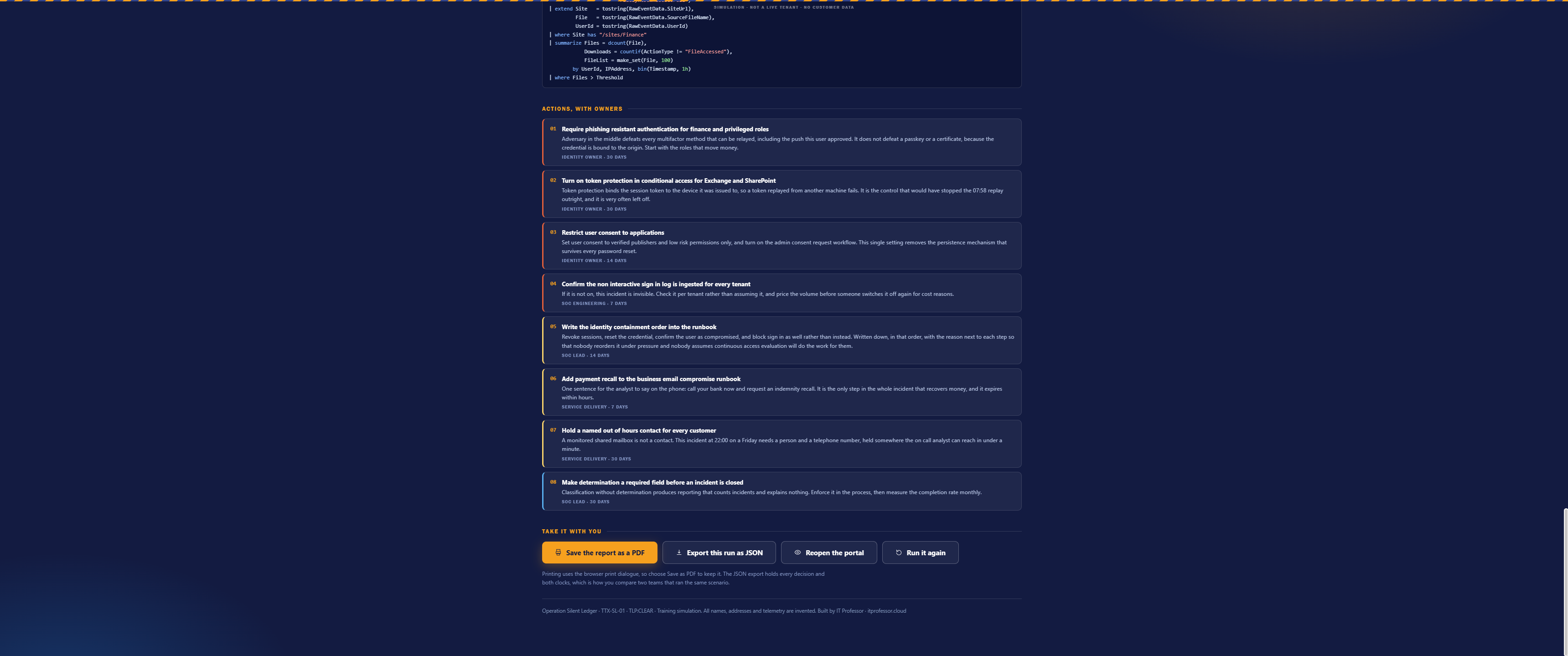
They cover phishing resistant authentication for the roles that move money, token protection in Conditional Access, restricting user consent to applications, confirming the non interactive sign in log is actually ingested for every tenant, writing the identity containment order into the runbook, adding payment recall to the business email compromise runbook, holding a named out of hours contact for every customer, and making determination a required field before an incident can be closed.
Questions people ask
Can I run this with my customers? Yes. It is TLP:CLEAR and free to use. It works well as a workshop, and the after action report gives the customer something to take away.
Does it send anything anywhere? No. It is a single HTML file that runs entirely in your browser. There is no login, no telemetry and no analytics. Save the page and it runs offline.
Is any of it real customer data? None of it. The tenant, the company, the people, the addresses and every log line are invented. The portal is reproduced for the purpose of instruction.
What do I need? A desktop browser and forty five minutes. No licence, no tenant and no Azure subscription.
Can I edit it? It is one file, so yes. If you change the scenario for your own environment I would be glad to hear what you did with it.
Do I need to know KQL? No. The queries are on screen and explained, and no decision requires you to write one.
Run it
Take it, run it with your team, and tell me which decision caused the longest argument. In my experience it is always the containment order.
Class dismissed.