The Antivirus Setting Your Admins Turned Off Years Ago

All right class.
Somewhere in your estate there is a device with C:\ in its Defender exclusion list. Somebody put it there in 2021 to stop a line of business application throwing errors, the ticket was closed, and antivirus has been switched off on that machine ever since.
Nobody knows. There is no dashboard for it, no compliance report that surfaces it, and no alert when it happens.
Why This Is Not Just Hygiene
An exclusion tells Defender to stop looking at something. That is the entire feature. It is the only security control I can think of that ships with a supported way to turn itself off, one directory at a time.
Attackers know this. The pattern is T1562.001, and it is two commands: add an exclusion for a folder, then drop the payload into that folder. No exploit, no bypass, no evasion research. You asked the antivirus not to look there and it did as it was told.
The insider version is duller and more common. An administrator excludes their own profile directory so a script stops getting quarantined. A vendor's installation guide instructs you to exclude the whole application drive, which is easier for the vendor than fixing their software. Neither person is malicious and both leave the same hole.
Microsoft does raise an alert called Suspicious Microsoft Defender Antivirus exclusion, so this is not completely uncovered. It fires on some cases. It does not give you an inventory, it does not tell you which of your existing exclusions are dangerous, and it does not tell you what has been running inside them since.
The Audit
Start with what you already have, grouped by the exclusion rather than the device, because the same string appearing on four hundred machines is a policy and the same string on one machine is a decision somebody made alone.
// Every Defender exclusion seen in the window, worst first
let Lookback = 14d;                  // sweep window
let ExclusionKeys = dynamic([
    @"\SOFTWARE\Microsoft\Windows Defender\Exclusions",
    @"\SOFTWARE\Policies\Microsoft\Windows Defender\Exclusions",
    @"\Windows Defender Exploit Guard\ASR\ASROnlyExclusions"]);
// Device context, so the output says what kind of machine this is
let DeviceContext = DeviceInfo
    | where TimeGenerated > ago(Lookback)
    | summarize arg_max(TimeGenerated, OSPlatform, MachineGroup) by DeviceId
    | project-away TimeGenerated;
DeviceRegistryEvents
| where TimeGenerated > ago(Lookback)
| where ActionType in ("RegistryValueSet", "RegistryKeyCreated")
| where RegistryKey has_any (ExclusionKeys)
| where isnotempty(RegistryValueName)
| extend Exclusion = RegistryValueName
| extend Hive = iff(RegistryKey has @"\Policies\", "Policy (GPO or Intune)", "Local")
| extend ExclusionType = case(
      RegistryKey has @"\Exclusions\Paths", "Path",
      RegistryKey has @"\Exclusions\Extensions", "Extension",
      RegistryKey has @"\Exclusions\Processes", "Process",
      RegistryKey has "ASROnlyExclusions", "ASR rule",
      "Other")
| lookup kind=leftouter DeviceContext on DeviceId
| summarize DeviceCount = dcount(DeviceId),
            AffectedDevices = make_set(DeviceName, 15),
            SetBy = make_set(InitiatingProcessFileName, 10),
            SetByAccount = make_set(InitiatingProcessAccountName, 10),
            Platforms = make_set(OSPlatform, 5),
            Groups = make_set(MachineGroup, 10),
            FirstSeen = min(TimeGenerated), LastSeen = max(TimeGenerated)
  by Exclusion, ExclusionType, Hive
| extend Verdict = case(
      Exclusion has "%", "Unexpanded variable, this exclusion does nothing",
      Exclusion matches regex @"(?i)^[a-z]:\\?$", "Entire drive excluded",
      ExclusionType == "Extension" and Exclusion has_any (".exe",".dll",".ps1",".bat",".vbs",".js",".scr",".hta"), "Executable extension excluded everywhere",
      Exclusion has_any (@"\Users\", @"\AppData\", @"\Temp", @"\Downloads", @"\Public", @"\Perflogs"), "User writable location",
      Exclusion has_any ("*", "?"), "Wildcard exclusion",
      ExclusionType == "Process", "Process exclusion, anything it touches is skipped",
      "Specific path")
| extend Priority = case(
      Verdict == "Entire drive excluded", 1,
      Verdict == "Executable extension excluded everywhere", 1,
      Verdict == "User writable location", 2,
      Verdict in ("Wildcard exclusion", "Process exclusion, anything it touches is skipped"), 3,
      Verdict == "Unexpanded variable, this exclusion does nothing", 4,
      5)
| project Priority, Verdict, Exclusion, ExclusionType, Hive, DeviceCount,
          SetBy, SetByAccount, Platforms, Groups, AffectedDevices, FirstSeen, LastSeen
| sort by Priority asc, DeviceCount desc
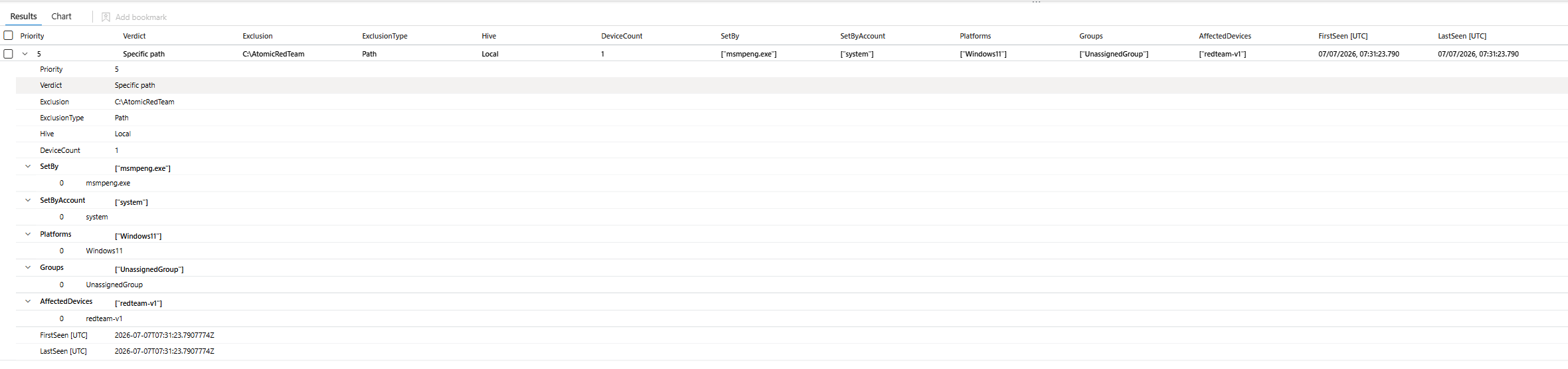
SetBy tells you the mechanism. MsMpEng.exe or a policy process is normal. powershell.exe is somebody typing Add-MpPreference, and that is the row to open.
What Changed Today
The audit above is a quarterly job. The detection is a different query, and it has one dominant false positive.
Intune re-applies its exclusion list on every reboot. Not once, every time. So a naive alert on exclusion writes returns your entire managed estate every Monday morning, which is why most teams try this rule once and turn it off.
The fix is not an allow list of approved strings, because that goes stale the moment somebody onboards an application. The fix is to ask whether this exclusion is new to this device, and to take the baseline from before the detection window so today cannot baseline itself.
// Exclusions that are new to the device, not policy re-application
let Detection = 1d;                  // events scored in this window
let Lookback = 14d;                  // baseline ends where the detection window starts
let ExclusionKeys = dynamic([
    @"\SOFTWARE\Microsoft\Windows Defender\Exclusions",
    @"\SOFTWARE\Policies\Microsoft\Windows Defender\Exclusions",
    @"\Windows Defender Exploit Guard\ASR\ASROnlyExclusions"]);
// What this device already had, strictly before the detection window
let Known =
    DeviceRegistryEvents
    | where TimeGenerated between (ago(Lookback) .. ago(Detection))
    | where ActionType in ("RegistryValueSet", "RegistryKeyCreated")
    | where RegistryKey has_any (ExclusionKeys)
    | where isnotempty(RegistryValueName)
    | summarize by DeviceId, RegistryValueName;
DeviceRegistryEvents
| where TimeGenerated > ago(Detection)
| where ActionType in ("RegistryValueSet", "RegistryKeyCreated")
| where RegistryKey has_any (ExclusionKeys)
| where isnotempty(RegistryValueName)
| join kind=leftanti Known on DeviceId, RegistryValueName
| extend Exclusion = RegistryValueName
| extend Ind_1 = iff(InitiatingProcessFileName in~ ("powershell.exe","pwsh.exe","cmd.exe","reg.exe","wmic.exe","mshta.exe","wscript.exe"), strcat("Set by hand using ", InitiatingProcessFileName), "")
| extend Ind_2 = iff(Exclusion has_any (@"\Users\", @"\AppData\", @"\Temp", @"\Downloads", @"\ProgramData\"), "Points at a user writable location", "")
| extend Ind_3 = iff(InitiatingProcessParentFileName in~ ("winword.exe","excel.exe","outlook.exe","mshta.exe","wscript.exe"), "Ancestor is a document or script host", "")
| extend RiskIndicators = trim(@"\s\|\s*$", strcat(
      iff(isnotempty(Ind_1), strcat(Ind_1, " | "), ""),
      iff(isnotempty(Ind_2), strcat(Ind_2, " | "), ""),
      iff(isnotempty(Ind_3), strcat(Ind_3, " | "), "")))
| project TimeGenerated, DeviceName, Exclusion, RegistryKey, RiskIndicators,
          SetBy = InitiatingProcessFileName, SetByAccount = InitiatingProcessAccountName,
          CommandLine = InitiatingProcessCommandLine,
          Parent = InitiatingProcessParentFileName, DeviceId, ReportId
| sort by RiskIndicators desc, TimeGenerated desc
An Intune reboot re-push produces no rows, because those exclusion strings already existed on that device. A genuinely new exclusion produces one. That is the whole design.
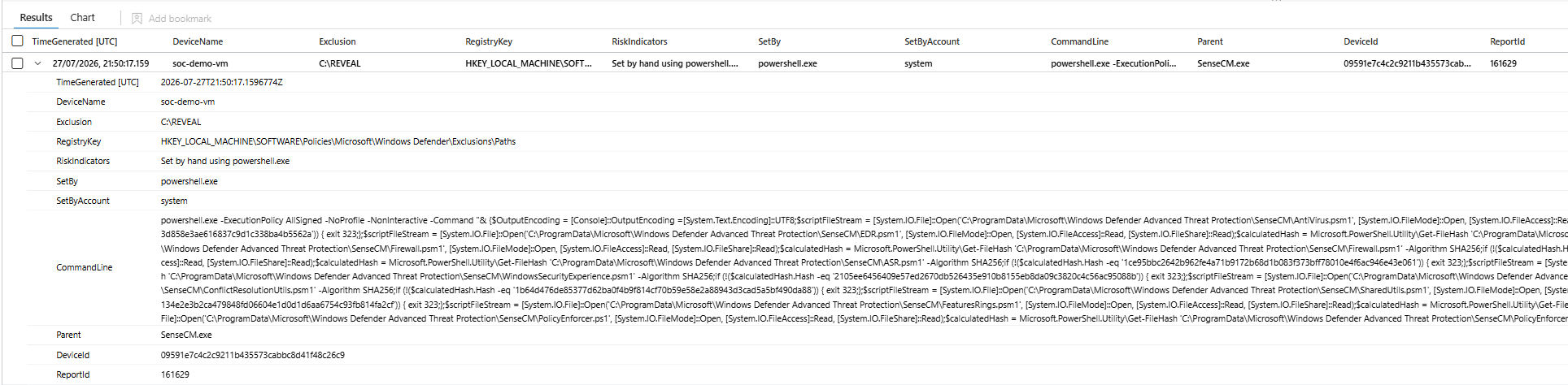
Watch for HideExclusionsFromLocalAdmins turning up in the results. That is a real Group Policy setting under the Defender policy key, and when it is set to 1 the exclusion list becomes invisible in Get-MpPreference, in the Windows Security app and in the registry editor, for administrators and for SYSTEM alike. It removes nothing. It only stops you seeing what is there. Legitimate use for it is rare, and attackers have been observed setting it.
What Is Living Inside Them
This is the query that turns an audit finding into an investigation. An exclusion by itself is a hole. An exclusion with something running inside it is a hole somebody walked through.
// Processes executing from inside an excluded path, after the exclusion was created
let Lookback = 14d;
let PathExclusions =
    DeviceRegistryEvents
    | where TimeGenerated > ago(Lookback)
    | where RegistryKey has @"\Windows Defender\Exclusions\Paths"
    | where isnotempty(RegistryValueName)
    | where RegistryValueName !has "%"          // dead entries protect nothing
    | summarize ExclusionSet = min(TimeGenerated) by DeviceId, ExcludedPath = tolower(RegistryValueName);
DeviceProcessEvents
| where TimeGenerated > ago(Lookback)
| where isnotempty(FolderPath)
| project TimeGenerated, DeviceId, DeviceName, FileName, FolderPath, SHA256,
          ProcessCommandLine, AccountName, InitiatingProcessFileName
| extend LowerPath = tolower(FolderPath)
| join kind=inner PathExclusions on DeviceId
| where LowerPath startswith ExcludedPath
| where TimeGenerated > ExclusionSet
| extend MinutesAfterExclusion = datetime_diff("minute", TimeGenerated, ExclusionSet)
| project TimeGenerated, DeviceName, ExcludedPath, MinutesAfterExclusion, FileName, FolderPath,
          ProcessCommandLine, AccountName, Parent = InitiatingProcessFileName, SHA256
| sort by MinutesAfterExclusion asc, TimeGenerated desc
MinutesAfterExclusion sorts ascending on purpose. A binary that started running four minutes after somebody excluded the folder it sits in is the shape you are looking for. Something running there eighteen days later is probably the application the exclusion was created for.

Expect legitimate results. Backup agents, database engines and line of business applications all run from excluded paths, because that is why the exclusion exists. What you are reading is the gap between when the hole opened and when something used it.
The Blind Spots You Should Know About
DeviceRegistryEvents shows changes, not state. A device that was excluded three years ago and has not rebooted inside your lookback contributes nothing. This is an inventory of exclusions that were written recently, not of exclusions that currently apply, and those are different lists. Widen the lookback in advanced hunting for a fuller picture, but the gap never closes completely.
There is no setting that stops a local administrator adding an exclusion. HideExclusionsFromLocalAdmins only hides the list. DisableLocalAdminMerge makes Intune settings win over local ones, which helps, but the local addition still happens and still gets logged. Tamper protection does not cover this either.
Finally, this is Windows only. macOS and Linux exclusions live elsewhere entirely and none of the above touches them.
Follow my repo - GitHub
What You Should Do Next
Run the audit and sort by Priority. Whole drives and executable extensions come first. You are looking for the entry nobody can justify, and the fastest way to find it is to ask who owns the application it was created for. If nobody can name one, delete it.
Turn the change query into a scheduled rule and set the local hive as the priority. In a properly managed estate, exclusions arrive through Intune. One written locally by powershell.exe is genuinely unusual and worth waking somebody for.
Then set DisableLocalAdminMerge and centralise the list. You cannot stop administrators adding exclusions, but you can make sure the ones that matter come from policy and that anything local is both overridden and visible. That converts this from a hunt you remember to run into a control that holds on its own.
Class dismissed.