Conditional Access, Part Five: Cross-Tenant Access, MFA Trust, and the Partner Problem

All right class.
Part two left a loose end and I promised to come back for it. Guests cannot register passkeys in your tenant (MC1459133 starts fixing this from October 2026, internal guests first). So if you put a phishing-resistant authentication strength on your Externals persona, you have built a policy that external users are structurally unable to satisfy, and the only ways out are to weaken the policy or to configure something else entirely.
That something else is cross-tenant access settings, and this post is about them.
There is a second reason to care, and it is the one that concerns me most in day to day work. If you run a managed service, a consultancy, or any operation that administers other people's tenants, then you are somebody else's external user. Every control your customer writes lands on your engineers. And there is a specific behaviour in this area that means the absence of a setting does not block your people, it silently downgrades them to the weakest authentication method available, without anybody noticing, on every tenant where it has not been configured.
I will get to that. First, the model.
What the defaults actually are
Cross-tenant access settings sit under External Identities in the Entra admin centre. Before you change anything, know what you inherited, because the defaults are a mixture of wide open and firmly shut.
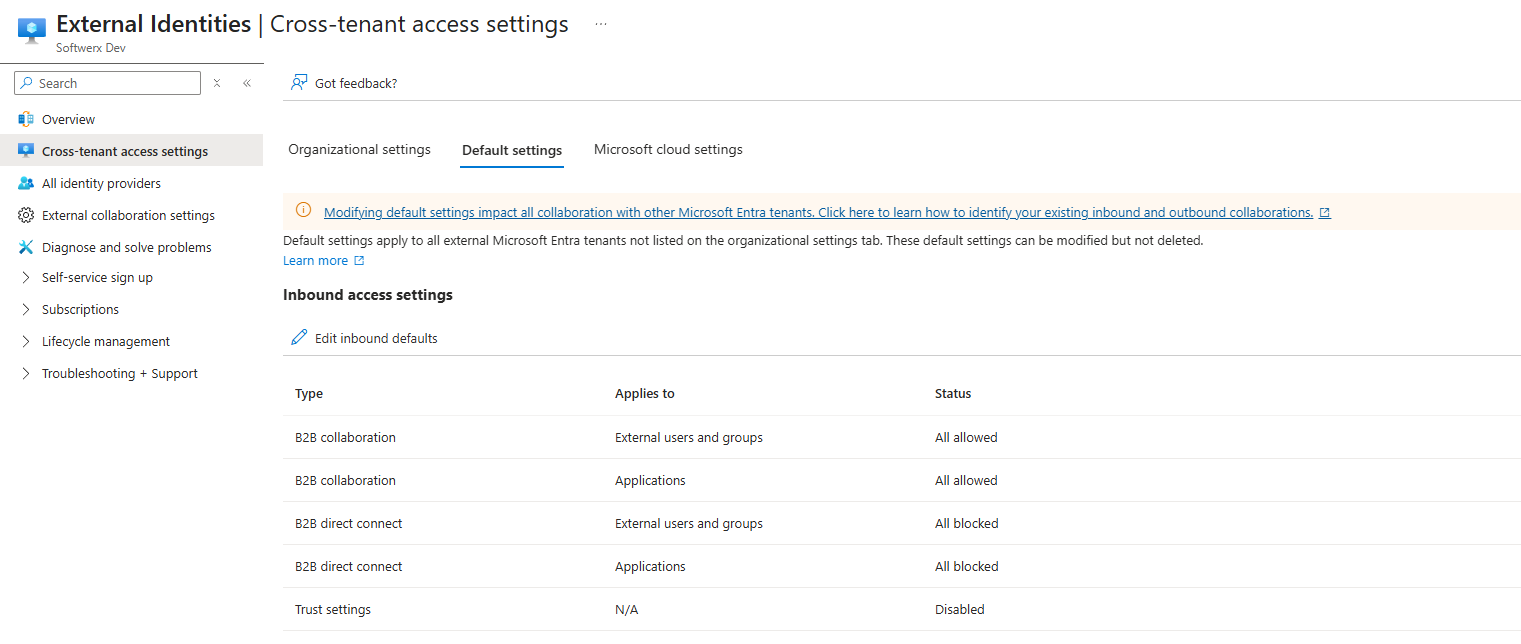
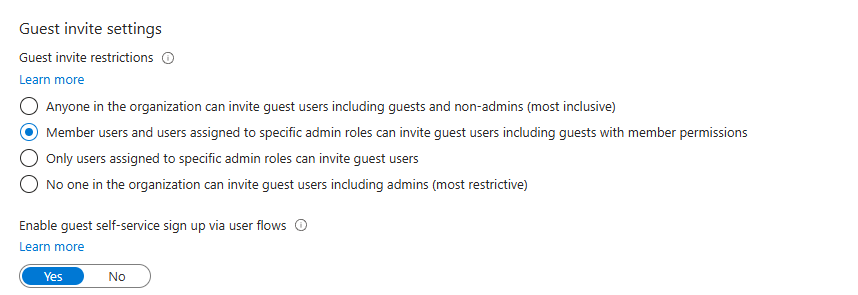
B2B collaboration is enabled by default for every external Entra organisation. All of your internal users can invite external guests, and all of them can be invited into other tenants as guests. Nobody configured that. It is how the tenant shipped.
B2B direct connect is blocked by default in both directions. Entra refuses all inbound and outbound direct connect until you set up a relationship deliberately.
Multifactor authentication and device claims from other organisations are not trusted by default. This is the important one and it is the subject of most of this post.
Organisational settings start empty. No organisations are listed, which means every external Entra tenant on the planet is currently governed by your default settings.
Cross-tenant synchronisation is off.
Read that list again and notice the shape of it. The identity plane is open by default and the trust plane is closed by default. Most people discover the second half when a partner complains about being prompted for authentication they have already completed.
Inbound, outbound, and the two-sided handshake
Three sets of controls, and the direction matters.
Inbound access settings control which users from external Entra organisations can reach which of your resources. You can apply the setting to everyone or scope it to specific users, groups and applications.
Outbound access settings control which of your users can reach resources in an external organisation, and which applications there. Again, everyone or a scoped set.
Trust settings, which are inbound only (except from auto-redeeming invitations) determine whether your Conditional Access policies accept multifactor authentication, compliant device and hybrid joined device claims from an external organisation when the user has already satisfied those requirements at home.
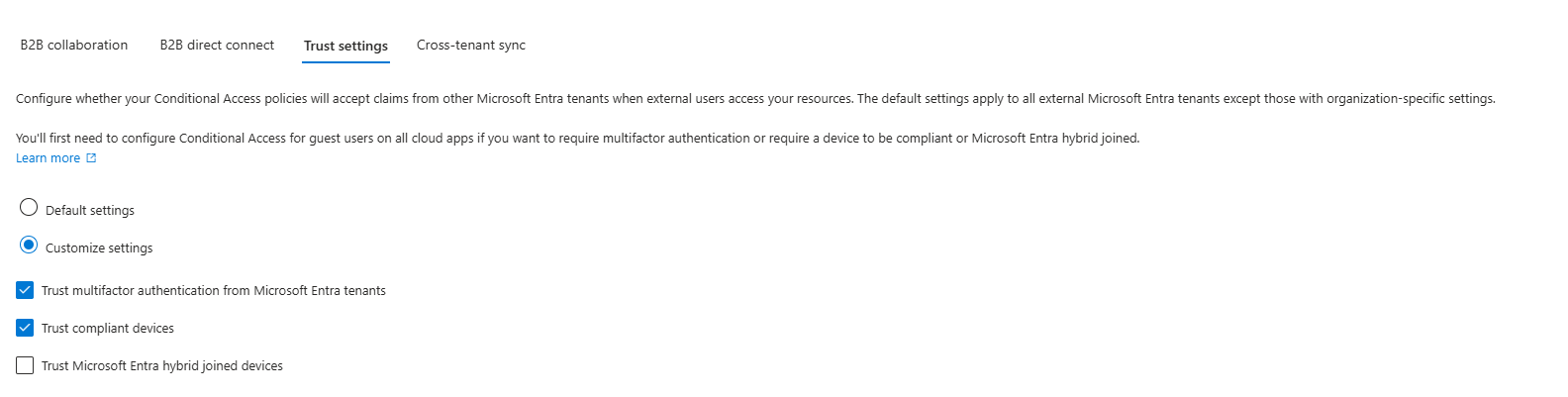
Then there is the layering. You have a default configuration that applies to all external organisations, and you can add named organisations with their own settings. Organisational settings take precedence over the default. That precedence is the whole design pattern: keep the default restrictive, and open up deliberately, per partner, with a record of why.
And it is a handshake. Your inbound settings meet their outbound settings. If your customer permits their users to reach your applications, but you have not permitted inbound access from their tenant, nothing works. Both sides have to agree, which is a feature rather than an inconvenience, and it means the conversation about collaboration is a conversation with two identity teams rather than one (this feature is also crucial for Teams Shared Channels and how they operate)
Trust settings: the control this post exists for
Three checkboxes, under inbound access for a given organisation, or under the default.
Trust multifactor authentication from Microsoft Entra tenants. With this on, when an external user reaches your resources, Entra inspects their token for a claim that they completed multifactor authentication. If the claim is there, your requirement is satisfied. If it is not, an authentication challenge is raised in their home tenant rather than yours.
Read the second half of that carefully, because it is the part people get wrong. Trusting multifactor authentication does not disable your policy. Your policy still applies to external users. What changes is where the requirement gets satisfied. The challenge moves to the tenant that actually owns the credential, which is the only tenant that can do anything sensible about credential strength.
Trust compliant devices and Trust Microsoft Entra hybrid joined devices do the same thing for the device controls from part three. Your compliant device requirement can be satisfied by a device that is compliant in the partner's tenant, assessed by the partner's Intune, against the partner's compliance policy.
That is a real transfer of assurance and it deserves a moment of thought before you tick it. You are accepting somebody else's definition of compliant. If their compliance policy checks a passcode and nothing else, that is what you are now accepting. Enable device trust for organisations whose posture you have actually seen, not for everyone by default.
Multifactor trust is a much easier decision, because the alternative is worse in a way that is not obvious. Without it, an external user has to register an authentication method in your tenant. That means a second credential, held by a person you do not employ, registered against a directory you control, sitting outside their organisation's lifecycle. When that person leaves their employer, their home tenant account is disabled, and the method they registered in yours is not. Multifactor trust removes that credential entirely and puts the assurance back where the employment relationship lives.
One documented interaction to handle before you enable it. Microsoft recommends excluding external users from the Identity Protection multifactor authentication registration policy if you intend to trust their multifactor authentication. Where both are present, external users cannot satisfy the requirements and you have built a deadlock. Check for that policy first.
And one limitation. Custom controls are not supported for cross-tenant trusts, which is a further reason to have migrated off custom controls to External Multifactor Authentication as discussed in part two.
The GDAP exception, and why it matters more than the setting
Here is the behaviour I referred to at the top, and it is the single most useful thing in this post for anyone working in or with a managed service.
Granular delegated admin privileges are how a Cloud Solution Provider administers a customer tenant without holding an account in it. A technician signs in with their partner tenant identity and receives delegated roles in the customer tenant.
Delegated administrator sign-ins do not use the trust setting. Microsoft's documentation is explicit: the trust multifactor authentication setting is not applied when an external user signs in using granular delegated admin privileges. Instead, multifactor authentication is always required in the user's home tenant and always trusted in the resource tenant.
So for delegated administration the trust is automatic and unconditional. You do not configure it, you cannot switch it off, and the requirement lands where it belongs, in the partner tenant.
Now the consequence.
Delegated administration can't produce this problem at all. There's no account in the customer tenant, so there's nothing to register a phone number against, and the multifactor requirement never lands there in the first place. Microsoft says the same thing from the other direction: registering multifactor authentication for a delegated administration user outside their home tenant isn't supported. If your access route is delegated, you can skip to the next section feeling pleased with yourself.
B2B guest access is where it goes wrong. Without trust configured, the customer's policy has to be satisfied in the customer's tenant, so your engineer registers a method there. Microsoft Authenticator, a software token or a phone number are all on the menu. A passkey isn't, at least not yet. That changes with MC1459133, which lets B2B users register a passkey in the resource tenant from the My Security Info page, from a proof-up prompt or from a registration campaign, rolling out from early October 2026 with internal guests first and external users following later. Until that reaches your customers, the strongest thing on the menu is a push notification.
So picture the failure mode. A partner engineer needs to work in a customer tenant. The customer requires multifactor authentication for guests. Cross-tenant trust was never configured for that tenant, so the challenge lands locally. No passkey on offer. Somebody registers a mobile number, either the engineer at ten to five on a Friday or a helpful administrator doing it on their behalf, where phone is close to the only thing that blade will take for an external guest.
Your engineer, who in their own tenant holds a security key and a compliant device and sits behind a phishing-resistant authentication strength, is now authenticating to a customer's production tenant with a text message.
Nobody was blocked. Nothing failed. No alert fired. The control quietly resolved to the weakest available method, in a tenant belonging to somebody who is paying you to be good at this.
It does have a shelf life. Microsoft-provided SMS and voice authentication retires on 1 February 2027, and from 1 September 2026 users enabled for those methods are auto-enabled for passkeys and prompted to register one. The weakest path on this page is being taken away for you, which is welcome, although it doesn't help anybody signing in this afternoon.
That is why this setting matters, and it is why I would treat cross-tenant trust configuration as a mandatory item on every customer onboarding checklist rather than an optimisation to do later.
Targeting external users in Conditional Access
The user assignment blade gives you granular external user types rather than one lump. You can select several, and you can scope each to specific tenants or to all tenants.
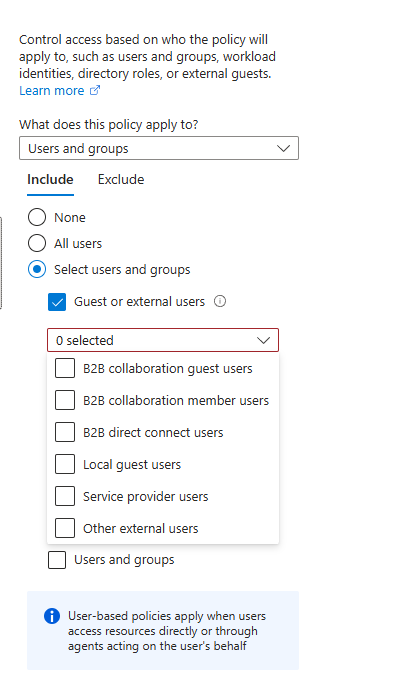
B2B collaboration guest users are what most people mean by guests.
B2B collaboration member users are external identities that have been given member rather than guest status in your directory.
B2B direct connect users reach Teams shared channels and SharePoint without a guest object existing at all. Note the documented behaviour: policies targeting direct connect users also apply to B2B collaboration users who are accessing Teams or SharePoint Online and are eligible for direct connect.
Local guest users are accounts in your own tenant whose user type attribute is set to guest. These are internal objects, not external identities, and they behave differently. Contractors created manually often end up here.
Service provider users are exactly what you would expect: a Cloud Solution Provider administering your tenant. This selection exists specifically so that organisations can write policy about partner access, and so that they can exclude partners deliberately rather than by accident.
Other external users catches anything the other selections do not.
If you previously had a policy set to "All guest and external users", the interface now shows the parent selection with every sub-type ticked. Microsoft has confirmed that this is a presentation change with no functional effect on evaluation.
Two things follow for a customer tenant. First, if you write broad policies for guests without thinking about partner access, you can and will interfere with delegated administration, which is why Microsoft calls the interaction out directly. Use the service provider type when you mean partners. Second, and better, use it positively. Write a policy that requires phishing-resistant authentication for service provider users specifically, and you have set an explicit bar for anyone administering your tenant on your behalf. If your partner cannot meet it, that is a conversation you want to have.
One more for non-Entra externals. Where the external user is a Microsoft account or a social identity, the resource tenant is always responsible for multifactor authentication. Trust settings do not apply, because there is no partner tenant making a claim. If your guest population includes personal accounts, they are on your authentication methods whether you like it or not.
Tenant restrictions: the direction nobody configures
Everything above is about identities coming towards you. Tenant restrictions are about your users going out, and they live under the same cross-tenant access settings with the same default and per-organisation structure.
The problem they solve is straightforward. Your employee, on your corporate device, on your network, signs into a foreign tenant with an account you do not control, and moves data into it. Your Conditional Access estate has nothing to say about this, because from Entra's perspective the authentication is happening somewhere else entirely.
Tenant restrictions let you specify which external tenants your users are permitted to sign into from your devices and network. The older mechanism relies on your corporate proxy injecting headers into traffic bound for Microsoft's login endpoints, which works but only covers traffic that traverses the proxy. The newer approach applies the policy through Global Secure Access, which removes the dependency on network position and covers devices wherever they are.
I raise it here because it is the natural counterpart to everything else in this post, and because the same organisations that spend a fortnight tuning inbound guest policy have usually never looked at the outbound direction at all. Start by measuring, with the third query below, and decide whether the list of foreign tenants your users are signing into is one you recognise.
The architecture a managed service should run
This is the part I have actually built, so let me set out the reasoning rather than just the settings.
The wrong model is guest accounts everywhere. Each engineer gets a guest object in each customer tenant, each guest object gets its own authentication method registered locally, and the number of credentials you are responsible for is engineers multiplied by customers. Every one of those methods sits outside your joiners and leavers process. When an engineer leaves, you disable one account in your tenant and you are relying on every customer to clean up theirs. In a portfolio of any size, that is not a security model, it is a spreadsheet nobody maintains.
The right model puts identity in one place. Your engineers exist once, in your tenant. Your tenant enforces the controls from parts two and three on them: phishing-resistant authentication with a strength restricted to hardware, compliant devices, privileged role activation through Privileged Identity Management, short sign-in frequency on administrative surfaces. Customer tenants trust the claims that result rather than minting their own credentials.
Two routes get you there.
Delegated administration is the better one wherever it is available, because the trust is automatic. Multifactor authentication is always required in your tenant and always accepted in theirs. There is nothing for the customer to configure, nothing to be forgotten during onboarding, and no local credential to leave behind. Use least-privileged delegated roles by task rather than reaching for Global Administrator, and reserve time-bound elevation for the specific known cases that genuinely need it.
B2B guest access with configured trust is the fallback, for customers outside your delegated relationship. Here the customer has to act: add your tenant under organisational settings, scope inbound access to the specific group of your engineers rather than to everyone, and enable trust for multifactor authentication and for compliant devices. Without those two checkboxes your engineers land on the text message path described earlier.
What you owe the customer in return is worth stating plainly, because this arrangement makes your tenant part of their trust boundary. They are accepting your authentication and, if they enable device trust, your compliance assessment. That is a serious thing to ask for and it should come with evidence. Write a one-page attestation covering the authentication strength your engineers are subject to, the device controls, how privileged access is granted and revoked, your joiners and leavers process, and how you monitor your own tenant. Hand it over at onboarding. If you cannot write that page honestly, you are not ready to ask for the trust.
And the customer side of the same relationship, if you are reading this as the customer: scope inbound access to a named group rather than to all users of the partner tenant, write a Conditional Access policy for the service provider user type that sets your own bar, review the organisational settings quarterly because partnerships end, and record for each configured organisation who approved it and why. Trust relationships outlive the contracts that justified them unless somebody goes looking.
Mapping onto the personas
| Policy | Persona | Control | Notes |
|---|---|---|---|
| CA300 | Externals | Require multifactor authentication for B2B guest users | Satisfied at home once trust is configured |
| CA301 | Externals | Restrict guests to named resources | Guests should never see all resources |
| CA302 | Externals | Require compliant device for named partners only | Only where you have seen their posture |
| CA303 | GuestAdmins | Require phishing-resistant authentication for service provider users | Your explicit bar for anyone administering your tenant |
| CA304 | GuestAdmins | Sign-in frequency Every time on Azure management for external administrators | Small population, high privilege |
| CA305 | Externals | Block B2B direct connect except for named organisations | Blocked by default, keep it that way deliberately |
CA303 and CA304 sit in the GuestAdmins persona from part one, which is the persona most estates never separate out and the one that carries the most privilege per head.
The rollout, in order
Inventory before you configure. Run the first two queries below and find out which external tenants are actually present in your estate and how they are arriving. Most organisations are surprised by the length of that list, and by how much of it corresponds to a project that finished years ago.
Check for the Identity Protection multifactor registration policy and exclude external users from it before you enable any trust, so you do not build the deadlock.
Set your default inbound settings restrictively, then add organisations deliberately. Every organisation you add needs a record: who approved it, which of their groups can reach which of your applications, what trust you granted, and when it will be reviewed.
Enable multifactor trust before device trust, and treat them as separate decisions. Multifactor trust is close to always correct. Device trust is a judgement about a specific partner's compliance policy and it deserves its own conversation.
Deploy the Externals policies in report-only for a fortnight, then enforce. This population is smaller and more predictable than Internals, so the observation window can be shorter, but watch for the seasonal partner who only signs in at quarter end.
Write the service provider policy separately from the guest policy, and test it with your own partner before enforcing, because this is the one that will interrupt somebody's ability to administer your tenant if you get it wrong.
Leave tenant restrictions until last. Measure the outbound picture, discuss it with the business, then configure. This one has genuine potential to interrupt legitimate work at organisations where people routinely hold accounts in customer or supplier tenants.
The traps
Trusting multifactor authentication does not disable your policy. The requirement still applies. Only the place it is satisfied changes.
The Identity Protection registration policy creates a deadlock. Exclude external users from it before enabling trust, or they can satisfy neither.
Delegated administration ignores the trust setting entirely. Always required at home, always trusted in the resource tenant. Do not spend an afternoon configuring something that was never going to apply.
Guests can't register a passkey in your tenant yet. Authenticator and phone are available to them, a passkey isn't, which is how a partner who carries a security key at home ends up on a push notification or a text message in yours. MC1459133 starts fixing that from October 2026, internal guests first. Until it lands, cross-tenant trust is the only route to a phishing-resistant partner sign-in 🦉
Device trust means accepting somebody else's compliance policy. You inherit their checklist, their grace periods and their tenant default from part three. Grant it per organisation, never in the default.
Custom controls do not work for cross-tenant trusts. Another reason they should already be gone.
Non-Entra externals are always your problem. Microsoft accounts and social identities have no home tenant to make a claim, so the resource tenant owns their authentication.
Organisational settings override defaults, and they are permanent until somebody removes them. A partner added for a six-week project in 2023 is still trusted today unless a review caught it.
Broad guest policies interfere with partner administration. Microsoft documents this directly. Use the service provider user type when you mean partners.
Outbound is a direction too. Your users signing into foreign tenants on your hardware is invisible to your inbound policy and to most people's monitoring.
Watching it from Sentinel
First, the inbound census. Which external organisations are present in your estate, how they arrive, and what they touch.
SigninLogs
| where TimeGenerated > ago(30d)
| where ResultType == 0
| where isnotempty(CrossTenantAccessType) and CrossTenantAccessType != "none"
| extend AccessType = tostring(CrossTenantAccessType)
| summarize SignIns = count(), Users = dcount(UserPrincipalName), Accounts = make_set(UserPrincipalName, 10), Applications = make_set(AppDisplayName, 15), FirstSeen = min(TimeGenerated), LastSeen = max(TimeGenerated) by HomeTenantId, AccessType
| extend DaysSinceLastUse = datetime_diff("day", now(), LastSeen)
| project HomeTenantId, AccessType, Users, SignIns, DaysSinceLastUse, Applications, Accounts, FirstSeen, LastSeen
| order by SignIns desc
The CrossTenantAccessType values worth knowing are b2bCollaboration, b2bDirectConnect, serviceProvider, microsoftSupport and passthrough. Anything showing as serviceProvider is delegated administration, which means somebody is administering your tenant from outside it. If that list contains a tenant identifier you cannot name, stop reading and go and find out whose it is.
Second, and this is the one that proves whether trust is working, where guests are actually satisfying multifactor authentication.
SigninLogs
| where TimeGenerated > ago(30d)
| where ResultType == 0
| where UserType == "Guest" or (isnotempty(CrossTenantAccessType) and CrossTenantAccessType != "none")
| where AuthenticationRequirement == "multiFactorAuthentication"
| mv-expand Detail = todynamic(AuthenticationDetails)
| extend Method = tostring(Detail.authenticationMethod)
| extend StepDetail = tostring(Detail.authenticationStepResultDetail)
| where isnotempty(Method) and Method != "Previously satisfied"
| extend Source = case(StepDetail has "satisfied by claim provided by external provider", "Home tenant claim", StepDetail has "satisfied by claim", "Token claim", "Completed in this tenant")
| summarize SignIns = count(), Users = dcount(UserPrincipalName), Methods = make_set(Method, 10) by HomeTenantId, AccessType = tostring(CrossTenantAccessType), Source
| order by HomeTenantId asc, SignIns desc
Rows showing "Completed in this tenant" for an external tenant mean that trust is either not configured for that organisation or not being applied. Look at the methods on those rows. If you see text message or voice against a partner who administers your tenant, you have found the failure described earlier in this post, and it is worth a phone call rather than a ticket.
Third, guests who no longer need to be here. Stale external identities are attack surface with no owner.
let Identities = union isfuzzy=true
    (datatable(AccountUPN: string, AccountDisplayName: string, AccountObjectId: string, UserType: string, IsAccountEnabled: bool, AccountCreationTime: datetime, TimeGenerated: datetime)[]),
    (IdentityInfo | where TimeGenerated > ago(14d) | summarize arg_max(TimeGenerated, *) by AccountUPN);
let RecentActivity = SigninLogs
    | where TimeGenerated > ago(90d)
    | where ResultType == 0
    | summarize LastSignIn = max(TimeGenerated), SignIns = count() by AccountUPN = UserPrincipalName;
Identities
| where UserType == "Guest"
| where IsAccountEnabled == true
| join kind=leftouter (RecentActivity) on AccountUPN
| extend DaysSinceSignIn = iff(isnull(LastSignIn), -1, datetime_diff("day", now(), LastSignIn))
| where isnull(LastSignIn) or DaysSinceSignIn > 60
| extend AccountAgeDays = datetime_diff("day", now(), AccountCreationTime)
| project AccountUPN, AccountDisplayName, AccountObjectId, LastSignIn, DaysSinceSignIn, AccountAgeDays, SignIns
| order by DaysSinceSignIn desc
A DaysSinceSignIn of minus one means no successful sign-in inside the ninety-day window at all. Those are the ones to remove first. Feed this into an access review rather than deleting from a query result, because some of them will turn out to be the auditor who visits annually.
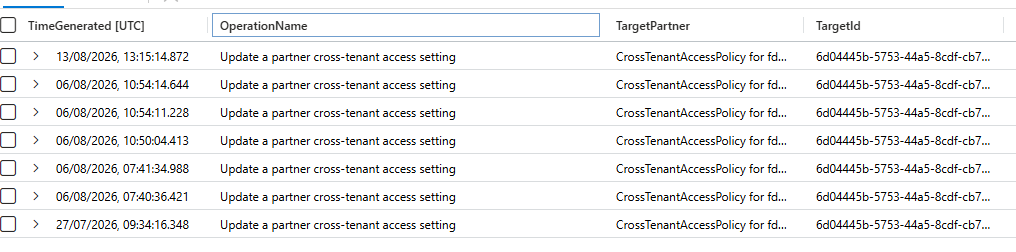
And finally, changes to the cross-tenant configuration itself. This is a small, quiet, high-value audit trail.
AuditLogs
| where TimeGenerated > ago(90d)
| where OperationName has_any ("cross-tenant access", "cross tenant access", "partner cross-tenant", "tenant restrictions", "CrossTenantAccess")
| extend TargetPartner = tostring(TargetResources[0].displayName)
| extend TargetId = tostring(TargetResources[0].id)
| extend ActorUser = tostring(InitiatedBy.user.userPrincipalName)
| extend ActorApp = tostring(InitiatedBy.app.displayName)
| extend Actor = iff(isempty(ActorUser), ActorApp, ActorUser)
| extend ActorIP = tostring(InitiatedBy.user.ipAddress)
| extend Changes = tostring(TargetResources[0].modifiedProperties)
| project TimeGenerated, OperationName, TargetPartner, TargetId, Actor, ActorIP, Result, Changes
| order by TimeGenerated desc
Operation names in this area vary, so run it once with only the time filter and read what your tenant produces before you narrow it. The events worth alerting on are a new organisation being added to organisational settings, trust settings being enabled for any organisation, and inbound access being widened from a scoped group to everyone. Each of those extends your trust boundary to include another company, and each should correspond to a change record naming the person who agreed to it.
Class dismissed.