KQL User Audit Playbook V2: The Insider Threat Investigation Guide

All right class.
This is a continuation of my previous lesson, which contains useful queries for insider risk hunting. Make sure to read it first, as it may contain just the queries and ideas you are looking for.
 Bartosz Wysocki
Data-exfiltration activity spikes in the two weeks before an employee resigns. That’s not a coincidence, that’s intent. The question isn’t whether they accessed files, but whether the pattern of access signals extraction.
This playbook covers the KQL queries that catch the tells: bulk downloads, impossible patterns, sabotage signals, and the people trying to hide their digital footprints.
The Exfiltration Patterns - Bulk Activity That Screams Intent
The first red flag is always volume. Normal users browse files. People extract data and download it in bulk.
The Massive Download Spike
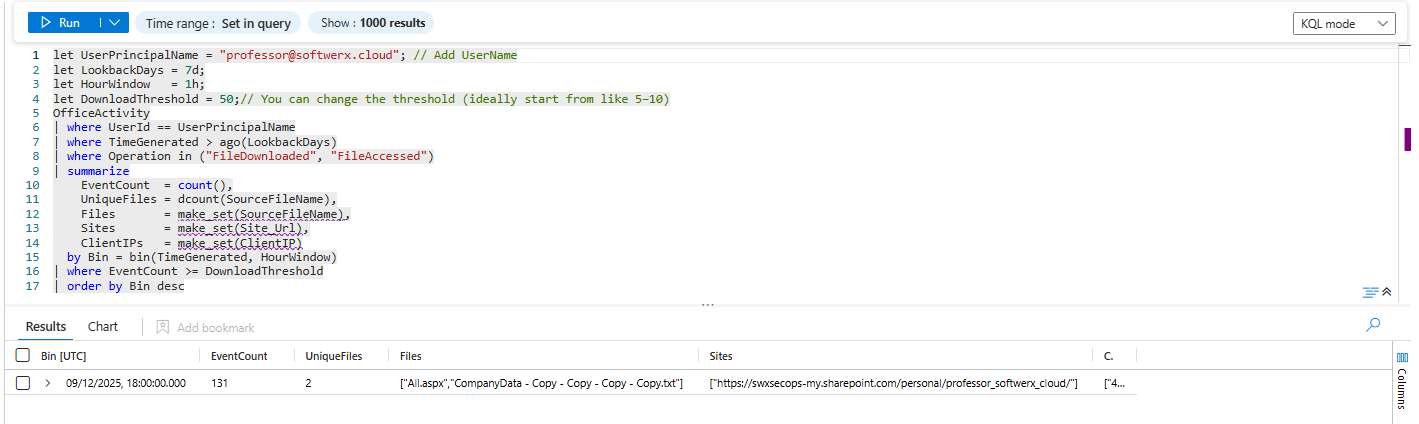
Someone accessed 50 files in an hour. That's not browsing. That's extraction.
let UserPrincipalName = "<user_name>"; // Add UserName
let LookbackDays = 7d;
let HourWindow   = 1h;
let DownloadThreshold = 50;// You can change the threshold (ideally start from like 5–10)
OfficeActivity
| where UserId == UserPrincipalName
| where TimeGenerated > ago(LookbackDays)
| where Operation in ("FileDownloaded", "FileAccessed")
| summarize
    EventCount  = count(),
    UniqueFiles = dcount(SourceFileName),
    Files       = make_set(SourceFileName),
    Sites       = make_set(Site_Url),
    ClientIPs   = make_set(ClientIP)
  by Bin = bin(TimeGenerated, HourWindow)
| where EventCount >= DownloadThreshold
| order by Bin desc
What you're looking for: If someone downloaded 50 files at 2 AM on a Saturday, that's intentional. If they did it right before giving notice, even more so. Legitimate backup operations are scheduled and regular. One-time bulk downloads are suspicious.
The Archive Creation Tell
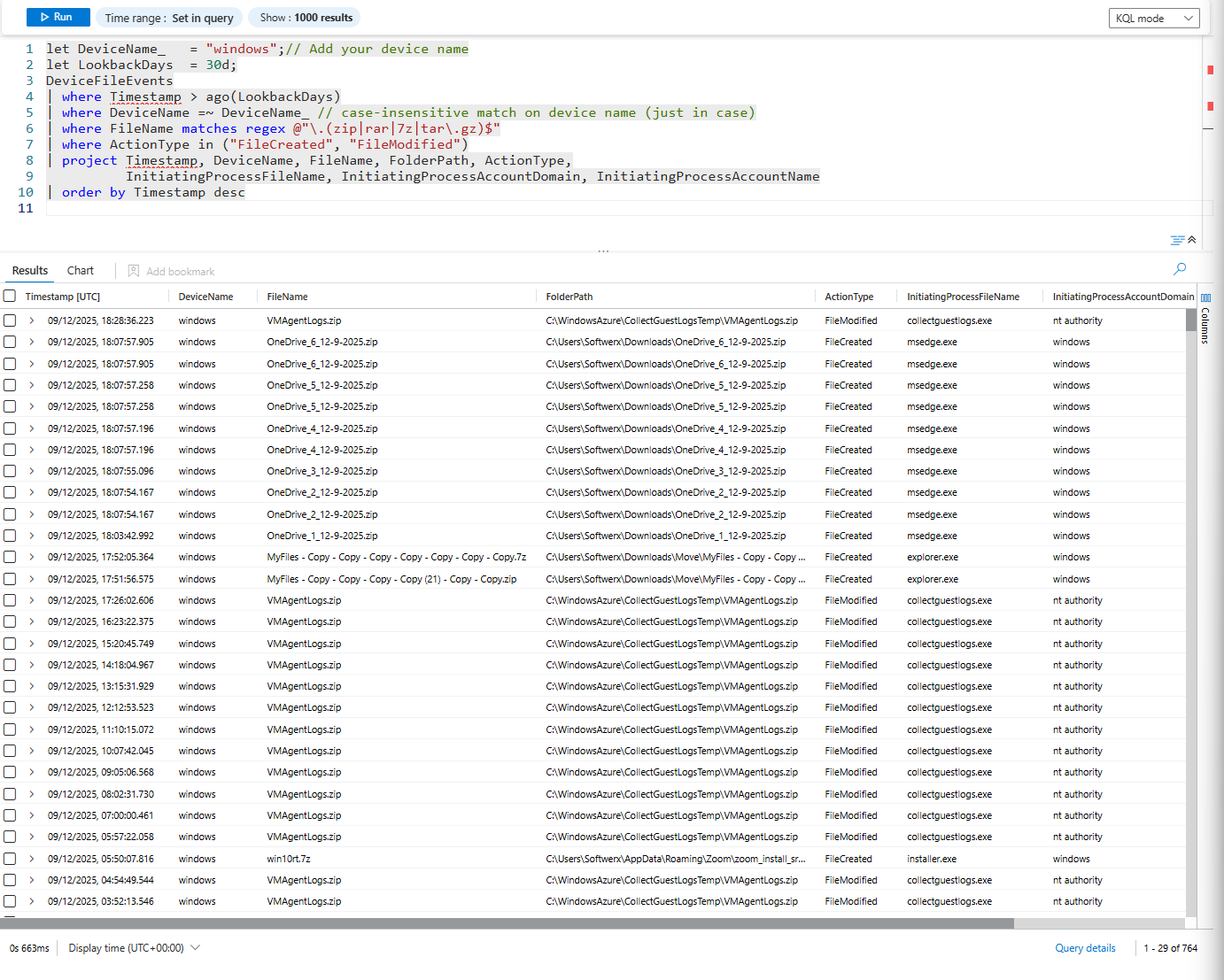
Before exfiltrating, people often compress files into .zip or .rar archives. It's faster to move and harder to detect. Look for sudden archive creation, especially of sensitive data.
let DeviceName_   = "Device_Name";// Add your device name
let LookbackDays  = 7d;
DeviceFileEvents
| where Timestamp > ago(LookbackDays)
| where DeviceName =~ DeviceName_ // case-insensitive match on device name (just in case)
| where FileName matches regex @"\.(zip|rar|7z|tar\.gz)$"
| where ActionType in ("FileCreated", "FileModified")
| project Timestamp, DeviceName, FileName, FolderPath, ActionType,
          InitiatingProcessFileName, InitiatingProcessAccountDomain, InitiatingProcessAccountName
| order by Timestamp desc
What you're looking for: Archives created in suspicious locations (temp folders, downloads, user home directory). Multiple archives created in a single day. Archives of folders that contain sensitive data (CONFIDENTIAL, IP, FINANCIAL).
The Unusual Folder Navigation
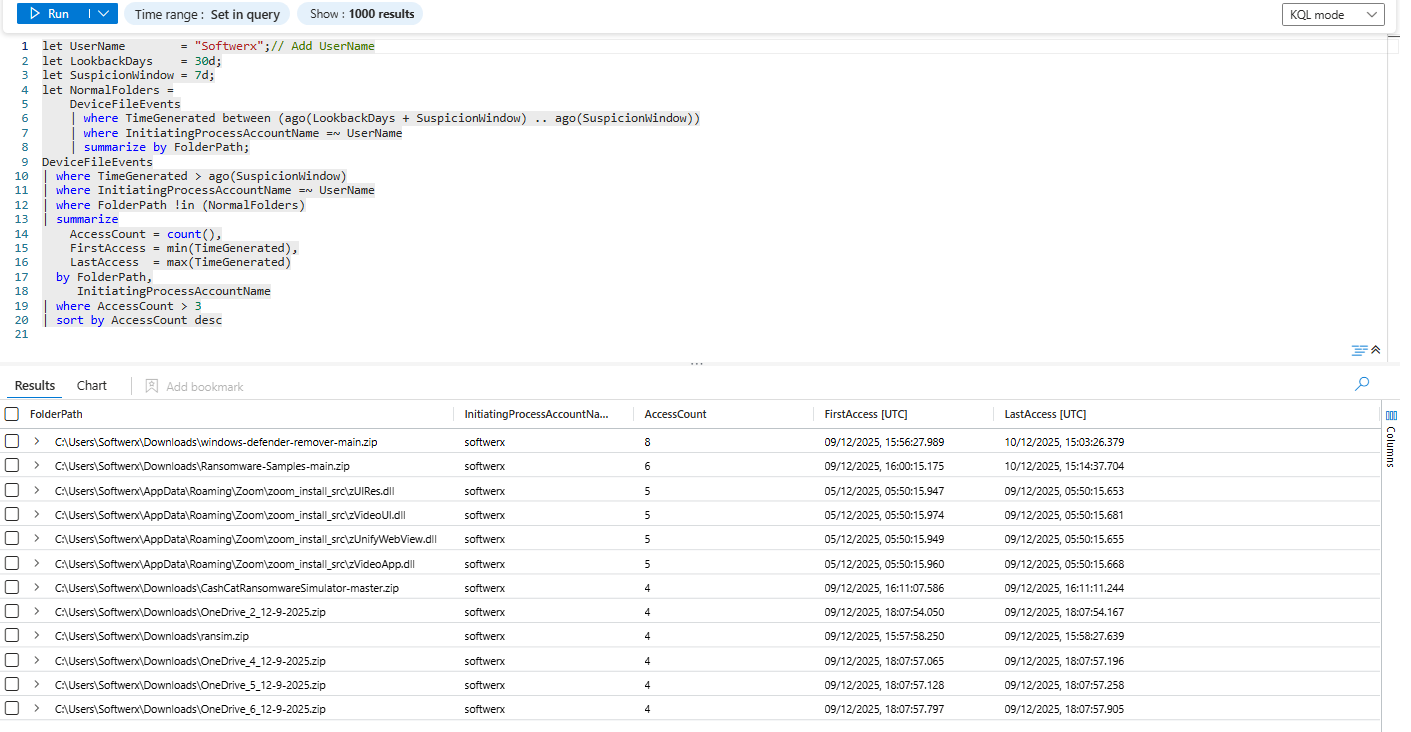
Normal work is predictable. People hammer the same few folders every day. When someone suddenly starts digging through paths they’ve never touched before, especially higher-privilege or sensitive ones, that’s a red flag.
let UserName        = "<User_Name>";// Add UserName
let LookbackDays    = 30d;
let SuspicionWindow = 7d;
let NormalFolders =
    DeviceFileEvents
    | where TimeGenerated between (ago(LookbackDays + SuspicionWindow) .. ago(SuspicionWindow))
    | where InitiatingProcessAccountName =~ UserName
    | summarize by FolderPath;
DeviceFileEvents
| where TimeGenerated > ago(SuspicionWindow)
| where InitiatingProcessAccountName =~ UserName
| where FolderPath !in (NormalFolders)
| summarize
    AccessCount = count(),
    FirstAccess = min(TimeGenerated),
    LastAccess  = max(TimeGenerated)
  by FolderPath,
     InitiatingProcessAccountName
| where AccessCount > 3
| sort by AccessCount desc
What you’re looking for: folders that never appeared in the user’s history over the last 30 (you can extend it, of course) days but suddenly show multiple accesses in the last couple of days. Finance hammering HR home drives, a dev wandering through Legal or M&A shares, or a random account suddenly crawling “CONFIDENTIAL” folders right before offboarding.
The Exfiltration Vectors - Where Is It Going?
Files downloaded are one thing. But where are they going? Out of the organisation? To personal accounts? To external cloud storage?
The Personal Email Exfiltration
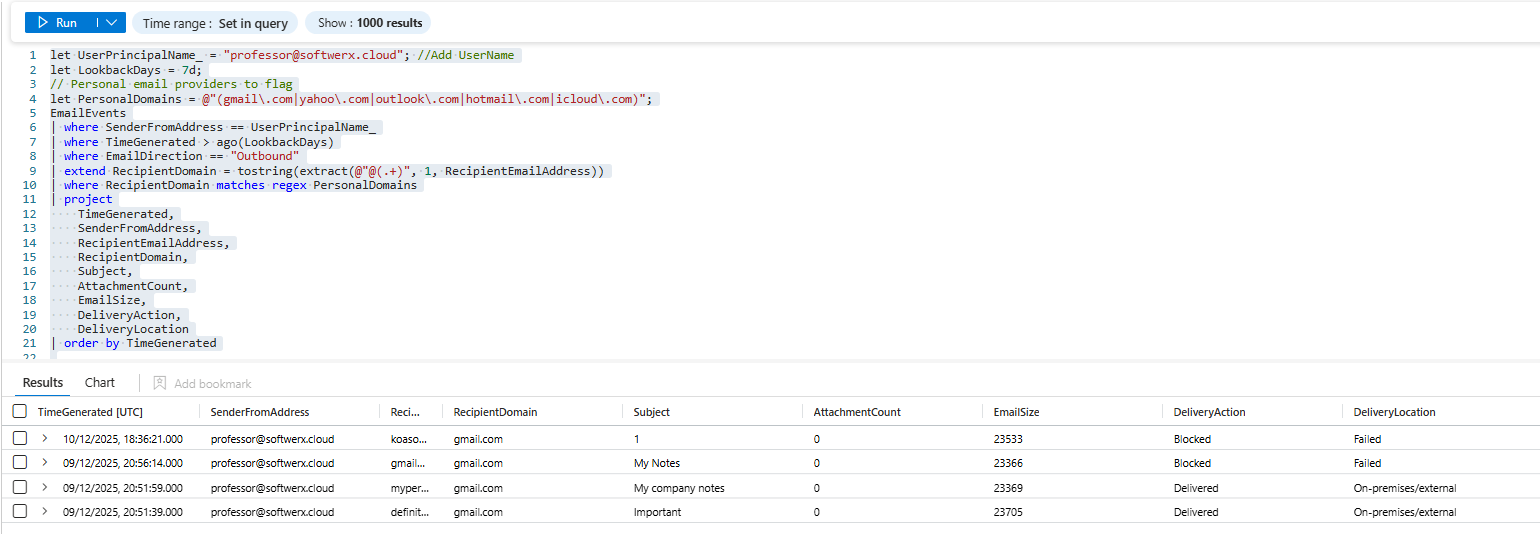
This is the most common. Sending company data to a personal email account.
let UserPrincipalName_ = "professor@softwerx.cloud"; //Add UserName
let LookbackDays = 7d;
// Personal email providers to flag
let PersonalDomains = @"(gmail\.com|yahoo\.com|outlook\.com|hotmail\.com|icloud\.com)";
EmailEvents
| where SenderFromAddress == UserPrincipalName_
| where TimeGenerated > ago(LookbackDays)
| where EmailDirection == "Outbound"
| extend RecipientDomain = tostring(extract(@"@(.+)", 1, RecipientEmailAddress))
| where RecipientDomain matches regex PersonalDomains
| project
    TimeGenerated,
    SenderFromAddress,
    RecipientEmailAddress,
    RecipientDomain,
    Subject,
    AttachmentCount,
    EmailSize,
    DeliveryAction,
    DeliveryLocation
| order by TimeGenerated
What you're looking for: Emails to personal Gmail, Yahoo, or Outlook accounts. Multiple emails over time (not just one). Emails with attachments (the actual exfiltration). Subject lines with keywords like "resume," "portfolio," "confidential," "trade secret," and "salary."
The Suspicious Cloud Storage Access
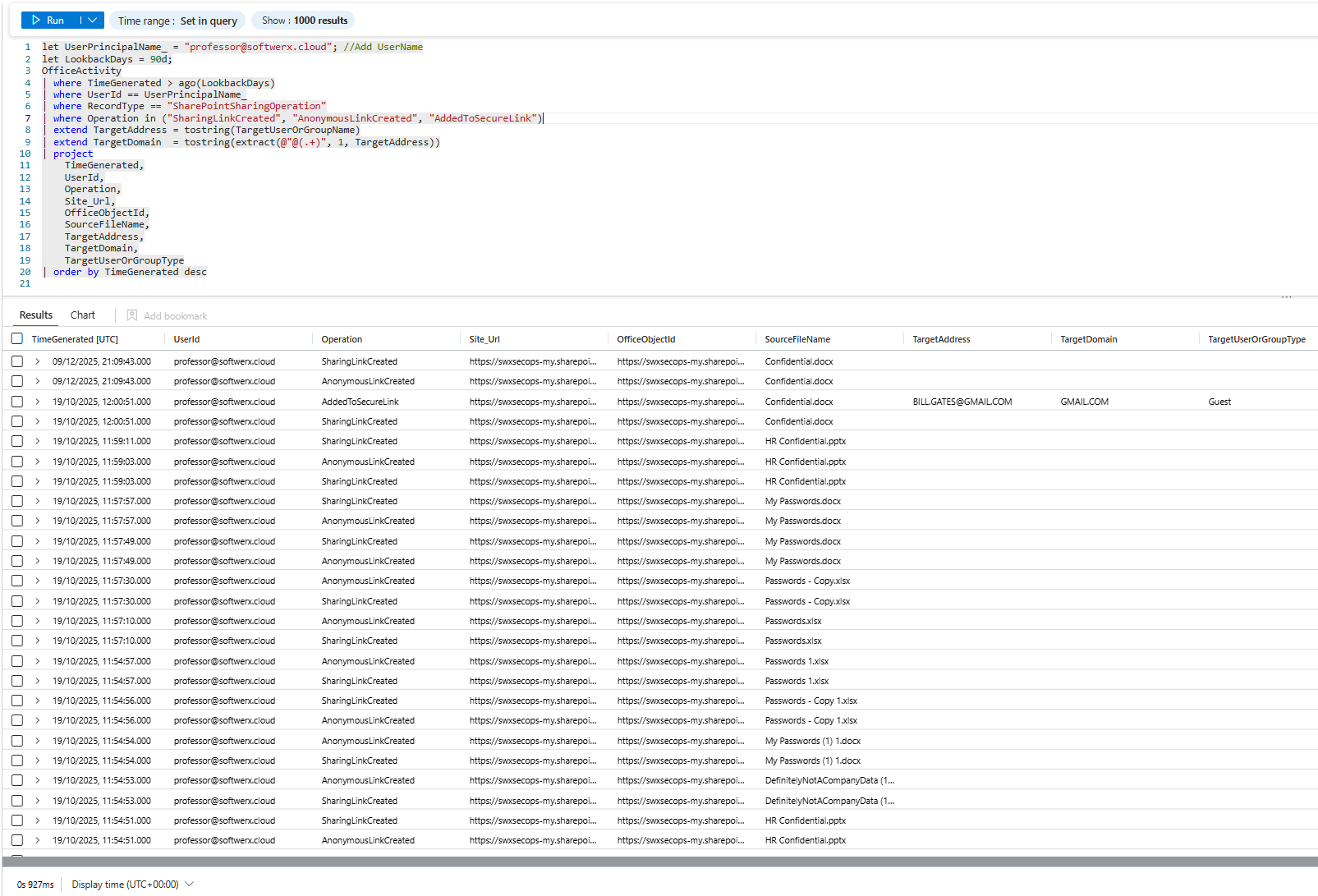
OneDrive, SharePoint, personal cloud storage. If someone suddenly uploads company data to personal cloud storage, that's extraction.
let UserPrincipalName_ = "User_Name"; //Add UserName
let LookbackDays = 90d;
OfficeActivity
| where TimeGenerated > ago(LookbackDays)
| where UserId == UserPrincipalName_
| where RecordType == "SharePointSharingOperation"
| where Operation in ("SharingLinkCreated", "AnonymousLinkCreated", "AddedToSecureLink")
| extend TargetAddress = tostring(TargetUserOrGroupName)
| extend TargetDomain  = tostring(extract(@"@(.+)", 1, TargetAddress))
| project
    TimeGenerated,
    UserId,
    Operation,
    Site_Url,
    OfficeObjectId,
    SourceFileName,
    TargetAddress,
    TargetDomain,
    TargetUserOrGroupType
| order by TimeGenerated desc
What you're looking for: Uploads to personal OneDrive or non-corporate cloud storage. Anonymous links created (anyone can access, no credentials needed). Multiple uploads to the same external location.
The Sabotage Signals - Intentional Destruction
Not all insider threats are theft. Some are sabotage. Someone deletes the project. Locks out accounts. Breaks the database.
The Mass Deletion Pattern
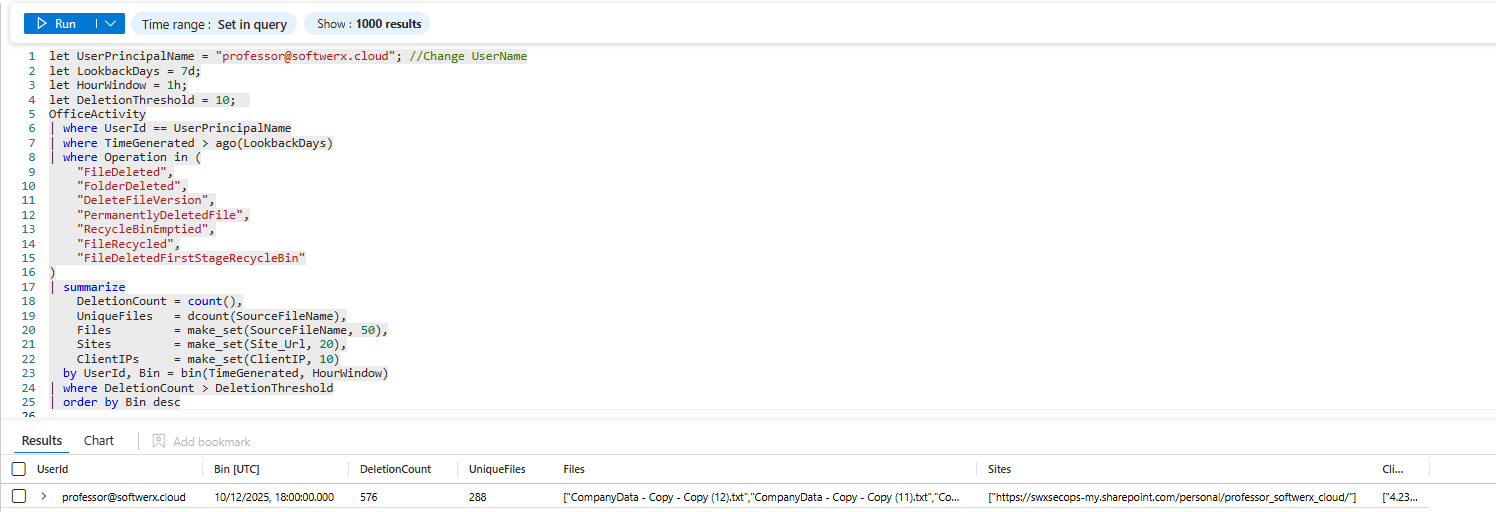
Someone deletes multiple files in an hour. Not normal work. Not an accident.
let UserPrincipalName = "<User_Name>"; //Change UserName
let LookbackDays = 7d;
let HourWindow = 1h;
let DeletionThreshold = 10;
OfficeActivity
| where UserId == UserPrincipalName
| where TimeGenerated > ago(LookbackDays)
| where Operation in (
    "FileDeleted",
    "FolderDeleted",
    "DeleteFileVersion",
    "PermanentlyDeletedFile",
    "RecycleBinEmptied",
    "FileRecycled",
    "FileDeletedFirstStageRecycleBin"
)
| summarize
    DeletionCount = count(),
    UniqueFiles   = dcount(SourceFileName),
    Files         = make_set(SourceFileName, 50),
    Sites         = make_set(Site_Url, 20),
    ClientIPs     = make_set(ClientIP, 10)
  by UserId, Bin = bin(TimeGenerated, HourWindow)
| where DeletionCount > DeletionThreshold
| order by Bin desc
What you're looking for: Spikes in deletion activity. Multiple files deleted in a short time window. Especially critical: deletions right before the user is terminated or resigns.
The Permission Change Sabotage
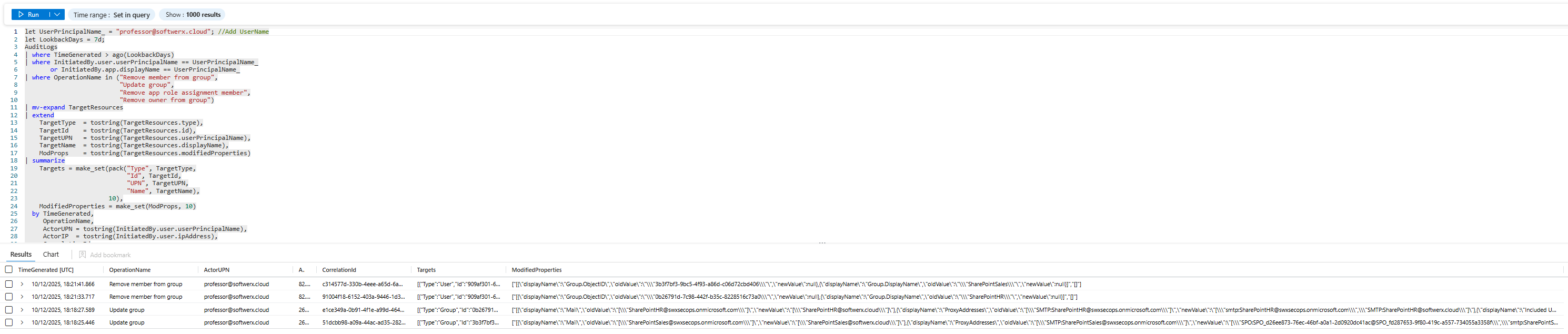
Someone removes permissions from a shared folder. Locks people out of critical projects.
let UserPrincipalName_ = "<User_Name>"; //Add UserName
let LookbackDays = 7d;
AuditLogs
| where TimeGenerated > ago(LookbackDays)
| where InitiatedBy.user.userPrincipalName == UserPrincipalName_
       or InitiatedBy.app.displayName == UserPrincipalName_
| where OperationName in ("Remove member from group",
                          "Update group",
                          "Remove app role assignment member",
                          "Remove owner from group")
| mv-expand TargetResources
| extend
    TargetType  = tostring(TargetResources.type),
    TargetId    = tostring(TargetResources.id),
    TargetUPN   = tostring(TargetResources.userPrincipalName),
    TargetName  = tostring(TargetResources.displayName),
    ModProps    = tostring(TargetResources.modifiedProperties)
| summarize
    Targets = make_set(pack("Type", TargetType,
                            "Id", TargetId,
                            "UPN", TargetUPN,
                            "Name", TargetName),
                       10),
    ModifiedProperties = make_set(ModProps, 10)
  by TimeGenerated,
     OperationName,
     ActorUPN = tostring(InitiatedBy.user.userPrincipalName),
     ActorIP  = tostring(InitiatedBy.user.ipAddress),
     CorrelationId
| order by TimeGenerated desc
What you're looking for: Removing yourself from groups right before departure. Removing other people from shared folders or projects. Removing owners or admins from critical resources.
The Track Covering - The Red Flag That Says "I Know What I Did Was Wrong"
The most suspicious activity is activity designed to hide activity. Someone tries to clear the logs. Disables auditing. Deletes their email sent folder.
The Audit Log Manipulation Attempt
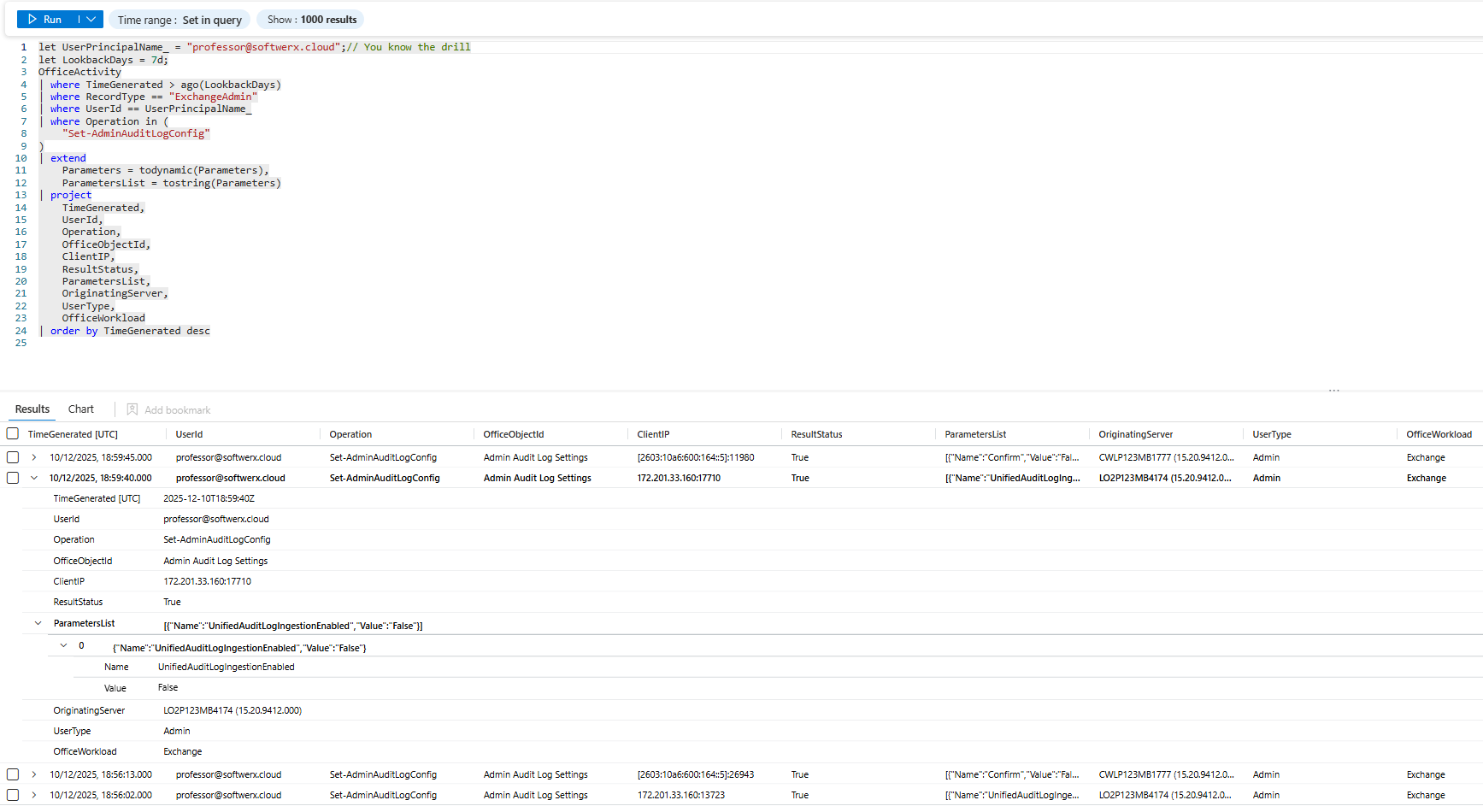
Really sophisticated insiders try to clear the record. They disable auditing. They delete logs.
let UserPrincipalName_ = "<User>";// You know the drill
let LookbackDays = 7d;
OfficeActivity
| where TimeGenerated > ago(LookbackDays)
| where RecordType == "ExchangeAdmin"
| where UserId == UserPrincipalName_
| where Operation in (
    "Set-AdminAuditLogConfig"
)
| extend
    Parameters = todynamic(Parameters),
    ParametersList = tostring(Parameters)
| project
    TimeGenerated,
    UserId,
    Operation,
    OfficeObjectId,
    ClientIP,
    ResultStatus,
    ParametersList,
    OriginatingServer,
    UserType,
    OfficeWorkload
| order by TimeGenerated desc
What you're looking for: Any attempt to disable auditing. Any modification to log retention policy. If someone with no legitimate reason to touch audit settings does so, that's intent to hide something.
The Email Purge
Someone deletes their entire sent folder. Or their deleted items folder. Classic track covering.
let UserPrincipalName_ = "User_Name";//Add user
let LookbackDays       = 7d;
let HourWindow         = 1h;
let DeleteThreshold    = 5;
OfficeActivity
| where TimeGenerated > ago(LookbackDays)
| where RecordType == "ExchangeItemGroup"
| where UserId == UserPrincipalName_
| where Operation == "MoveToDeletedItems"
| extend
    FolderPath     = tostring(todynamic(Folder).Path),
    DestFolderPath = tostring(todynamic(DestFolder).Path),
    Items          = todynamic(AffectedItems)
| extend Subject = tostring(Items[0].Subject)
| summarize
    DeleteCount   = count(),
    FirstDelete   = min(TimeGenerated),
    LastDelete    = max(TimeGenerated),
    SourceFolders = make_set(FolderPath),
    DestFolders   = make_set(DestFolderPath),
    Subjects      = make_set(Subject)
  by Bin = bin(TimeGenerated, HourWindow), UserId, ClientIP
| where DeleteCount >= DeleteThreshold
| order by Bin desc
What you're looking for: Sudden mass email deletion. Especially: deletions right before an investigation starts or right before the user is terminated.

The Timing Red Flags - When Did It Happen?
The WHEN matters as much as the WHAT.
The Pre-Departure Spike
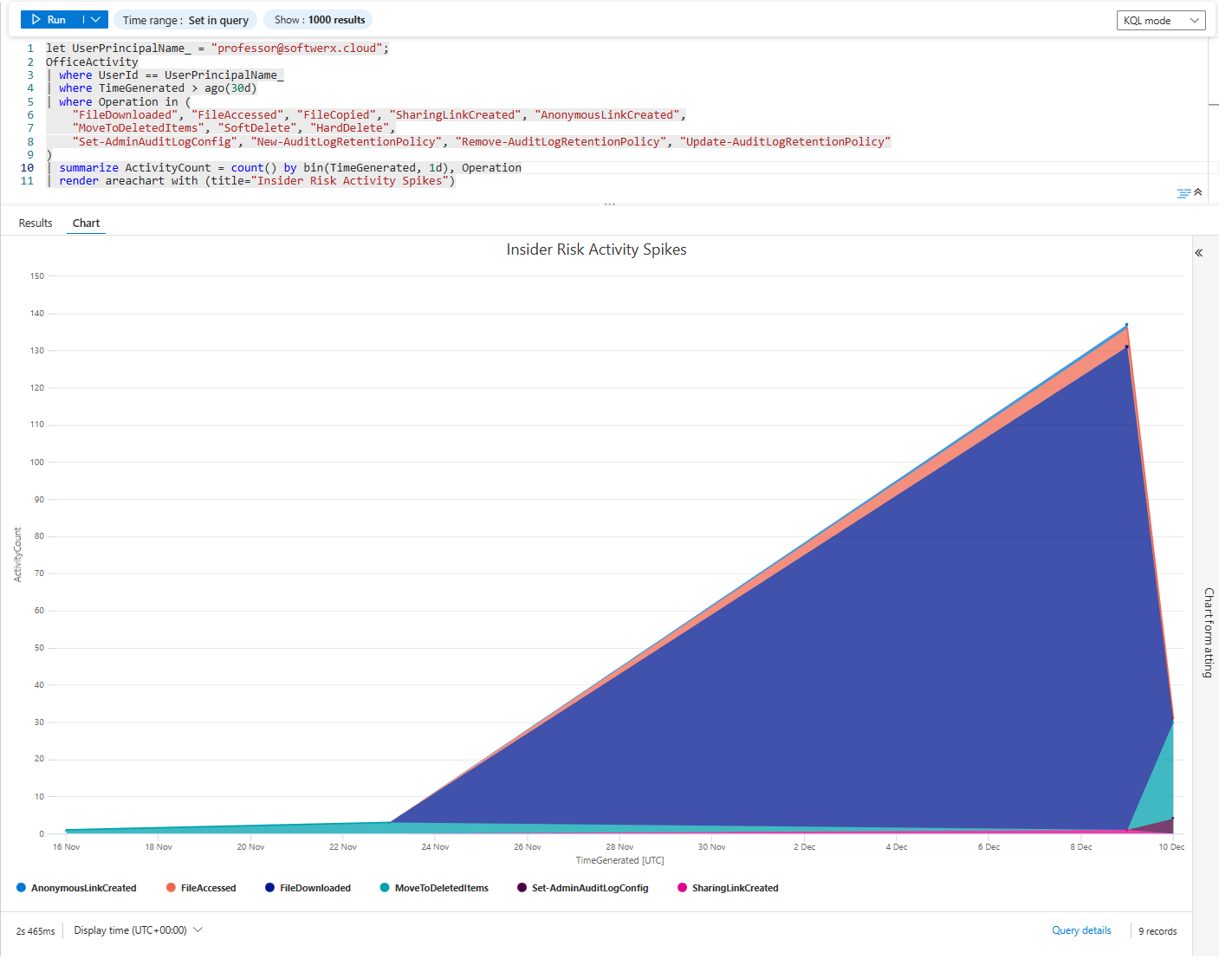
Visualisation is key; sometimes it's just better to run it first so you can see straight away where to focus your investigation.
let UserPrincipalName_ = "<User>";//User
OfficeActivity
| where UserId == UserPrincipalName_
| where TimeGenerated > ago(30d)
| where Operation in (
    "FileDownloaded", "FileAccessed", "FileCopied", "SharingLinkCreated", "AnonymousLinkCreated",
    "MoveToDeletedItems", "SoftDelete", "HardDelete",
    "Set-AdminAuditLogConfig"
)
| summarize ActivityCount = count() by bin(TimeGenerated, 1d), Operation
| render areachart with (title="Insider Risk Activity Spikes")
What you're looking for: Any spike in suspicious activity in the weeks before departure. Usually it's quite easy to spot those patterns.
Final Note
You have logs for a reason. Use them. If you find evidence of data theft, exfiltration, or sabotage, don't sit on it. Escalate immediately to Legal, HR, and your incident response team. Depending on your jurisdiction, you may have legal obligations to preserve evidence and investigate.
And remember: Intent is written in patterns. One suspicious action is noise. Three suspicious actions in the same week is a story.
Class dismissed.