
KQLMicrosoft SentinelDetection Engineering
Finding password.txt Before Someone Else Does
 Bartosz Wysocki
9 min read
Bartosz Wysocki
9 min read

Alright class.
Somewhere in your tenant right now there is a file called password.txt. Probably a few of them. There is a spreadsheet called Logins.xlsx sitting in a finance OneDrive, a text file called wifi passwords on somebody's desktop, and a Word document holding every service account credential the infrastructure team has created since 2019, parked in a SharePoint library that forty people can read.
You already have the logs to find all of it. Almost nobody looks.
This post is not a rule rebuild. It is a sweep, and the output is a remediation list rather than an incident queue.
Why This Is Worth an Afternoon
I usually argue that we do security and not auditing, so let me justify the exception.
A file named password.txt is not an attack. It is pre-positioned loot. When an attacker lands on an endpoint, credential discovery is one of the first things they do, and they do it with one command:
findstr /si password *.txt *.xml *.ini
That is T1552.001, Unsecured Credentials in Files. Four seconds, no admin rights, nothing tripped. The same applies in the cloud, where an attacker holding a stolen token searches OneDrive and SharePoint for the word password before anything else, because it is the cheapest privilege escalation available.
So the sweep is not about telling users off. It is about removing the reward before somebody arrives to collect it. Every file you clear up is one fewer path from a phished mailbox to a domain admin account.
Two estates to cover, so two queries.
The Cloud Sweep
OfficeActivity records every file operation in SharePoint, OneDrive and Teams, and the file name sits right there in SourceFileName. Group by the file rather than the event, because you want a list of things to fix, not a list of times somebody opened them.
// Credential-named files across SharePoint, OneDrive and Teams
let Lookback = 30d;                  // sweep window; the whole point is breadth, not recency
let CredentialTerms = @"(?i)(password|passwrd|passwd|pwd|passcode|credential|creds|logins|secret|apikey|api[_\- ]key|privatekey|id_rsa)";
let BenignTerms = @"(?i)(compass|passport|passenger|passive|passage|bypass|encompass|surpass|secretar|secret santa|passwordless|password[_\- ]?polic|password[_\- ]?manager|password[_\- ]?expir|(reset|change|forgot)[_\- ]?password|password[_\- ]?(reset|change)|credential[_\- ]?guard)";
let DocExtensions = dynamic(["txt","csv","xls","xlsx","xlsm","doc","docx","rtf","one","md","json","yaml","yml","xml","ini","cfg","conf","env","ps1","bat","sql","pdf","pem","ppk","key","rdp","bak"]);
OfficeActivity
| where TimeGenerated > ago(Lookback)
| where RecordType == "SharePointFileOperation"
| where UserId !~ "app@sharepoint"
| where isnotempty(SourceFileName)
| where SourceFileName matches regex CredentialTerms
| where not(SourceFileName matches regex BenignTerms)
| where SourceFileExtension in~ (DocExtensions)
| extend Estate = iff(Site_Url has "/personal/", "OneDrive", "SharePoint")
| extend TeamsChatFile = SourceRelativeUrl has "Microsoft Teams Chat Files"
| extend OwnerPath = extract(@"/personal/([^/]+)", 1, tolower(Site_Url))
| summarize
    FirstSeen = min(TimeGenerated),
    LastSeen = max(TimeGenerated),
    Touches = count(),
    DistinctUsers = dcount(UserId),
    TouchedBy = make_set(UserId, 25),
    Operations = make_set(Operation, 10),
    ClientIPs = make_set(ClientIP, 10)
  by SourceFileName, SourceFileExtension, Estate, TeamsChatFile, OwnerPath, Site_Url, SourceRelativeUrl
| extend FullPath = strcat(Site_Url, SourceRelativeUrl, "/", SourceFileName)
| project FirstSeen, LastSeen, SourceFileName, SourceFileExtension, Estate, TeamsChatFile,
          OwnerPath, DistinctUsers, TouchedBy, Touches, Operations, ClientIPs, FullPath
| sort by DistinctUsers desc, LastSeen desc
DistinctUsers is the column that matters. One person opening their own password list is a conversation. Nine people opening the same file called Service Accounts.xlsx is a finding, and it belongs in a report with a date on it.

Comment out the extension filter on your first run, so you see what you are excluding before you exclude it.
The Endpoint Sweep
DeviceFileEvents covers the other half, and it gives you something the cloud logs cannot: the process that wrote the file. A password list created by notepad.exe is a user. One created by a script is a process nobody has looked at in three years.
// Credential-named files written on endpoints, with owner context attached
let Lookback = 30d;                  // sweep window
let CredentialTerms = @"(?i)(password|passwrd|passwd|pwd|passcode|credential|creds|logins|secret|apikey|api[_\- ]key|privatekey|id_rsa)";
let BenignTerms = @"(?i)(compass|passport|passenger|passive|passage|bypass|encompass|surpass|secretar|secret santa|passwordless|password[_\- ]?polic|password[_\- ]?manager|password[_\- ]?expir|(reset|change|forgot)[_\- ]?password|password[_\- ]?(reset|change)|credential[_\- ]?guard)";
let NoisePaths = dynamic([@"\Windows\", @"\Program Files", @"\ProgramData\Package Cache", @"\AppData\Local\Temp\", @"\AppData\Local\Microsoft\Windows\INetCache", @"\node_modules\", @"\.git\", @"\vendor\", @"\site-packages\"]);
DeviceFileEvents
| where TimeGenerated > ago(Lookback)
| where ActionType in ("FileCreated", "FileRenamed", "FileModified")
| where FileName matches regex CredentialTerms
| where not(FileName matches regex BenignTerms)
| where not(FolderPath has_any (NoisePaths))
| extend Actor = tolower(iff(isnotempty(InitiatingProcessAccountUpn), InitiatingProcessAccountUpn, InitiatingProcessAccountName))
| extend SyncedToCloud = FolderPath has_any ("OneDrive", "SharePoint")
| extend InUserProfile = FolderPath has_any (@"\Desktop", @"\Documents", @"\Downloads")
| summarize
    FirstSeen = min(TimeGenerated),
    LastSeen = max(TimeGenerated),
    Devices = make_set(DeviceName, 10),
    Actions = make_set(ActionType, 5),
    WrittenBy = make_set(InitiatingProcessFileName, 10),
    Label = take_any(SensitivityLabel),
    Bytes = max(FileSize)
  by FileName, FolderPath, Actor, SyncedToCloud, InUserProfile
| project FirstSeen, LastSeen, FileName, FolderPath, Actor, SyncedToCloud, InUserProfile, Devices, Actions, WrittenBy, Label, Bytes
| sort by SyncedToCloud desc, LastSeen desc
SyncedToCloud sorts first on purpose. A password file on a laptop is a local problem. The same file inside the OneDrive folder is replicated, versioned, indexed and shareable.

The Word Pass Will Cost You an Afternoon
Here is the part most write-ups get wrong, and it is a KQL point rather than a security one.
The standard advice is to prefer has over contains, because has uses the term index and contains scans every character. That advice is correct, and it is wrong here. Kusto tokenises on non-alphanumeric characters, so has "password" matches password.txt and misses passwords.txt, MyPasswords.xlsx and adminpasswords.docx, because each of those is a single token that merely contains the word. On a sweep you want completeness, so pay for the regex and narrow hard on time and record type first.
Then pay for the exclusions, because the naive pattern is worse than useless:
Compass Group Invoice.pdf
Passport Scan - New Starter.pdf
Passenger Manifest.xlsx
Secretary Meeting Notes.docx
Passwordless Authentication Rollout.docx
Password Policy v4.docx
None of those holds a credential. The Passwordless one is my favourite, because every tenant has that document right now.
One thing to leave alone: a .kdbx file is a KeePass database, which is the correct answer to this whole problem. A password manager export is the opposite, because those are plain text by design, and finding one is a real result.
The Ones That Are Already Shared
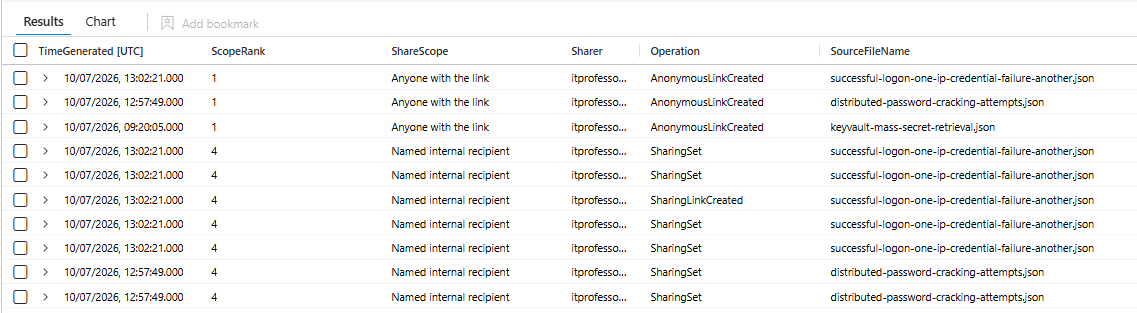
A password file is a problem. A password file with a link that says anyone with this link can view is an incident, and this is the query I would run first.
// Credential-named files that have been shared, worst scope on top
let Lookback = 30d;
let CredentialTerms = @"(?i)(password|passwrd|passwd|pwd|passcode|credential|creds|logins|secret|apikey|api[_\- ]key|privatekey|id_rsa)";
let BenignTerms = @"(?i)(compass|passport|passenger|passive|passage|bypass|encompass|surpass|secretar|secret santa|passwordless|password[_\- ]?polic|password[_\- ]?manager|password[_\- ]?expir|(reset|change|forgot)[_\- ]?password|password[_\- ]?(reset|change)|credential[_\- ]?guard)";
let ShareOperations = dynamic(["AnonymousLinkCreated","AnonymousLinkUsed","SecureLinkCreated","AddedToSecureLink","SharingInvitationCreated","SharingSet","CompanyLinkCreated","SharingLinkCreated","SharingLinkUpdated"]);
OfficeActivity
| where TimeGenerated > ago(Lookback)
| where RecordType in ("SharePointSharingOperation", "SharePointFileOperation")
| where Operation in (ShareOperations)
| where isnotempty(SourceFileName)
| where SourceFileName matches regex CredentialTerms
| where not(SourceFileName matches regex BenignTerms)
| extend ShareScope = case(
      Operation startswith "Anonymous", "Anyone with the link",
      TargetUserOrGroupType in ("Guest", "Partner"), "External recipient",
      Operation startswith "Company", "Anyone in the organisation",
      "Named internal recipient")
| extend ScopeRank = case(
      Operation startswith "Anonymous", 1,
      TargetUserOrGroupType in ("Guest", "Partner"), 2,
      Operation startswith "Company", 3,
      4)
| project TimeGenerated, ScopeRank, ShareScope, Sharer = UserId, Operation,
          SourceFileName, SourceFileExtension, SharedWith = TargetUserOrGroupName,
          TargetUserOrGroupType, SharingType, Site_Url, SourceRelativeUrl, ClientIP, UserAgent
| sort by ScopeRank asc, TimeGenerated desc
ScopeRank exists only to sort. Anonymous links come first because they need no authentication at all, then external recipients, then organisation-wide links, then named internal shares. If row one says AnonymousLinkUsed against a file called Logins.xlsx, stop reading this post and go and deal with it.
The Ones That Left by Email
People also just email passwords, usually to themselves, at their personal address, on their last day.
// Credential-named attachments leaving the organisation
let Lookback = 30d;
let CredentialTerms = @"(?i)(password|passwrd|passwd|pwd|passcode|credential|creds|logins|secret|apikey|api[_\- ]key|privatekey|id_rsa)";
let BenignTerms = @"(?i)(compass|passport|passenger|passive|passage|bypass|encompass|surpass|secretar|secret santa|passwordless|password[_\- ]?polic|password[_\- ]?manager|password[_\- ]?expir|(reset|change|forgot)[_\- ]?password|password[_\- ]?(reset|change)|credential[_\- ]?guard)";
EmailAttachmentInfo
| where TimeGenerated > ago(Lookback)
| where isnotempty(FileName)
| where FileName matches regex CredentialTerms
| where not(FileName matches regex BenignTerms)
| project NetworkMessageId, RecipientEmailAddress, FileName, FileType, FileSize, SHA256
| join kind=inner (
    EmailEvents
    | where TimeGenerated > ago(Lookback)
    | where EmailDirection == "Outbound"
    | where AttachmentCount > 0
    | project NetworkMessageId, RecipientEmailAddress, SenderFromAddress, Subject,
              SentTime = TimeGenerated, DeliveryAction
  ) on NetworkMessageId, RecipientEmailAddress
| extend RecipientDomain = tolower(tostring(split(RecipientEmailAddress, "@")[1]))
| project SentTime, Sender = SenderFromAddress, Recipient = RecipientEmailAddress, RecipientDomain,
          Subject, FileName, FileType, FileSize, SHA256, DeliveryAction
| sort by SentTime desc
The attachment table sits on the left deliberately, because after the regex it holds a handful of rows and the small side of a join belongs there. The join needs both NetworkMessageId and RecipientEmailAddress: a message to five people produces five attachment rows, and joining on the message alone multiplies your results by five.

Worth a second pass with Subject matches regex CredentialTerms and no attachment filter. The body is invisible to you, the subject line is not, and Here is the password is a subject people genuinely write.
Who Is Already Looking
The four queries above find the loot. This one finds somebody shopping for it.
// Credential discovery on endpoints (T1552.001)
let Lookback = 30d;
let SearchTools = dynamic(["findstr", "Select-String", "sls", "grep", "reg", "Get-ChildItem", "gci"]);
let CredentialTargets = @"(?i)(password|passwd|pwd|passcode|credential|creds|secret|unattend|sysprep)";
let RecursiveFlags = @"(?i)(-recurse|/s\b|/si\b|\s-r\b|\*\.|--include)";
DeviceProcessEvents
| where TimeGenerated > ago(Lookback)
| where isnotempty(ProcessCommandLine)
| where ProcessCommandLine has_any (SearchTools)
| where ProcessCommandLine matches regex CredentialTargets
| where ProcessCommandLine matches regex RecursiveFlags
| extend Actor = tolower(iff(isnotempty(AccountUpn), AccountUpn, strcat(AccountDomain, @"\", AccountName)))
| project TimeGenerated, DeviceName, Actor, FileName, ProcessCommandLine,
          Parent = InitiatingProcessFileName, ParentCommandLine = InitiatingProcessCommandLine,
          Grandparent = InitiatingProcessParentFileName, ReportId
| sort by TimeGenerated desc
Three gates, all required. The tool filter runs on the term index and is nearly free, so it goes first and throws away almost everything. Then the target regex, then a recursive or wildcard flag.
That third gate does the real work. Reading one file called password.txt is a user. Walking the disk for every file that might hold a password is somebody who does not know what is on the machine, which is either an attacker or your own penetration test. Check the parent: cmd.exe under explorer.exe is a person, the same command line under a Word document is not.
What This Sweep Cannot See
File names, and only file names. A spreadsheet called Q3 Budget.xlsx with a credentials tab is invisible to every query above. Purview with sensitive information types answers that, not KQL.
There is also a category of file that is pure credential and says nothing in its name: .env, web.config, unattend.xml, .pem keys with project names on them. Those need an extension rule rather than a name rule, which is why env and pem sit in DocExtensions. Query 1 catches them, query 2 does not, and that asymmetry is worth fixing in your own copy.
Unmanaged machines contribute nothing, because DeviceFileEvents needs Defender for Endpoint on the device. And OfficeActivity records the file operation, not the file's continued existence, so treat every row as a lead to confirm rather than a fact.
The honest one: this sweep will annoy people. You are going to email somebody in finance about a file they have used every day for six years. Have the replacement ready before you send it, or you will be ignored and deserve to be.
Follow my repo - GitHub
What You Should Do Next
Run the sharing query first, because it is the only one of the five that can produce something needing action today. The other four produce a backlog. That one can produce an incident.
Run the two sweeps with the exclusion list commented out, look at what comes back, then put it back. Your tenant has terms that belong in one list or the other, and you will only find them by looking.
Promote the discovery query to a scheduled rule, and leave the rest as hunts. Somebody searching a disk for credentials is a real detection worth an alert. A file with a bad name is not, and turning the sweeps into rules is how you teach your SOC to ignore a whole category. When you promote it, drop Lookback to 1h and set the query period to match: these are written for the Logs blade, where 30d is fine, but a scheduled rule caps its query period at P14D and will refuse to deploy with a 30 day lookup inside it.
Give people somewhere to put passwords before you take the text files away. A password manager and a documented process for shared service accounts fixes this permanently. Every query above is only a way of measuring how badly you need them.
Class dismissed.