Attack Simulation Training in Microsoft Defender for Office 365
Allright class
Built into your Microsoft 365 E5 or Defender for Office 365 Plan 2 license is a phishing simulation tool that doesn't suck as hard as it used to. But before you build your entire security awareness program around it, we need to talk about what it actually does, what it can't do, and whether it's worth your time versus dropping money on KnowBe4, Proofpoint or similar apps.
What You're Actually Getting
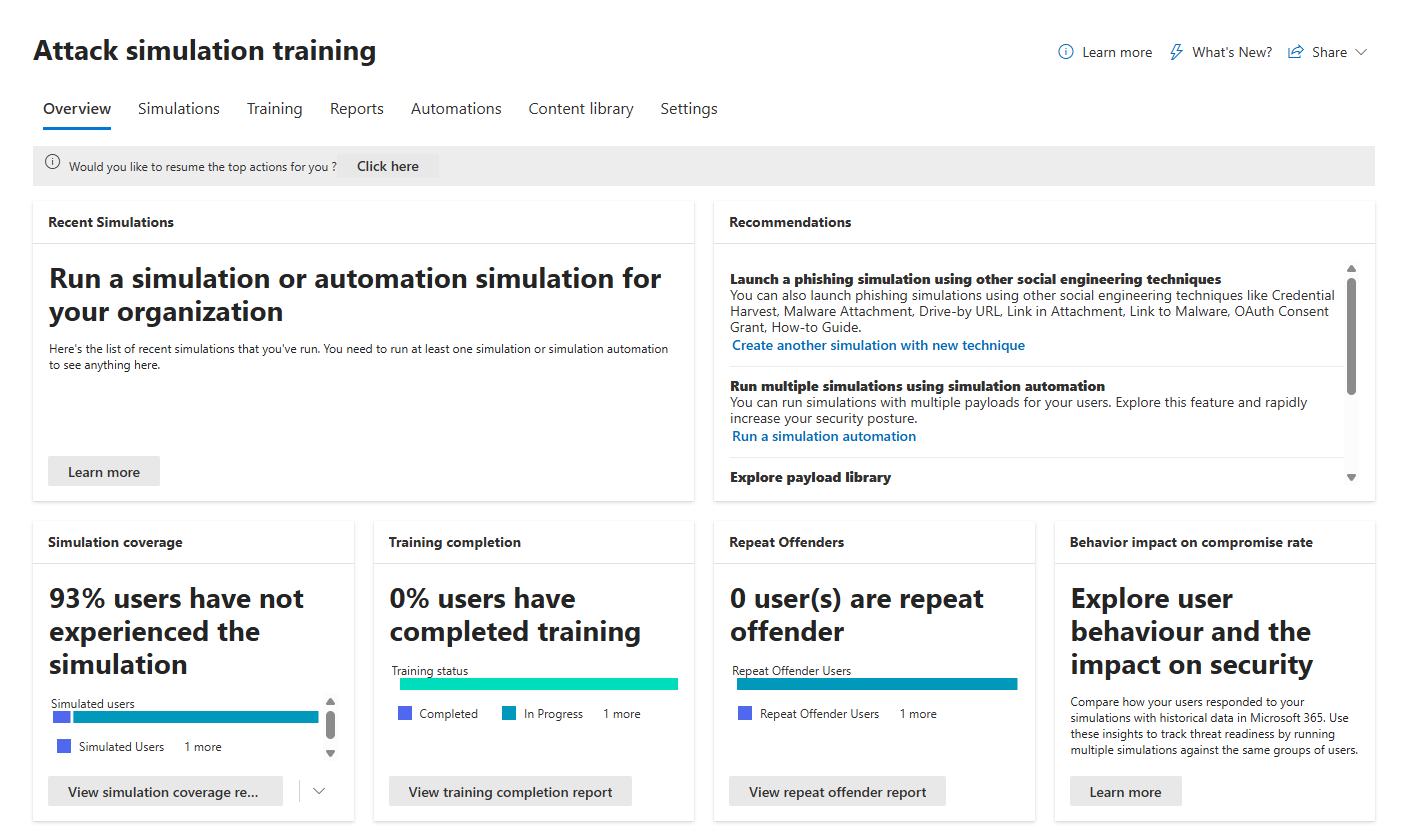
Attack Simulation Training (AST) is Microsoft's way of saying "stop guessing whether your users are dumb when it comes to phishing." You launch fake phishing campaigns from the Microsoft 365 security portal, track who clicks, who submits credentials, and who actually reports it. Then, users who fail get enrolled on training modules automatically. That's the core of it.
It ships with Microsoft Defender for Office 365 Plan 2, the same license tier that gets you Safe Links, Safe Attachments, and other email security stuff. So if you're already paying for E5 or Plan 2, you already own this.
On licensing: Technically, AST will work with only the admin having an E5/Plan 2 license. But Microsoft's licensing terms require each targeted user to also hold a matching license. Microsoft doesn't enforce this technologically. The system works regardless. You're technically non-compliant if you don't license all targeted users though. If you're running simulations at scale and keeping your licensing strict, factor this in. If you're an org that's loose with licensing compliance, this caveat doesn't matter (meaning you can have a 1x E5 license and have access to it anyway)
What Social Engineering Techniques Are Included
Microsoft curates seven attack vectors.
Credential Harvest: User gets an email with a link. Clicks it. Lands on a phishing page asking for username/password. Boom, compromised.

Malware Attachment: Email with a nasty attachment. User opens it. Code runs. Worst-case scenario for testing.

Link in Attachment: Hybrid. Attachment contains a link. Click the link, and land on a phishing page.

Link to Malware: Email with a link to a file on SharePoint or Dropbox. Click, malware downloads.

Drive-by URL: Email with a link to a watering-hole attack. Background code attempts to install software or gather information.

OAuth Consent Grant: Attacker's malicious Azure app requests data access. User hits approve. Your data is gone.

How-to Guide: Training without the test. No gotcha. Just education.

Microsoft adds 30-40 new payloads to the global library each month. That's decent. They're based on real attacks from their threat intelligence, so they're actually relevant.
Main concern: You're limited in what you can customise. The OAuth technique requires you to manually enter app details. Malware Attachment, Link in Attachment, and How-to Guides can't be customised the way some third-party tools let you. You get templates. You can add a few modifications to the sender, from email, email subject, phishing URL, and body when using a custom payload, which is decent, but..
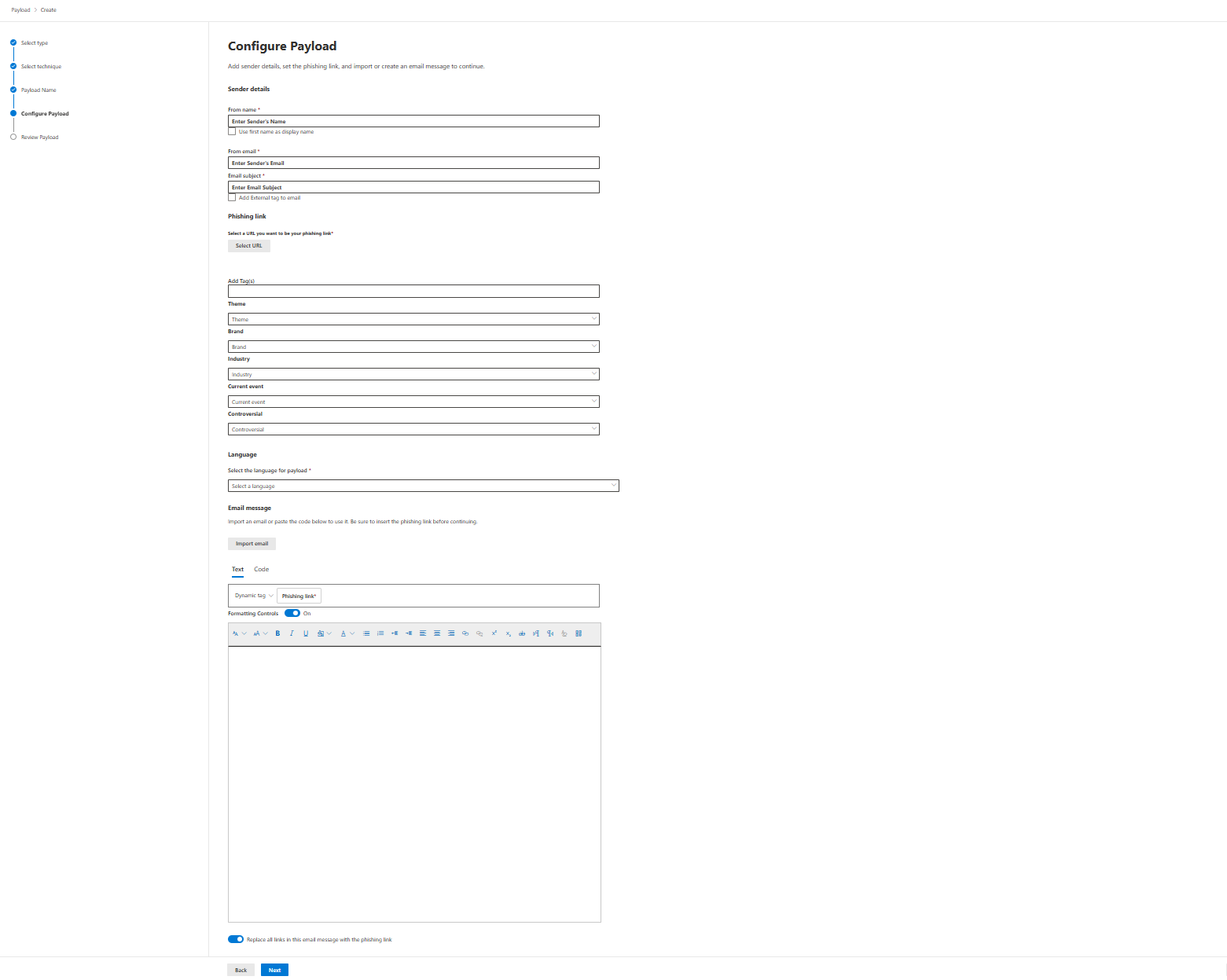
..if you wanted to layer in advanced techniques like vishing (voice phishing), deepfakes, or smishing (SMS phishing)? Not here. This is email and Teams in limited preview. That's your whole scope.
The Payload Architecture
Built-in payloads come from three buckets.
Global Payloads (read-only) is Microsoft's curated library. You can't modify these, but you can copy them and customise the copies.
Tenant Payloads (custom) is anything you build in-house.
MDO Recommendations (dynamic) is Microsoft's monthly refresh of "these payloads are hitting real attacks in your industry right now." (included in Global payloads)
Each payload has a Predicted Compromise Rate (PCR). This is statistical modelling based on historical data from Microsoft 365. It tells you what percentage of users will likely fall for it based on aggregated, anonymised data across millions of simulations. PCR is useful for calibrating difficulty. A PCR of 20% means it's moderately believable. 60% plus means that users may have a hard time recognising it (which, of course, depending on what you are trying to achieve, may not be a bad thing)
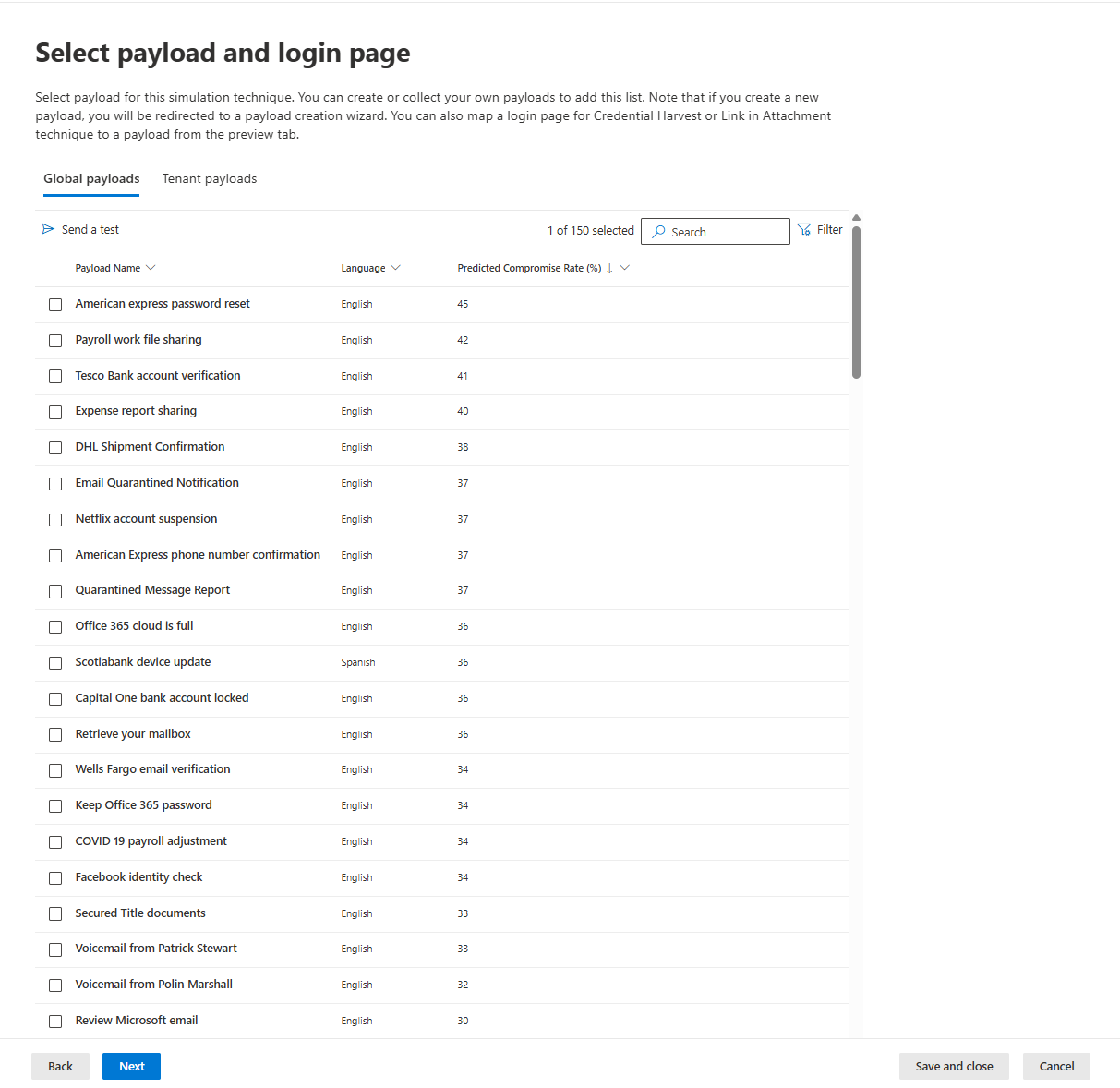
Note on PCR: This is clever statistical modelling, not cutting-edge machine learning. It uses payload content, historical compromise rates, and metadata to predict outcomes. It works, and it's a genuine advantage over tools that make you guess difficulty levels. But don't oversell it. It's pattern matching based on historical data, not some AI breakthrough.
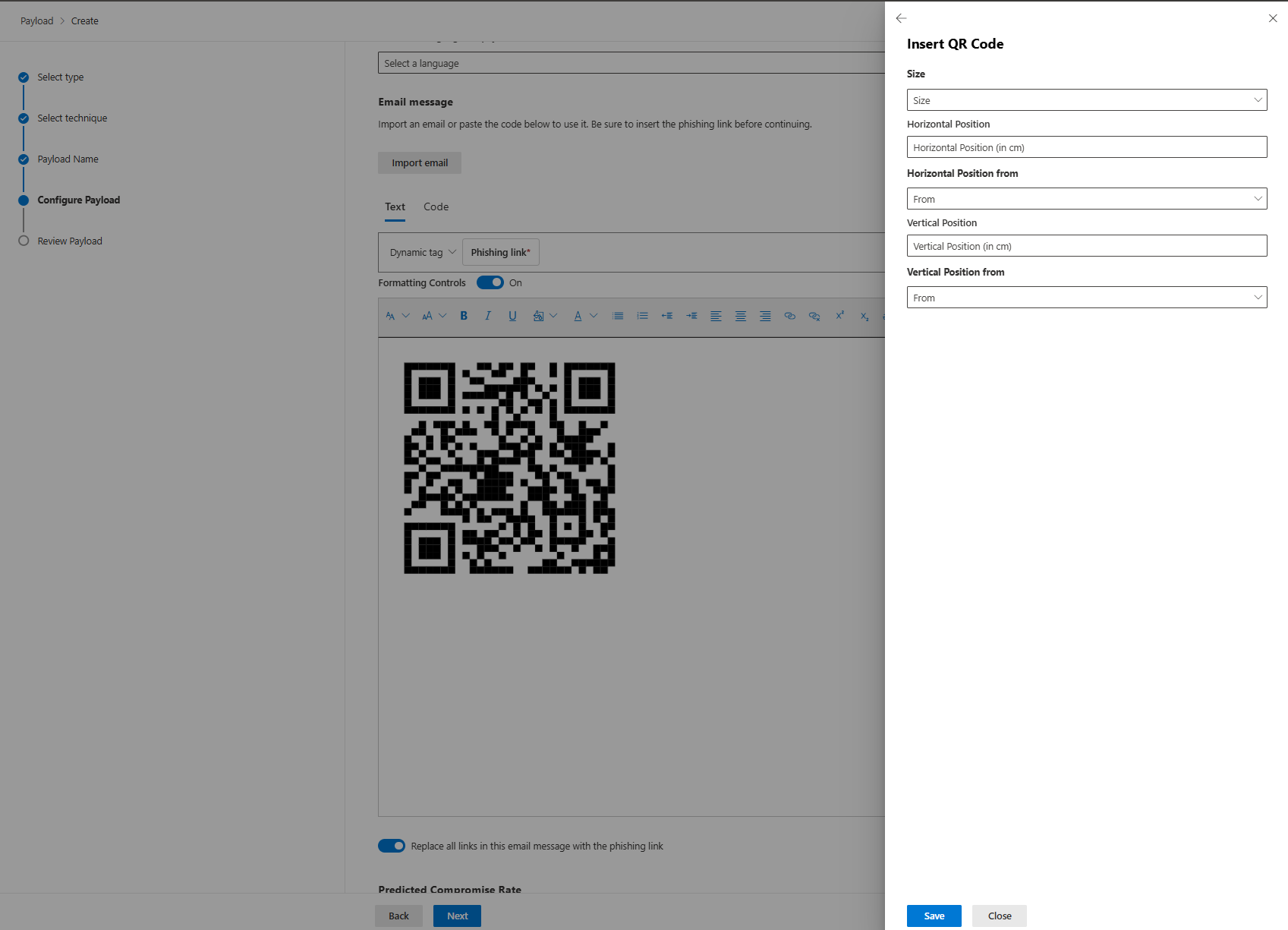
You can also inject QR codes into payloads. They point to your phishing URLs. It's newer, works in email and landing pages. Doesn't solve any problems Microsoft didn't already have, but it's there.
The Landing Pages and Training Assignment
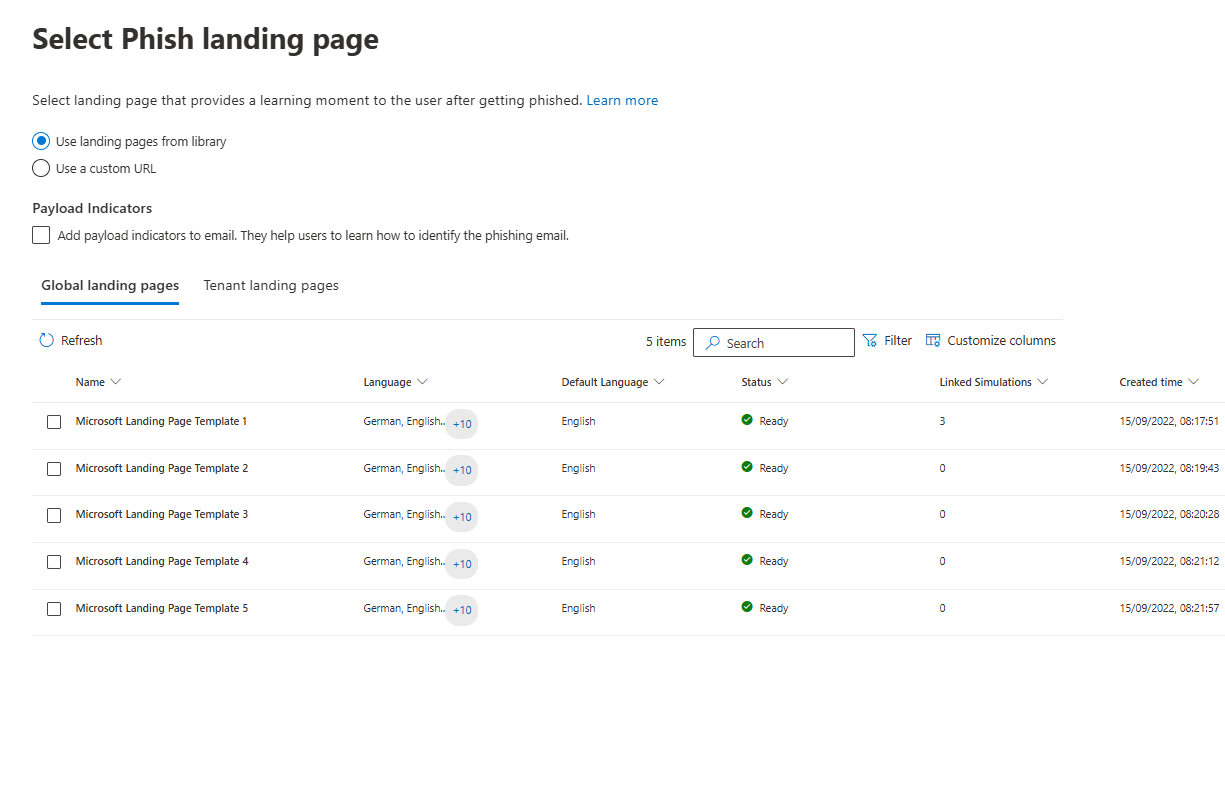
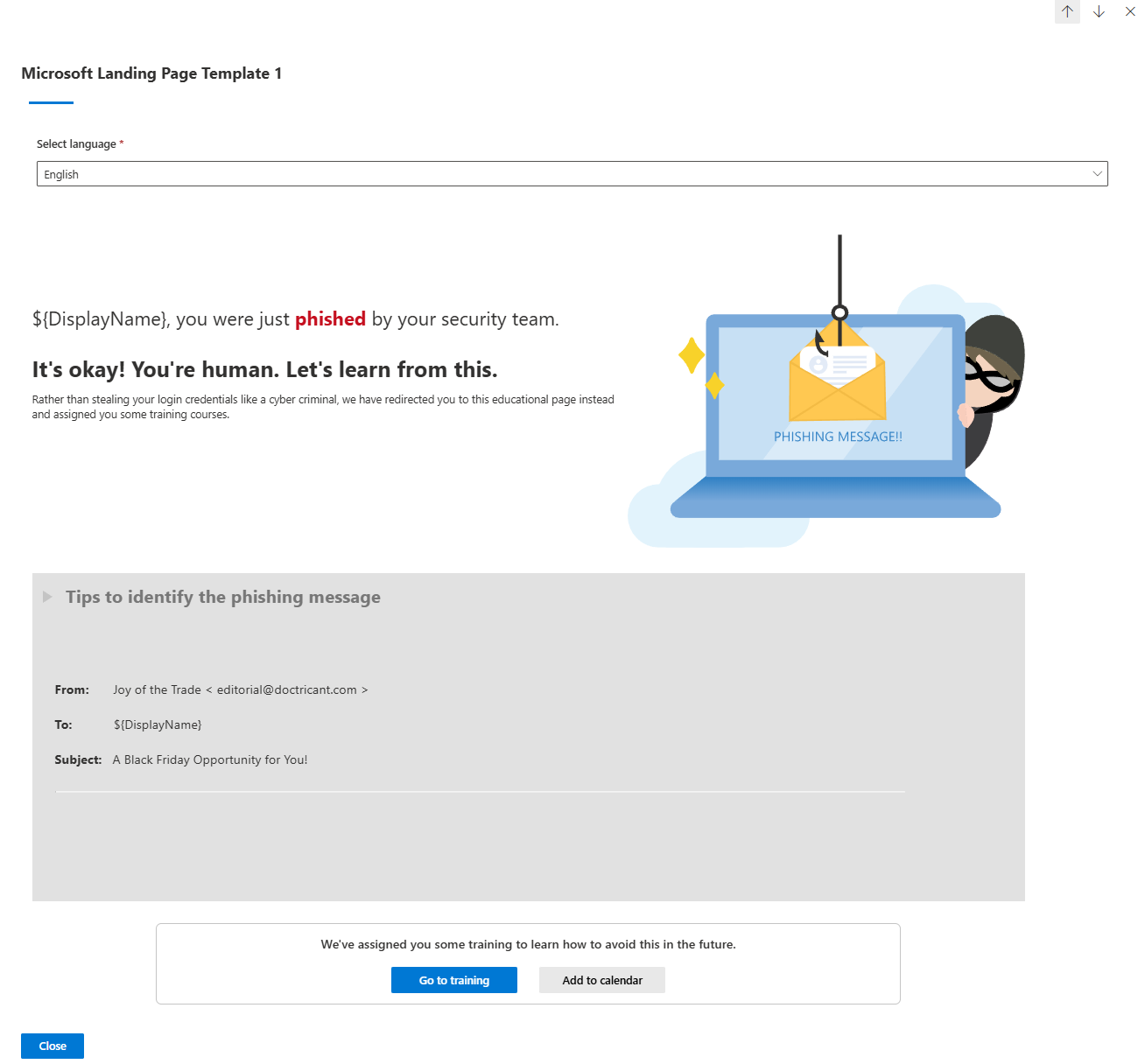
When a user gets caught, they land on a page. Microsoft has templates. You can customise them with your own branding. Or use a custom URL and host your own training elsewhere.
If a user fails, clicks the link, and submits credentials, AST automatically assigns training. You pick how.
Microsoft's recommended training (based on what they fell for): Credential harvesting failures get a specific training module about spotting phishing. OAuth failures get different training.
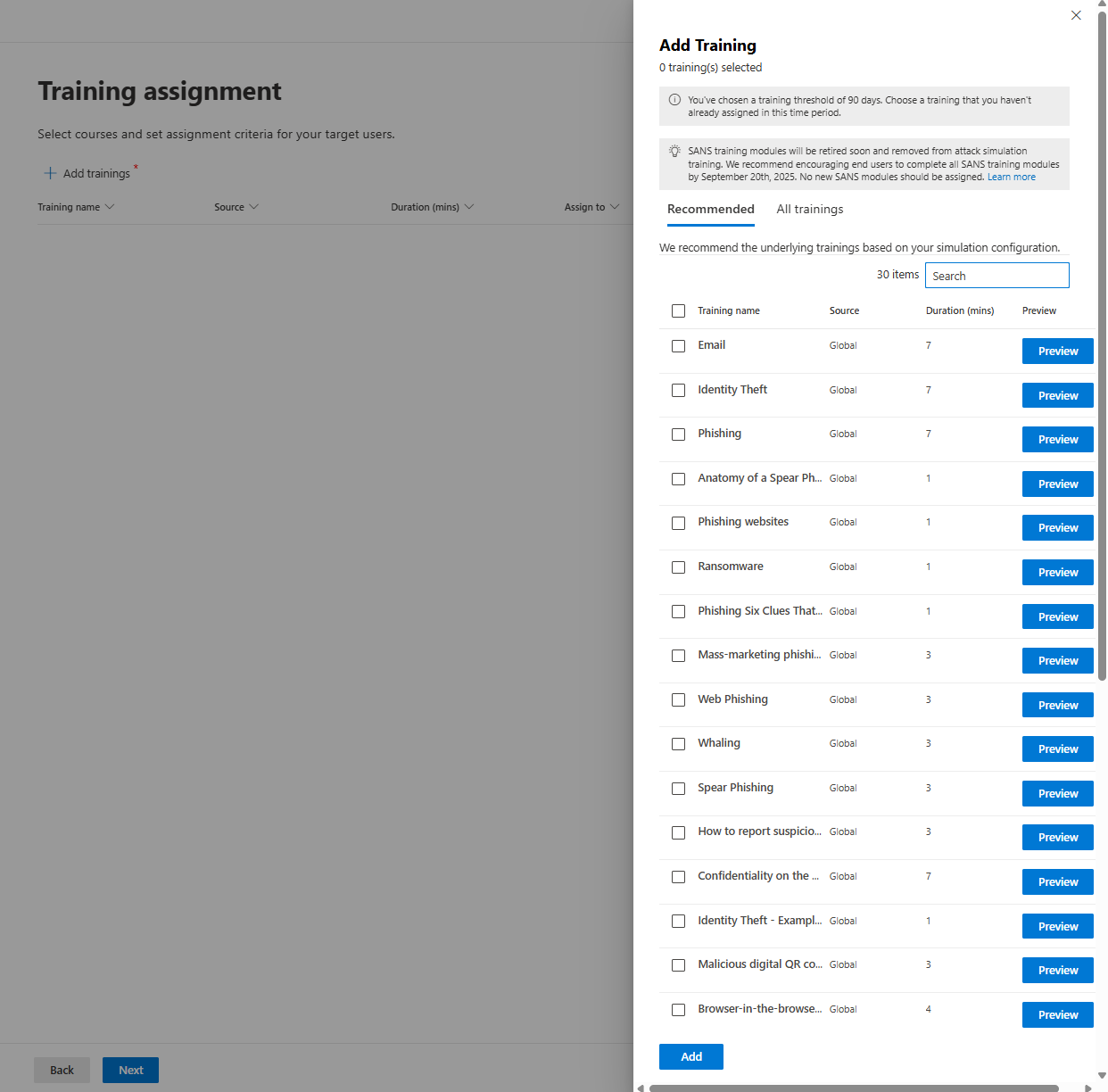
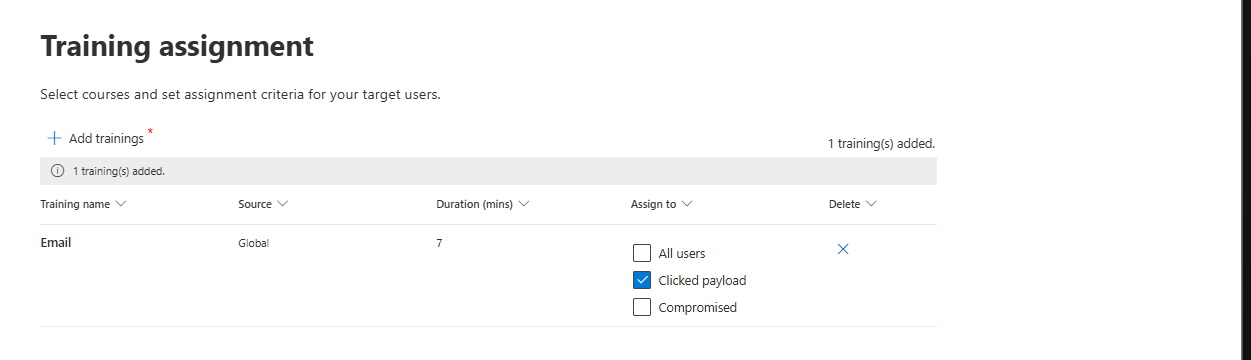
You can assign the training to all users, those who clicked the link or/and are compromised (they actually entered their credentials inside the phishing link)
A phishing landing page can also be selected from the templates ( where you can still add your company logo) or by creating your own company-branded one.
Example of Landing Page
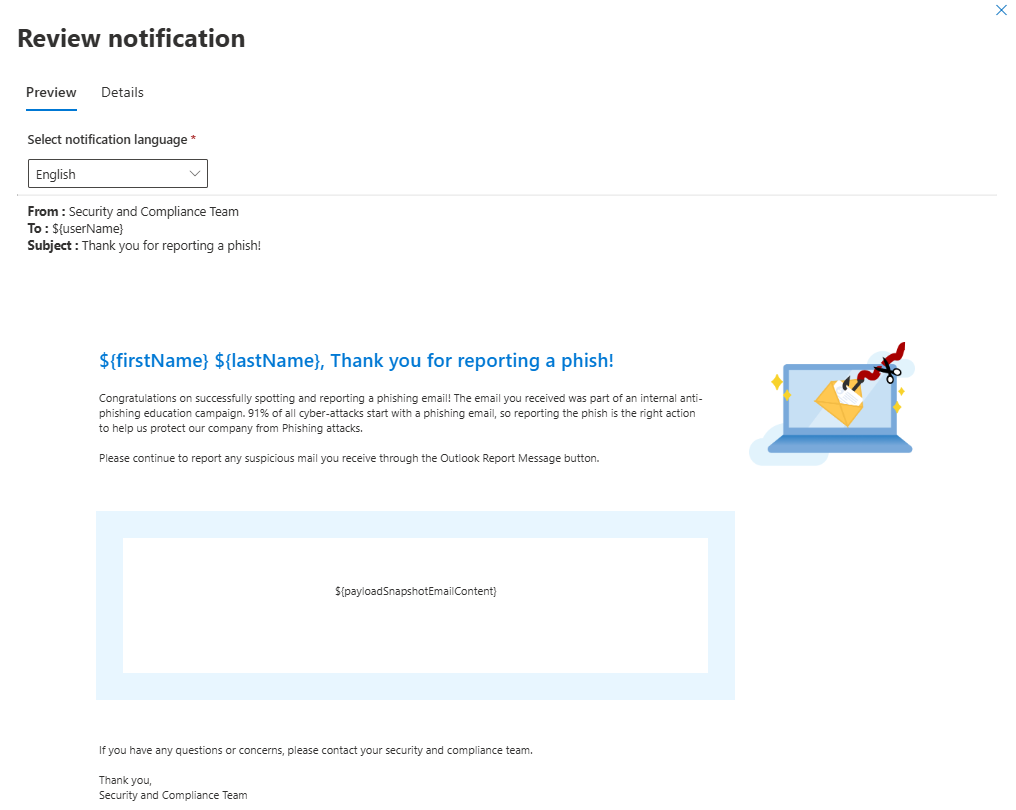
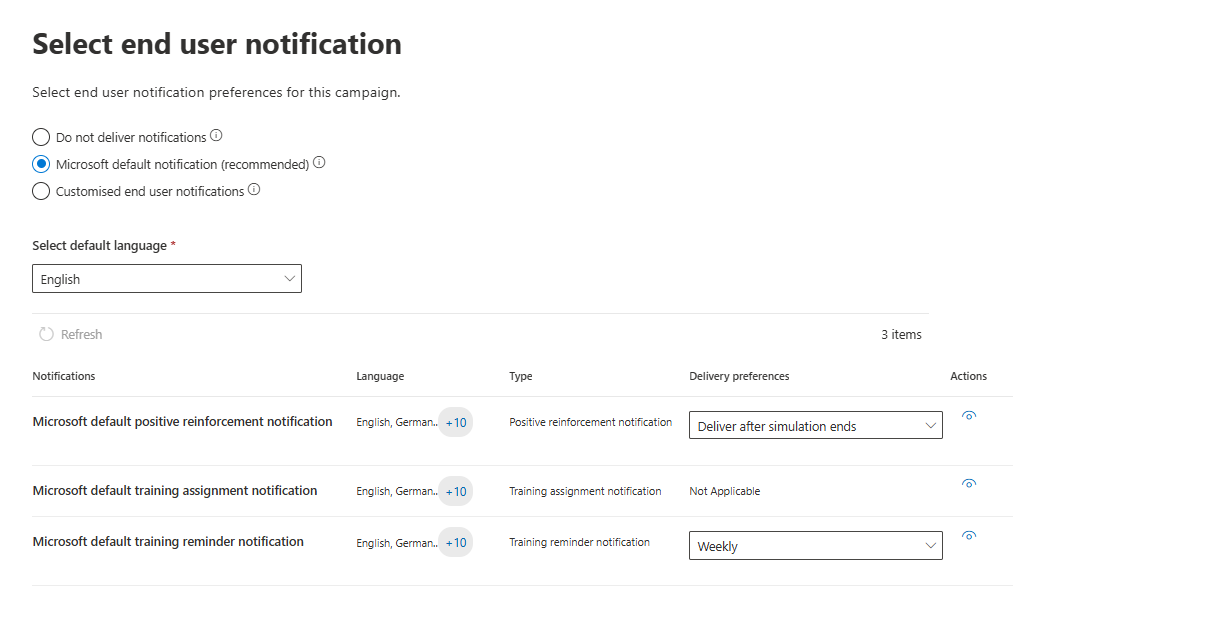
User notification is a great addition to everything above. You can switch between different reminders when a user was phished and add a "Thank you" message when a user reports a message
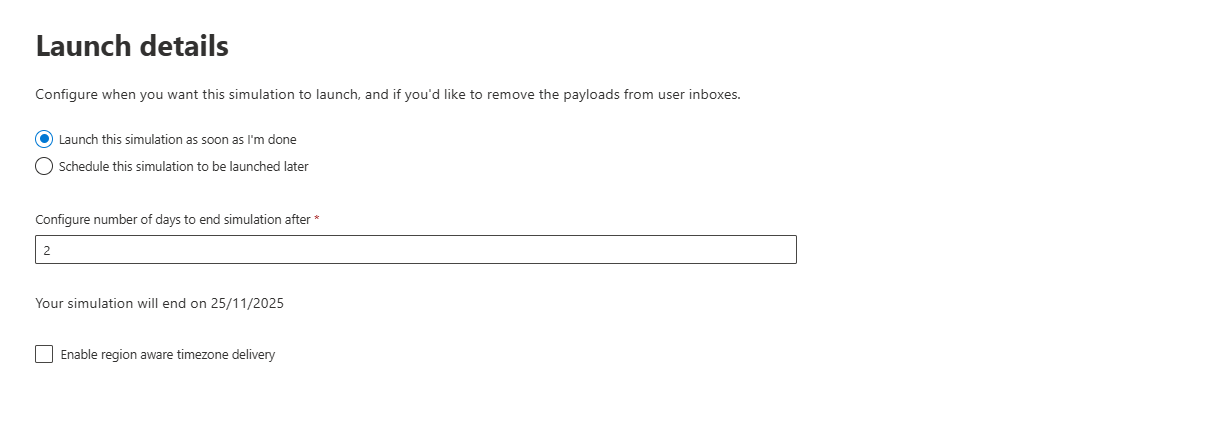
Launching details will help scheduling phishing campaigns, as you can set up multiple of them running one after another
Where It Actually Works
Baseline Phishing Risk Identification
Running your first simulation reveals something terrifying: your actual phish-prone percentage. Industry averages sit around 30-33% before any training. This is your baseline.
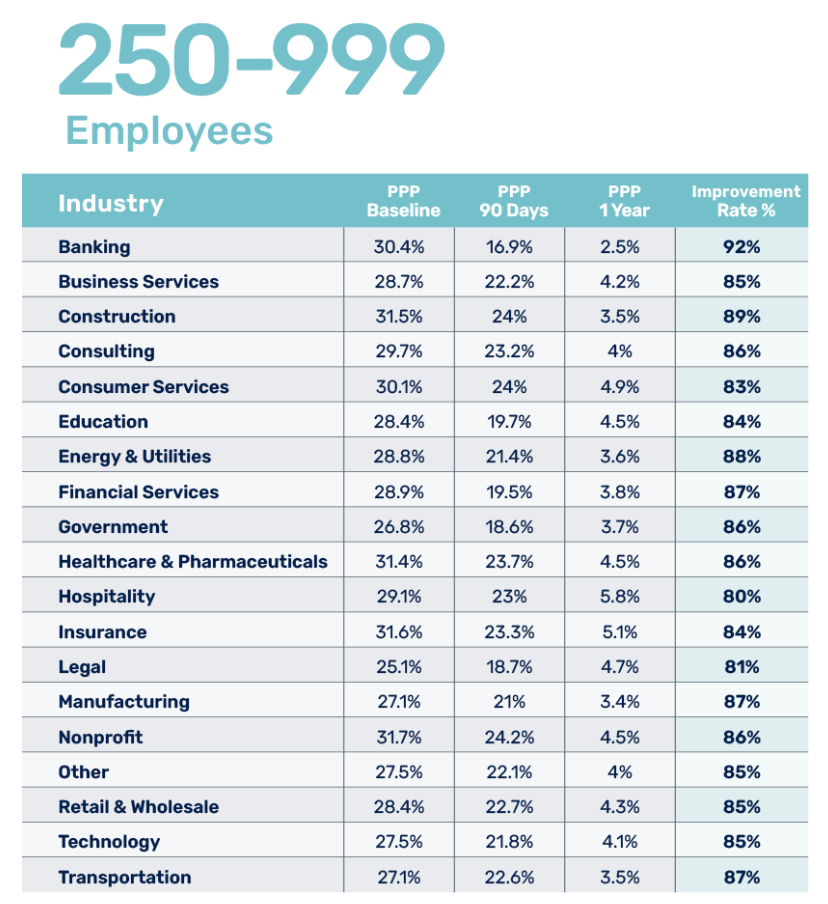
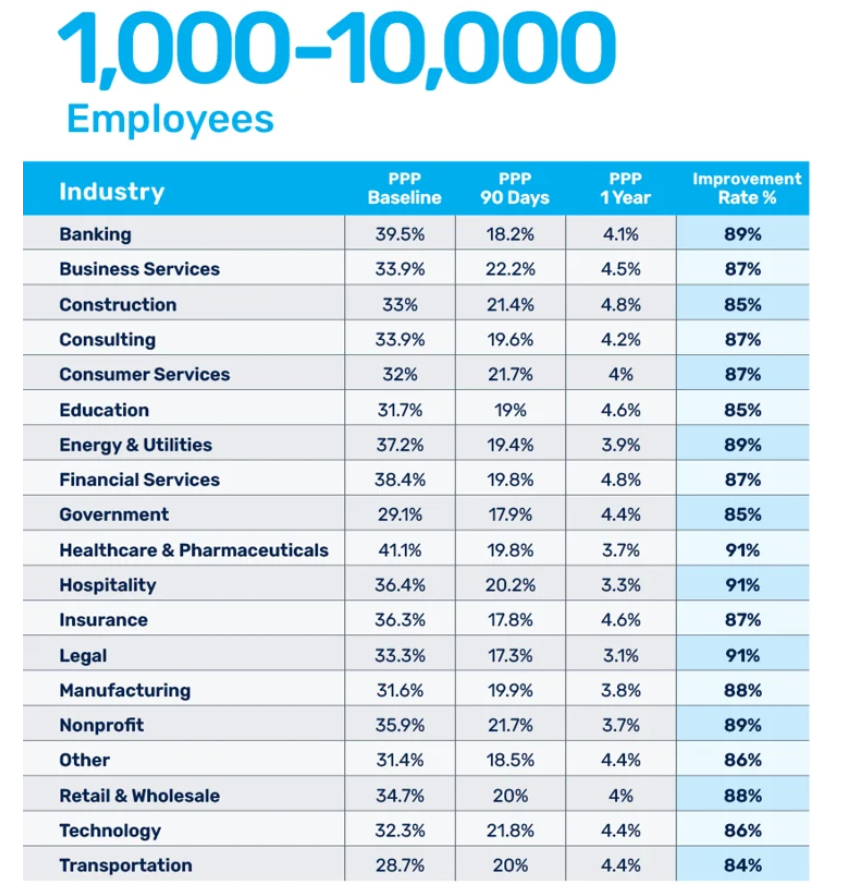
Industry data from the KnowBe4 2025 Phishing by Industry Benchmarking Report, analysing 67.7 million simulations across 14.5 million users, shows that after 12 weeks of repeated simulations with continuous training, that drops to around 5-10%. After 12 months of consistent simulations, you're looking at 4-5%. That's real risk reduction.
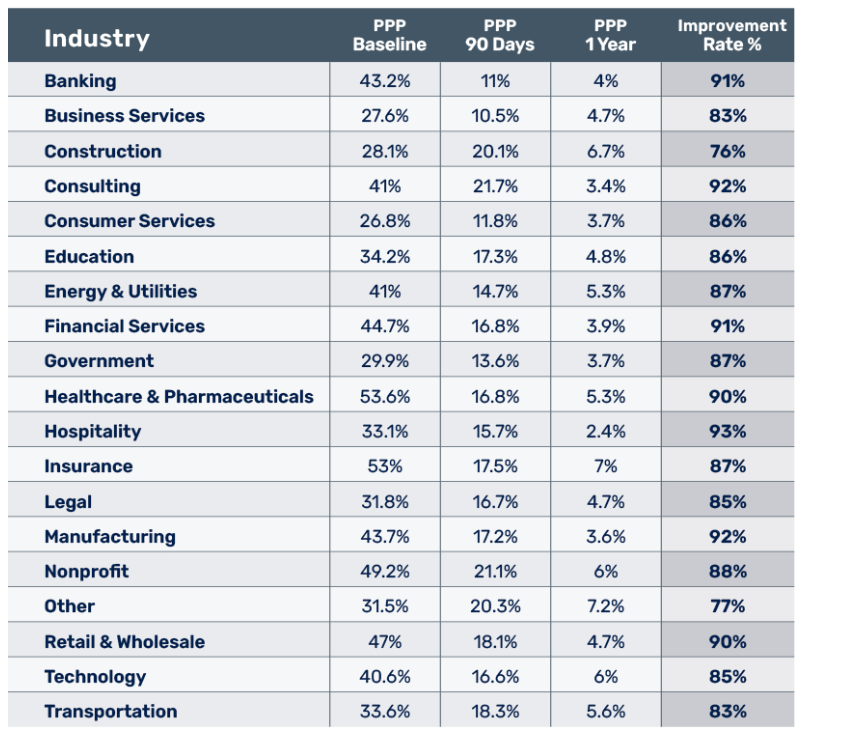
Important caveat: This is industry data across all platforms, not AST-specific data. AST can help you achieve this, but the 86% improvement rate isn't guaranteed. It depends on how you run the program. If you run monthly simulations with mandatory training, you'll see improvement. If you run quarterly one-offs with optional training, don't expect industry benchmarks (or any results at all, to be honest)
Reporting Rate Improvements
Most organisations see abysmal baseline reporting rates. Studies show 9-29% of users report suspicious emails, depending on the industry. Financial services do better at 29%. Education is terrible at 9%.
With continuous training, that climbs. Organisations using dedicated, ongoing programs see reporting rates jump to 40-60% after a year. That's actually valuable because reported phishing gives your SOC early warning.
But, and this is important; Those improvement rates apply to organisations using dedicated, continuous programs. One-off campaigns don't move the needle much.
Integration with Your Microsoft 365 Ecosystem
AST lives in the Microsoft Defender portal. No extra console. You can integrate with Microsoft 365 groups and distribution lists, including dynamic groups based on department, hire date, role, or any Azure AD attribute. This is genuinely useful for focused training.
End-user notifications go through Exchange. They look legit because they are legit. No strange third-party email systems. No deliverability issues.
Where It Falls Apart (Or Needs Serious Nuancing)
API and Automation Reality
Microsoft explicitly states: there are no PowerShell cmdlets for Attack Simulation Training. None. Zip. So you can't automate AST operations via PowerShell in any official, supported way. There are no Graph API endpoints for AST either, at least not documented.
What you can do is use Graph APIs to pull training data out of AST and integrate it with your SIEM or reporting dashboards. But you can't programmatically create simulations, launch campaigns, or manage payloads via API. If you need serious automation, AST isn't going to cut it.
Translation: If you need GitOps-style infrastructure-as-code for your awareness program (automation, CI/CD pipelines, repeatable campaign templates), AST is a manual portal tool. Period.
The Teams Support Situation
Attack Simulation for Teams exists. It's in limited preview.
Teams simulations have limited availability. You probably can't get in unless you were invited early. When or if it reaches general availability, there's no ETA from Microsoft.
The Compliance Reality Check
Keep in mind that AST may not be something when you have specific compliance requirements.
DORA (Digital Operational Resilience Act)
DORA requires employee security awareness training and evidence of effectiveness. AST can provide this IF you run it continuously and track metrics. But DORA auditors are sophisticated. They'll ask for training plans, metrics over time, and evidence of behavioural improvement. Running AST quarterly and calling it "done" won't pass a real audit. You need a program, not a tool.
GDPR
GDPR requires appropriate measures, including training. AST covers that. But GDPR auditors care more about your overall security posture than just awareness training. AST is one piece of a much larger puzzle.
NIS2
NIS2 requires periodic security awareness training. AST works. But you need to show evidence of continuous, periodic delivery and effectiveness measurement. One-time simulations don't satisfy periodicity.
PCI-DSS
PCI-DSS requires security awareness training. AST works. But you need documentation showing you're running it annually and tracking effectiveness. A single report won't cut it.
Using AST alone for compliance is thin, especially if you're facing sophisticated auditors. They'll ask:
Is this continuous or one-time?
Where's your evidence of behavioural change?
What's your remediation process for vulnerable users?
How are metrics tracked over time?
AST helps answer these questions, but only if you're running a real program, not checking a box. If you are planning to use it, ensure you have a dedicated person who can deal with those reports.
AST vs Third-Party Tools: The Actual Comparison
Use AST If:
You already own E5 or Plan 2 and want zero additional licensing cost.
Your user base is entirely cloud-based (Exchange Online, no hybrid).
You're just starting your awareness program and need simple metrics.
Your threat model is generic phishing (credential harvest, malware attachments).
You tolerate occasional UI lag and occasional scheduling quirks.
You have unsophisticated compliance auditors or light regulatory requirements.
Buy Third-Party Tools If:
You need advanced techniques (vishing, smishing, deepfakes).
You want sophisticated reporting, benchmarking, and role-based analytics.
You need personalised or role-specific training modules.
You require an API or automation for integration with your security stack.
You have complex regulatory compliance requirements.
Your threat intelligence tells you users are vulnerable to techniques AST doesn't cover.
The Honest Assessment: When Does AST Actually Make Sense?
Good use case: Mid-market organisation on E5 (with all users licensed), cloud-only Exchange, monthly-to-quarterly awareness program, light regulatory requirements. AST is perfect. No extra cost, gets the job done, reporting is sufficient.
Bad use case: Financial services company with a hybrid Exchange, DORA audit looming, sophisticated security posture requirements. AST is 40% of what you need. You need to buy a 3rd party provider. AST might supplement it, but it won't be your solution.
Notes:
Cost-free at scale (if properly licensed) is unbeatable: If you're a 2,000-person org already on E5 with all users properly licensed, paying nothing for phishing simulations versus 1-3 dollars per user per month with a paid solution is a massive financial win. Even if AST is 70% as feature-rich, you're getting breakeven value at a fraction of the cost.
Built-in integration with Microsoft 365 is underrated: AST uses Safe Links for click tracking. It integrates with Exchange natively. No third-party email system glitches. That's genuinely nice and reduces implementation friction.
Predicted Compromise Rate is clever: Most third-party tools don't have this. PCR tells you if your chosen payload is too easy or too hard based on historical data. That's actual statistical sophistication working for you in a useful way.
Quick to set up: No sales process. No implementation. No waiting weeks for a dedicated support person to onboard you. You log into the portal and launch a campaign in 15 minutes.
Silver line: If you're on E5 and you're not running any phishing simulations, using AST is infinitely better than doing nothing. Even a half-assed free program beats a zero program.
Class dismissed.