Why KQL Enrichment Actually Works (And Why Your Alerts Are So Much Better With It)

All right class.
You run an analytic rule. It fires (duh). Your SOC analyst opens the incident. They see a CallerIpAddress, a Caller name, and OperationNameValue. Then what? They're clicking around Azure portal. Switching tabs. Opening Azure AD. Checking roles. Deep diving into the account. Checking risk flags. Opening investigations page that will nicely show the user information, but then what if you have 50 users involved?

15 minutes later they figure out it's a false positive because the user is a legitimate Global Admin.
Now imagine the same alert fires but includes:
CallerType: User
RiskLevel: High
AssignedRoles: GlobalAdministrator
AccountAge: 3 days
OperationCount: 5
FailureCount: 0
UniqueSubscriptions: 47
Same activity. Completely different story. A high-risk account that's never touched resource deployment suddenly creating resources across 47 subscriptions. That's not rare. That's a compromise.
The difference isn't the detection logic. The difference is enrichment.
Enrichment Is Where Triage Happens
Enrichment is triage automation. It's the difference between "investigate every alert" and "investigate the alerts that matter."
Your analytic rules trigger on unusual things. An account deploying for the first time. A user signing in from a new country. A service principal hitting an endpoint it hasn't touched. But unusual isn't dangerous. Enrichment tells you which unusual things are actually dangerous.
Without enrichment: You are alerted on everything weird.
With enrichment: You alert on everything dangerous that's also weird. Analyst workload drops. Dwell time drops. Signal rises. Nice.
The Template Rule Problem
Microsoft's "Suspicious Resource deployment" catches:
- Users deploying their first VM (usually fine)
- Service principals doing their job (usually fine)
- Automation from a new IP (usually fine)
- A compromised account blowing through 50 subscriptions (very bad)
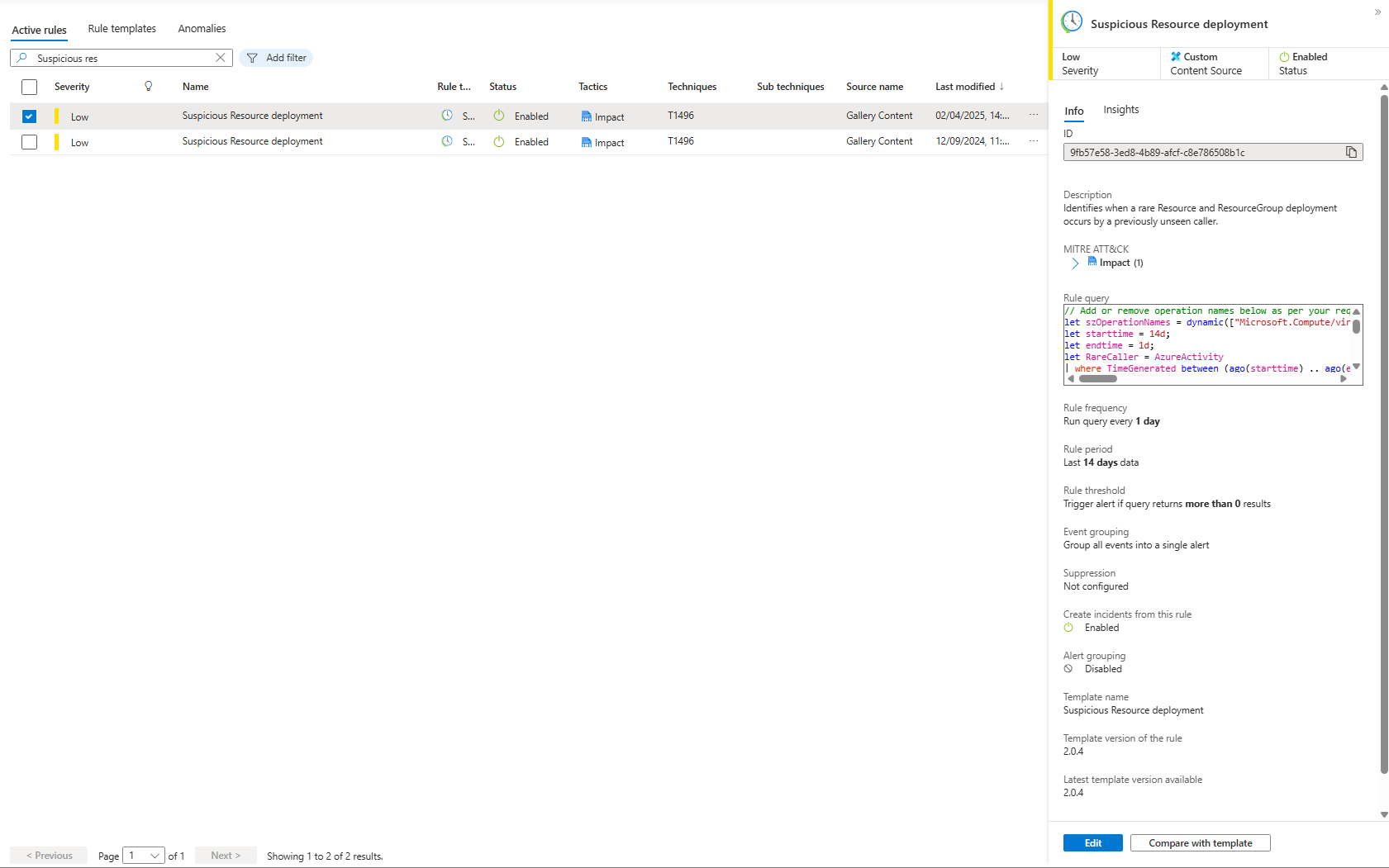
All trigger the same alert. Your analyst manually figures out which is which.
The improved version still detects rare activity. But it adds enrichment that tells you immediately whether rare is dangerous.
The Improved Query
Here's what we are going to use instead:
let szOperationNames = dynamic([
    "Microsoft.Compute/virtualMachines/write",
    "Microsoft.Resources/deployments/write",
    "Microsoft.Resources/subscriptions/resourceGroups/write"
]);
let starttime = 14d;
let endtime = 1d;
let RareCaller = AzureActivity
| where TimeGenerated between (ago(starttime) .. ago(endtime))
| where OperationNameValue in~ (szOperationNames) and CategoryValue == "Administrative"
| summarize count() by CallerIpAddress, Caller, OperationNameValue
| join kind=rightantisemi (
    AzureActivity
    | where TimeGenerated > ago(endtime)
    | where OperationNameValue in~ (szOperationNames) and CategoryValue == "Administrative"
    | summarize
        StartTimeUtc = min(TimeGenerated),
        EndTimeUtc = max(TimeGenerated),
        ActivityTimeStamp = make_set(TimeGenerated, 100),
        ActivityStatusValue = make_set(ActivityStatusValue, 100),
        CorrelationIds = make_set(CorrelationId, 100),
        ResourceGroups = make_set(ResourceGroup, 100),
        ResourceIds = make_set(_ResourceId, 100),
        ActivityCountByCallerIPAddress = count(),
        OperationCount = countif(ActivityStatusValue == "Success"),
        FailureCount = countif(ActivityStatusValue == "Failure"),
        UniqueSubscriptions = dcount(SubscriptionId),
        UniqueResources = dcount(_ResourceId)
        by CallerIpAddress, Caller, OperationNameValue)
    on CallerIpAddress, Caller, OperationNameValue
| where ActivityCountByCallerIPAddress > 1 or OperationCount > 0;
RareCaller
| extend Name = iif(Caller has '@', tostring(split(Caller, '@', 0)[0]), "")
| extend UPNSuffix = iif(Caller has '@', tostring(split(Caller, '@', 1)[0]), "")
| extend AadUserId = iif(Caller !has '@', Caller, "")
| extend CallerType = case(
    Caller has '@', "User",
    Caller has '-', "ServicePrincipal",
    "Other")
| join kind=leftouter (
    IdentityInfo
    | where TimeGenerated > ago(30d)
    | summarize arg_max(TimeGenerated, *) by AccountUPN
    )
    on $left.Caller == $right.AccountUPN
| extend AccountAgeDays = toint((now() - AccountCreationTime) / 1d)
| project
    CallerType,
    CallerIpAddress,
    Caller,
    Name,
    UPNSuffix,
    AadUserId,
    OperationNameValue,
    InvestigationPriority,
    RiskLevel,
    RiskState,
    RiskLevelDetails,
    AssignedRoles = strcat_array(AssignedRoles, ", "),
    GroupMembership = strcat_array(GroupMembership, ", "),
    AccountDisplayName,
    Department,
    AccountAge = strcat(AccountAgeDays, "d"),
    StartTimeUtc,
    EndTimeUtc,
    OperationCount,
    FailureCount,
    UniqueSubscriptions,
    UniqueResources,
    CorrelationIds,
    ResourceGroups,
    ResourceIds,
    ActivityStatusValue,
    ActivityTimeStamp,
    AccountCreationTime,
    IsAccountEnabled
| sort by InvestigationPriority desc, OperationCount desc, EndTimeUtc desc
What Changes vs Microsoft's Template
Filter for Signal
The improved query adds:
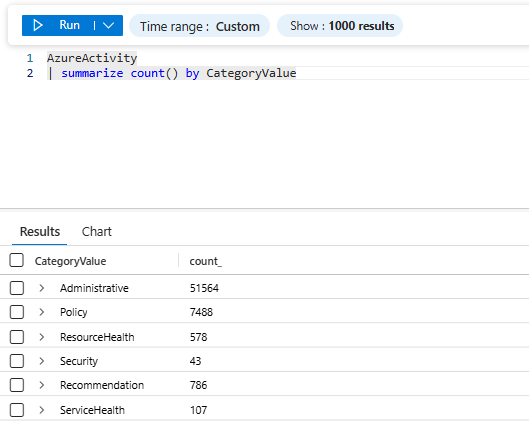
and CategoryValue == "Administrative"AzureActivity logs policy changes, security events, and system operations. Most aren't relevant to resource deployment. Filter to just Administrative, as most likely this is what is actually interesting for you (or not, in that case leave as is)
Separate Success From Failure
OperationCount = countif(ActivityStatusValue == "Success"),
FailureCount = countif(ActivityStatusValue == "Failure"),
A user deploying successfully is different from failing. An attacker fails 30 times, succeeds 5 times. That's reconnaissance, then execution. Different threat model.
Measure Blast Radius
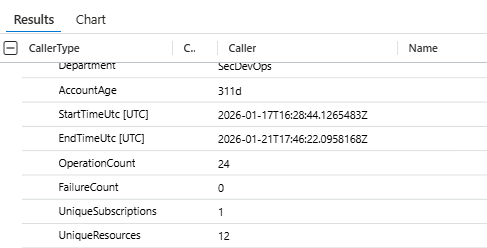
UniqueSubscriptions = dcount(SubscriptionId),
UniqueResources = dcount(_ResourceId)
Creating 2 VMs in one subscription? Probably fine. Creating 5 VMs across 5 subscriptions? Lateral movement.
Two alerts both say "rare caller deploying." One shows UniqueSubscriptions: 1. One shows UniqueSubscriptions: 35. Which do you investigate first? The query should tell you.
Add Identity Context
| join kind=leftouter (
    IdentityInfo
    | where TimeGenerated > ago(30d)
    | summarize arg_max(TimeGenerated, *) by AccountUPN
    )
    on $left.Caller == $right.AccountUPN
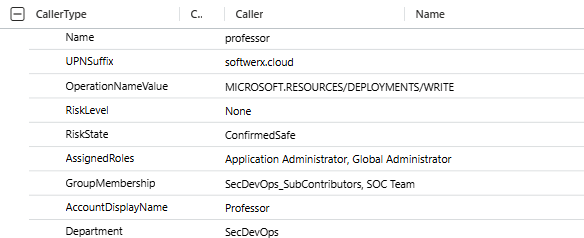
IdentityInfo is populated by Sentinel's UEBA engine. It has roles, risk flags, department, and account age. Everything Entra ID knows.
Now you know: Is this a high-risk account? Are they authorized to deploy? How old is the account? Is it even enabled?
A 3-day-old account with GlobalAdmin role deploying across 47 subscriptions. Compromised.
An 8-year-old account with GlobalAdmin role deploying in their normal subscription. Probably fine.
Same activity. Different enrichment. Different outcome.
Calculate Account Age
| extend AccountAgeDays = toint((now() - AccountCreationTime) / 1d)A 2-day-old service account deploying is suspicious. A 5-year-old service account deploying is normal. This single field tells you which.

Classify the Caller
| extend CallerType = case(
    Caller has '@', "User",
    Caller has '-', "ServicePrincipal",
    "Other")
A user deploying for the first time is unusual. A service principal deploying is its job. Same activity, different risk profiles.
Users have @. Service principals have dashes. This one field lets you apply different thresholds downstream. You can of course figure this easily anyway, just by looking at the caller (user friendly name vs bunch of letters and numbers)

Sort by Threat Level
| sort by InvestigationPriority desc, OperationCount desc, EndTimeUtc descYour results now rank themselves. Most dangerous first. Your analyst doesn't decide which to investigate; the query did.

Real Examples
False Positive
Alert fires:
- Caller: john.smith@contoso.com (or now something called Zava ^^)
- Operation: Create VM
- Success: 1
- Unique subscriptions: 1
Enrichment shows:
- CallerType: User
- RiskLevel: Low
- AssignedRoles: Contributor
- AccountAge: 2000d
- Department: Infrastructure
Analyst thinks: "5-year-old infrastructure account creating 1 VM in 1 subscription. Normal." Close in 30 seconds.
Without enrichment? 5-10 minutes figuring this out.
Real Compromise
Alert fires:
- Caller: svc-automation@contoso.com
- Operation: Create VM
- Success: 8
- Failure: 42
- Unique subscriptions: 19
Enrichment shows:
- CallerType: ServicePrincipal
- RiskLevel: High
- AssignedRoles: Owner
- AccountAge: 1d
- IsAccountEnabled: false (but authenticating 30 min ago)
Analyst thinks: "Brand new service principal with Owner across 19 subscriptions. 42 failures then 8 successes. Account disabled, but managed to authenticate sometime ago. Compromised." Escalate immediately.
Same rule. Different enrichment. Completely different triage.
Why This Works
Microsoft's template is anomaly detection. Find what's different from baseline. But different doesn't equal dangerous.
The enriched query is an intelligence-driven detection. Find what's different AND tell me whether it's dangerous based on who the caller is, what they're authorized to do, and their blast radius.
False positives drop. Dwell time drops. Signal rises. Analysts investigate threats instead of chasing weirdness.
How To Use It
You have the improved query. Your Sentinel has AzureActivity and IdentityInfo tables (well, hopefully it does). Here's what to do:
Step 1: Copy the query into a new Analytic Rule.
Test it against 7-14 days of data. Baseline what normal looks like in your environment.
Step 2: Look at the output.
What's normal? A developer deploying:
OperationCount 1-5, UniqueSubscriptions 1.
Compromised account: OperationCount 20+, UniqueSubscriptions 10+.
Step 3: Set thresholds based on what you see.
| where (CallerType == "User" and OperationCount > 5)
    or (CallerType == "ServicePrincipal" and OperationCount > 50)
    or UniqueSubscriptions > 5
Different thresholds for different caller types.
Step 4: Automate response.
InvestigationPriority > 70 and UniqueSubscriptions > 10? Auto-escalate. ServicePrincipal with FailureCount > 20 and OperationCount > 0? Auto-disable (with approval).
Step 5: Iterate.
You'll see false positives. Adjust thresholds. Add conditions. Enrichment is an ongoing conversation with your data.
Notes
Enrichment is only useful if you actually use it. If you fire the alert and investigate everything anyway, you gained nothing.
The real value: Your analyst opens the alert, reads enriched fields, and makes a triage decision, spending less time on it, and burnout is gone. That time savings across thousands of alerts per month is the ROI.
Everything here is doable in Sentinel right now. You have the tables. You have the KQL. The only blocker is doing it.
Class dismissed.