Defender for Identity: What's The Point? (And Is It Actually Worth Your Time)

All right class.
You have Active Directory. You have domain controllers. You're probably already paying for M365 or E5. Microsoft ships Defender for Identity and tells you it's essential for identity threat detection.
But you're running a SOC. You've got Sentinel. You've got Defender for Endpoint on your workstations. You're already drowning in alerts. So the real question isn't what Defender for Identity does. It's whether you should actually bother turning it on.
Let's cut through the marketing.
What Defender for Identity Actually Does
Defender for Identity puts a sensor on your domain controllers (and optionally AD FS and AD CS servers). That sensor monitors four things: network traffic, Windows Event logs, Active Directory structure, and entity behavior. It sends that data to Microsoft's cloud.
The cloud part then runs machine learning against it. It establishes a baseline of what normal behavior looks like for your users and computers. Then it watches for deviations.
When something doesn't match the baseline, you get an alert.
Here's what it actually detects:
Kerberos attacks. Pass-the-Hash, Pass-the-Ticket, Overpass-the-Hash, Kerberoasting. Defender for Identity catches them by watching Kerberos traffic patterns. This works because it monitors network-level activity, not just logs.
Reconnaissance. If someone starts enumerating your domain users via Kerberos TGT requests, Defender for Identity flags it. Anonymous account enumeration is noisy but it works.
Credential compromise. Bad logins, unusual login locations, and sign-ins at 3 AM from IPs that make no sense. Baseline gets broken, alert fires.
Account changes that matter. Someone adds a user to Domain Admins. Someone resets the krbtgt account password. Someone adds themselves to a sensitive group. These trigger alerts.
Failed password resets on sensitive accounts. This capability has been available since August 2024 in the IdentityDirectoryEvents (it's in Advanced Hunting) table. An attacker trying to reset a domain admin's password and failing? You see it.
Microsoft Entra Connect security. Since around August 2024, Defender for Identity monitors the Microsoft Entra Connect connector account for suspicious activity. Compromised Entra Connect accounts can give attackers paths into both cloud and on-premises environments.
That's the current menu. All of it runs in real-time and integrates into your Defender XDR portal.
The Lateral Movement Path Feature (The Honest Truth)
As of mid-May 2025, Microsoft disabled the remote collection of local administrators' group members using SAM-R queries across all Defender for Identity deployments. This happened automatically. No admin action required.
The lateral movement path detection feature relied entirely on this data. The sensor would query endpoints for local admin group membership, build a map of who could reach whom in your domain, and show you potential attack paths. That visualization is gone.
The documentation is explicit: "This data is used to build potential lateral movement path maps, which are no longer being updated."
If you see lateral movement paths in your portal right now, they're stale. They haven't updated since May 2025. They won't update going forward. An attacker moves into a sensitive account? New paths aren't being mapped.
Why did Microsoft do this? Because of CVE-2025-26685, a spoofing vulnerability was discovered in May 2025 by NetSPI. An unauthenticated attacker on your local network could force the sensor's Directory Service Account to authenticate using SAM-R. The attacker could capture the Net-NTLM hash and use it for privilege escalation into your AD environment.
Microsoft's response: disable SAM-R collection entirely. Faster than fixing the underlying issue. So if anyone tells you "deploy Defender for Identity for lateral movement path visualization," they're selling you a feature that died in May 2025.
Any article, blog post, or documentation you read before that date about lateral movement paths? Outdated.
What Defender for Identity Is Actually Good For (Now)
Without SAM-R, Defender for Identity's actual value sits here:
Kerberos-level attack detection. This is real. Sentinel doesn't see Kerberos attacks well because Sentinel works on logs. Defender for Identity works on network traffic. When an attacker does a Pass-the-Ticket attack, they're replaying a legitimate Kerberos token. The Windows Event logs look normal. The traffic pattern doesn't. Defender for Identity sees it.
On-premises credential monitoring. Defender for Identity surfaces on‑prem AD logons (via IdentityLogonEvents) and risky patterns such as unusual logon types or locations. In a hybrid setup, this on‑prem signal complements Entra ID Protection’s cloud‑focused sign‑in risk, giving you a fuller picture of how an identity is being used across DCs and Entra ID
AD structural monitoring. Changes to sensitive groups, privilege escalations, account modifications. Real-time and integrated into Defender XDR.
Reconnaissance detection. Account enumeration via Kerberos. Noisy, but catches reconnaissance activity before the actual compromise.
Microsoft Entra Connect monitoring. Since August 2024, you get visibility into suspicious activity on your Entra Connect servers, including unusual logons and suspicious password resets by the connector account.
What Defender for Identity is NOT:
- A replacement for endpoint EDR
- A visibility tool for cloud-only identities
- A lateral movement mapper (the feature is disabled)
- Useful if you haven't configured proper Windows Event audit policies on your DCs
- Useful if you've already moved entirely to cloud-native identities
The Honest Limitations
Defender for Identity only works on-premises or hybrid. If you've moved entirely to cloud identities, this tool has nothing to do.
It depends on proper Windows Event log configuration. The alerts are only as good as the audit policy on your domain controllers. If you haven't configured the right event IDs, Defender for Identity is half-blind.
It's not a replacement for endpoint EDR. It doesn't see what's happening on user workstations. It only sees Active Directory traffic and network-level Kerberos patterns. If an attacker compromises a workstation and stays there without touching AD, Defender for Identity won't see it.
It doesn't monitor cloud identities well. If you're using hybrid Entra ID with cloud-only users, those users mostly skip on-premises authentication. Defender for Identity blind spot. You need Entra ID Protection and Defender for Cloud Apps for that.
The vulnerability situation was real. CVE-2025-26685 exposed a fundamental issue with how the sensor works. Microsoft's fix was to remove functionality rather than patch the vulnerability. That's not confidence-inspiring if you're evaluating this for security-critical features.
You have to actually use the alerts. If you deploy this and let alerts pile up in your portal, you get zero value.
How To Actually Install It (January 2026)
Defender for Identity now offers two deployment paths depending on your DC OS version.
For domain controllers running Windows Server 2019 or later (recommended):
This is now the simplest path. Defender for Identity uses auto-activation if your DCs are already enrolled in Defender for Endpoint.
Step 1: Go to the Defender portal.
Log in to https://security.microsoft.com with a Global Administrator or Security Administrator account.
Step 2: Navigate to System > Settings > Identities > Activation.
The portal displays all detected servers from your device inventory. Defender for Identity shows which are eligible for the new v3.x sensor.
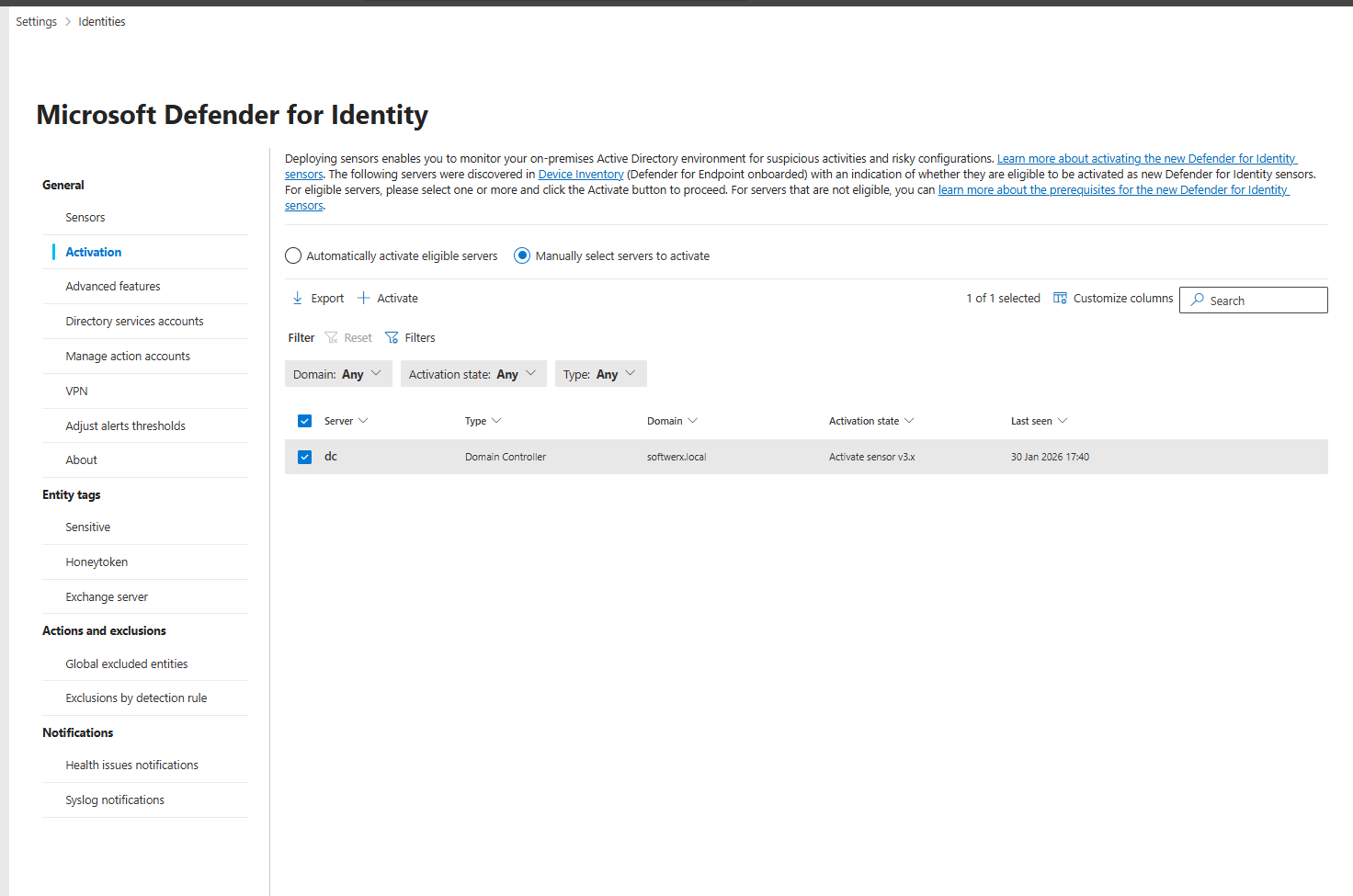
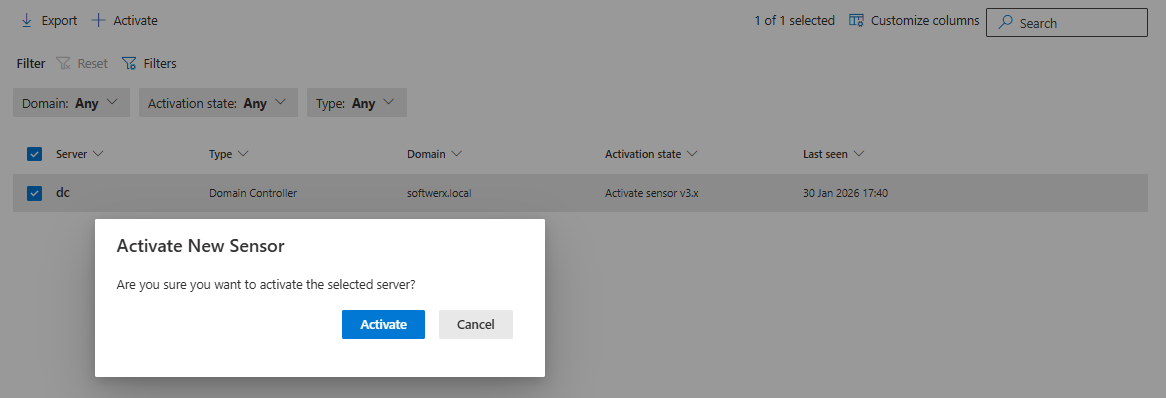
Step 3: Select a domain controller and click Activate.
Confirm the selection. That's it. The sensor activates automatically, no manual download, no restart required. It shows up in the Sensors page within 5 minutes (up to 1 hour for the first sensor).
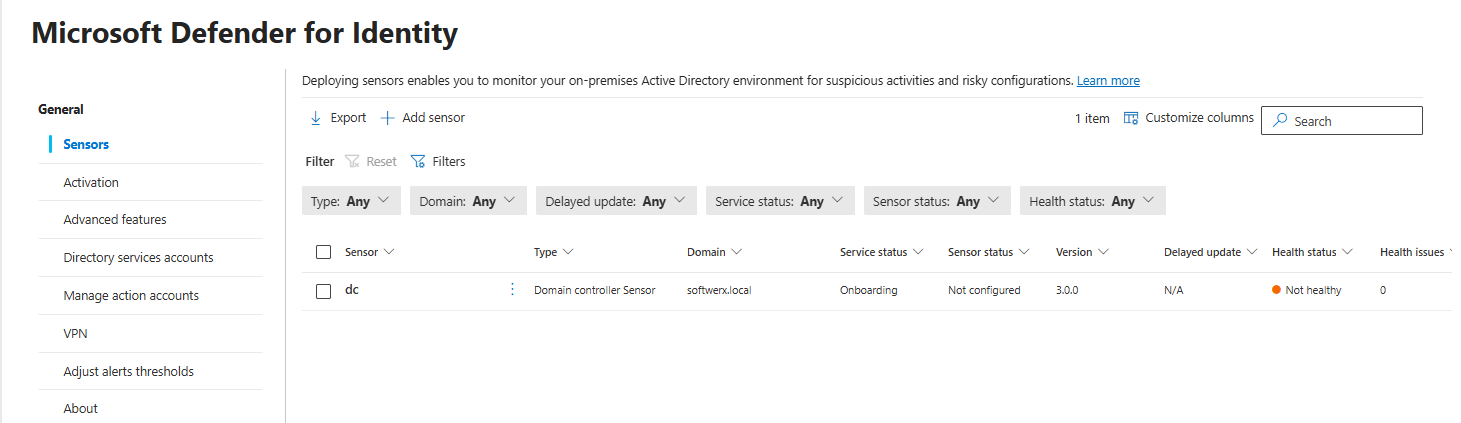
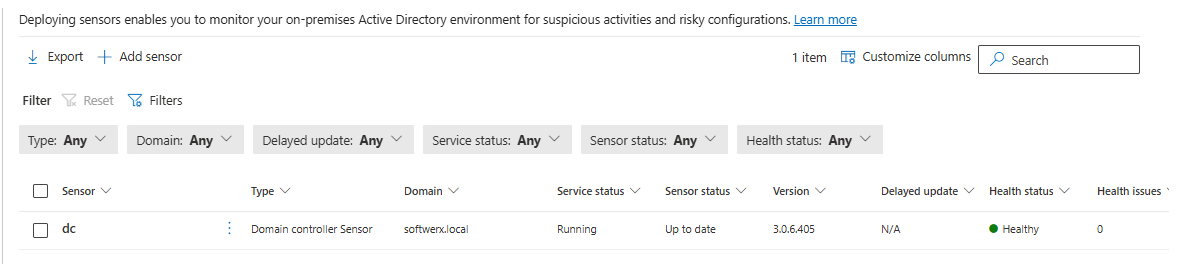
Step 4: Verify it's working.
Go to System > Settings > Identities > Sensors. You should see your domain controller listed with status "Running" or "Healthy."
For domain controllers running Windows Server 2016 (or if auto-activation doesn't apply):
Use the classic sensor deployment. Go to System > Settings > Identities > Sensors and follow the "Install classic sensor" link to download the manual installer package.
Prerequisites you need:
- Windows Server 2016, 2019, 2022, or 2025 (fully patched). For the new v3.x auto-activation method, you need 2019 or later.
- 2 CPU cores minimum
- 6 GB RAM
- 6 GB disk space (10 GB recommended)
- Domain controller must be enrolled in Defender for Endpoint (for auto-activation)
- Outbound connectivity to the Defender for Identity cloud endpoint
Group Managed Service Account (gMSA) [Optional but recommended]:
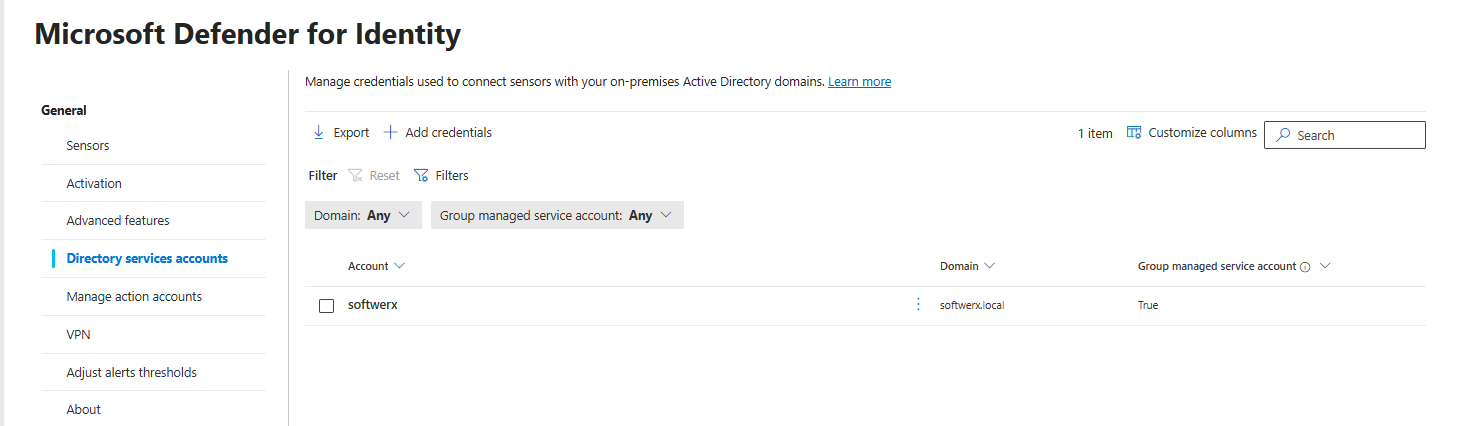
If you want to enable full AD visibility for reconnaissance and account change detection, create a gMSA and configure it at System > Settings > Identities > Directory Service Account. The sensor will use this for queries. This is optional for the new v3.x sensor, but recommended for comprehensive coverage.
What You Actually Get When It's Running
One of two things happens.
Scenario 1: You turn it on and forget about it.
You get alerts in your Defender XDR portal. You close them because they mostly look like noise. You mutter about "yet another alert system." You get no value.
Scenario 2: You actually tune it.
You establish baselines for what normal looks like in your environment. You investigate Kerberos attacks when they fire. You monitor for reconnaissance patterns. You use the integration with Defender XDR to understand attack chains. You get a signal.
The Real Decision
Defender for Identity costs roughly £4.10 per user per month if bought standalone, or it comes with EMS E5. So if you already have E5, you're not paying extra. It's already licensed.
If you're paying for it separately, the question is: Is Kerberos attack detection and on-premises credential monitoring worth £4.10 times your user count per month?
For a 1000-user environment, that's £4,100 per month. For most organizations that's minimal.
For a 100-user environment, it's £410 per month. Still cheap.
The math usually works out on cost. You're not paying much. You're using existing infrastructure. Installation won't take long.
The real decision is time and usefulness. Do you have 2-3 hours to set it up properly? Do you have analyst time to investigate Kerberos attacks and reconnaissance alerts? Do you have an on-premises AD environment worth protecting?
If you're cloud-only, skip it. The feature set doesn't apply to you.
If you have hybrid or on-premises AD and you actually have time to tune the alerts for Kerberos and reconnaissance detections, it's worth it. Just don't expect lateral movement path visualization to be part of it.
If you'll install it and ignore the alerts, hoping for the best, don't bother.
Next Steps
If you're going to do this, do it right.
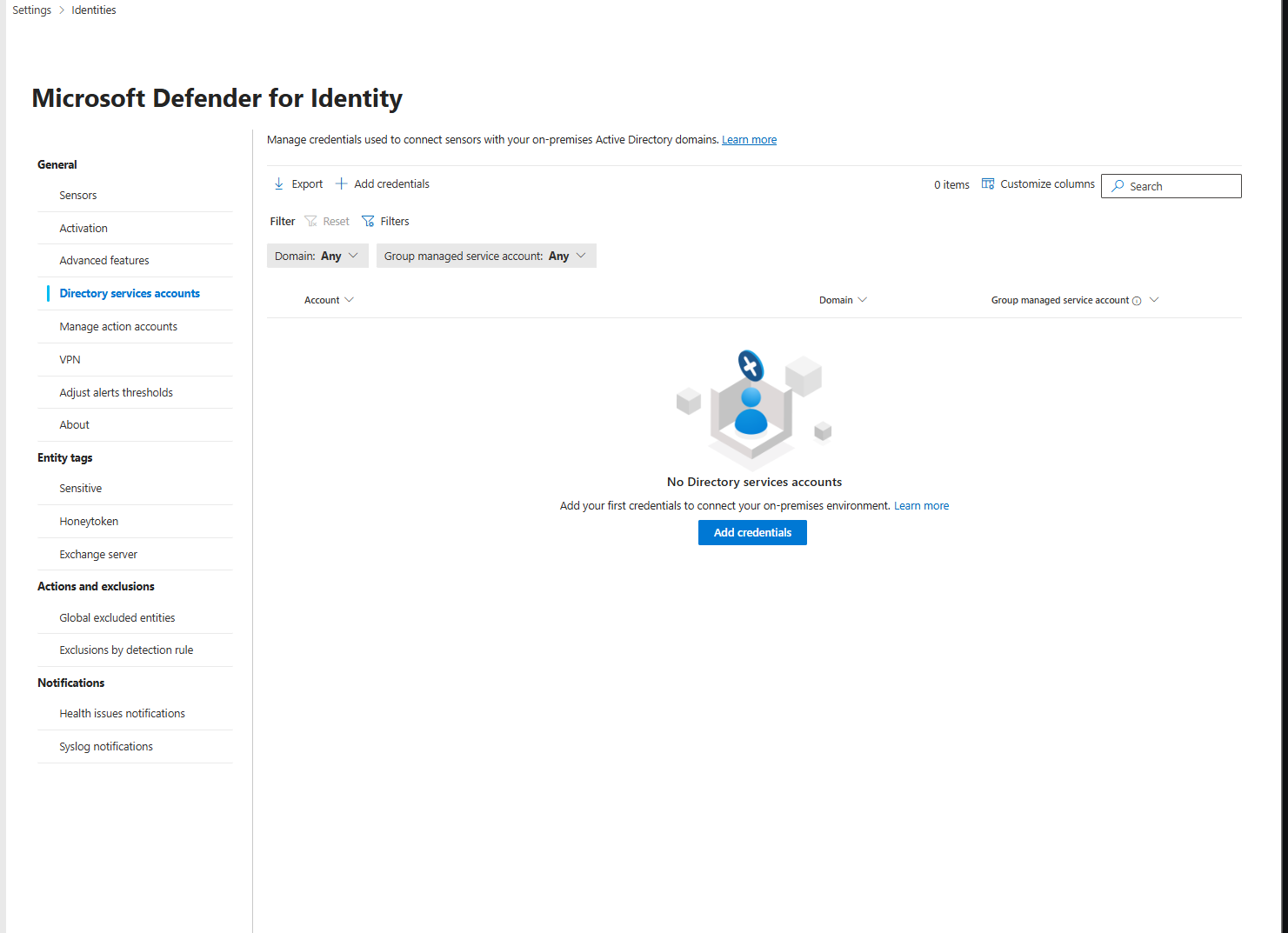
Step 1: Set up the gMSA and install the sensors first.
Get them connected and healthy. Make sure you have at least one domain controller reporting "Connected" status in the Defender portal.
Step 2: Let it baseline for two weeks.
Don't tune alerts yet. Let the machine learning establish normal behavior for your environment. After two weeks, you'll have fewer noisy alerts.
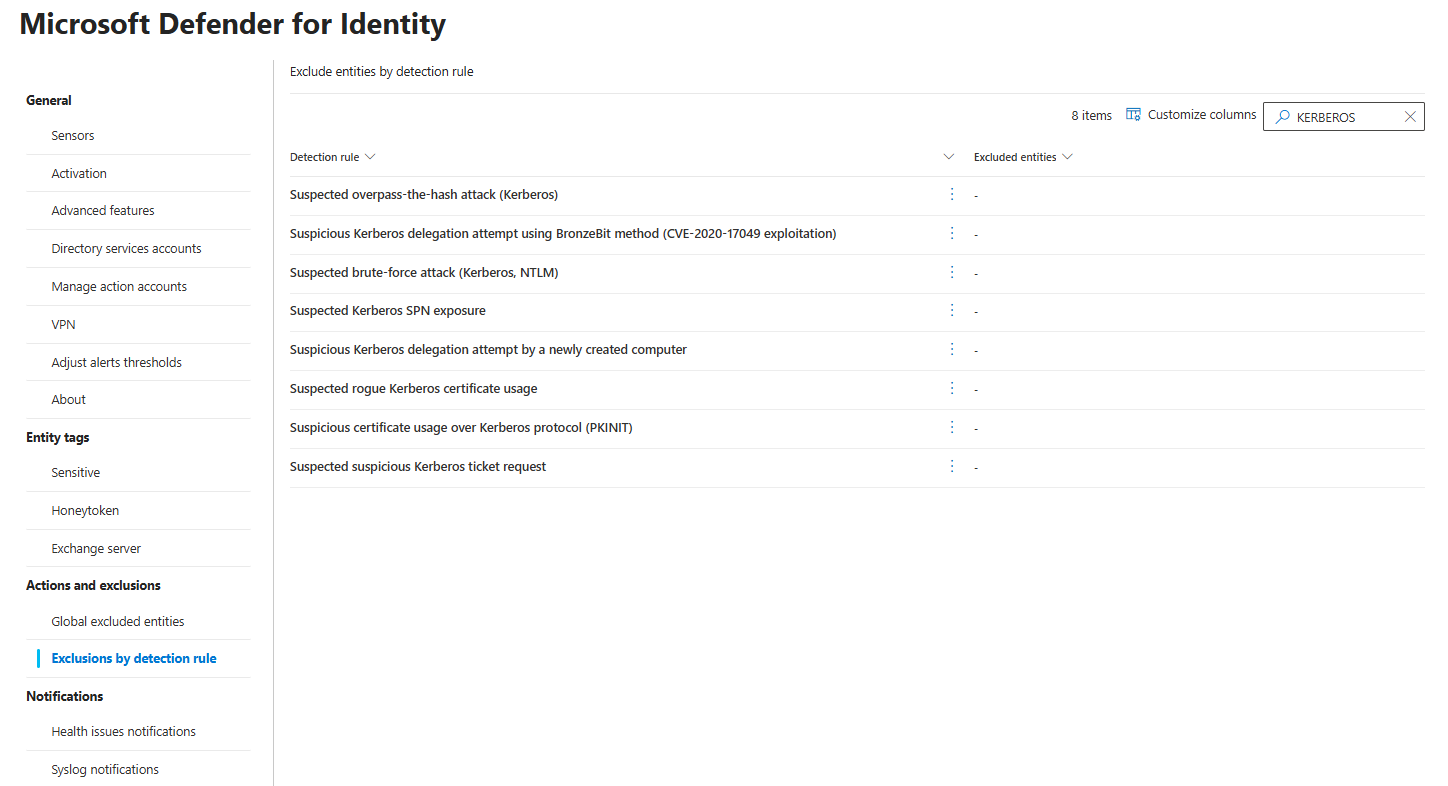
Step 3: Understand your Kerberos detections and reconnaissance alerts.
See what's actually firing. Understand your baseline. This is where the actual value sits now.
Step 4: Set up automation or scheduled reviews.
Either set up playbooks in Defender XDR to handle certain alerts, or schedule a weekly 30-minute review of what Defender for Identity found. One or the other. Not doing either means the alerts are worthless.
Step 5: Iterate.
You'll find false positives. You'll find detections that don't matter in your environment. Adjust. After 2-3 months, you'll have a baseline that actually means something.
Class dismissed.